

OneTapCopy - Text Snippets
Seonggon Sim Productivity iPhoneiPadiPod touch
OneTapCopy - Text Snippets is a free Productivity app for iPhone and iPad by Seonggon Sim. Requires iOS 15.1. Updated October 16, 2026.
- Price
- Free
- on the App Store
- Size
- 36 MB
- Age 4+
- Updated
- Oct 16
- 2026 · v1.0.8
Screenshots

About OneTapCopy - Text Snippets
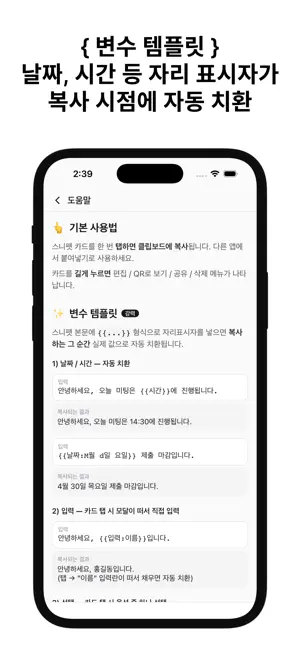
OneTapCopy is not a notes app. It is a copy button for the text you send every day. WHY NOT JUST USE NOTES? - Notes: open the app, find the note, select the text, long-press, tap Copy. Four steps. - OneTapCopy: tap the card. One step. Notes are built to store text. OneTapCopy is built to hand it back to you fast. WHAT IT DOES - Tap a card to copy it instantly, with a short haptic buzz and a "Copied" toast - Group snippets into categories, with 8 colors and 28 emoji to pick from - Variable templates that fill themselves in as you copy: {{date}} and {{time}}, {{input:Label}} to type a value, {{choice:A|B|C}} to pick one, {{counter}} for a number that goes up on every copy - Sort by newest, most used or last used, and pin the snippets you need at the top - Search titles and bodies as you type - Lock any snippet behind Face ID, Touch ID or your device passcode; locked cards stay hidden until you authenticate, then stay open for five minutes - Show a snippet as a QR code, or send it through the system share sheet - When there is text on your clipboard, a banner offers to save it as a snippet - Export and import a JSON backup to move everything to a new phone, merging or replacing what is there - Dark mode, following the system or set by hand Ready-made example categories are waiting at first launch, so you can see how it all works before writing anything of your own. Everything stays on your device. No account, no sign-in, no cloud sync, no server. Free, with a banner ad that never gets in the way of a copy, plus one full-screen ad a day when you save a category.
What’s new
Version 1.0.8 · Updated October 16, 2026
Added support for more languages. The app now follows your device language.
App privacy
The developer, Seonggon Sim, reported these privacy practices to Apple.
Data Used to Track You
The following data may be used to track you across apps and websites owned by other companies:
- Identifiers: Device ID
Data Not Linked to You
The following data, which may be collected but is not linked to your identity, may be used for the following purposes:
- Identifiers: Device ID
Used for: Third-Party Advertising
Alternatives to OneTapCopy - Text Snippets
Looking for apps like OneTapCopy - Text Snippets? Here are 6 similar apps on the App Store. The highest rated is Syncra - Cloud Clipboard (5.0/5), and all 6 are free to download.
-
 RelayJuice
-
 Chat-style Memo & TODO -Nagaru
-
 Nexto
Nexto
-
 하루기록소
하루기록소
-
 Syncra - Cloud Clipboard
5.0
Syncra - Cloud Clipboard
5.0
-
 NoteTrack - 자유도 높은 트래커 메모앱
| App | Rating | Price | Last updated | Compare |
|---|---|---|---|---|
| OneTapCopy - Text Snippets | – | Free | October 16, 2026 | |
| RelayJuice | – | Free | Sep 3, 2026 | Compare |
| Chat-style Memo & TODO -Nagaru | – | Free | May 13, 2026 | Compare |
| Nexto | – | Free | Jun 1, 2026 | Compare |
| 하루기록소 | – | Free | Dec 15, 2025 | Compare |
| Syncra - Cloud Clipboard | 5.0 / 5 (4) | Free | Oct 17, 2026 | Compare |
| NoteTrack - 자유도 높은 트래커 메모앱 | – | Free | Jul 2, 2026 | Compare |