

QR or Barcode
Isaias Batista Utilities iPhoneiPadiPod touch
QR or Barcode is a free Utilities app for iPhone and iPad by Isaias Batista. Requires iOS 17.0. Updated September 1, 2026.
- Price
- Free
- on the App Store
- Size
- 18 MB
- Age 4+
- Updated
- Sep 1
- 2026 · v1.1
Screenshots


About QR or Barcode
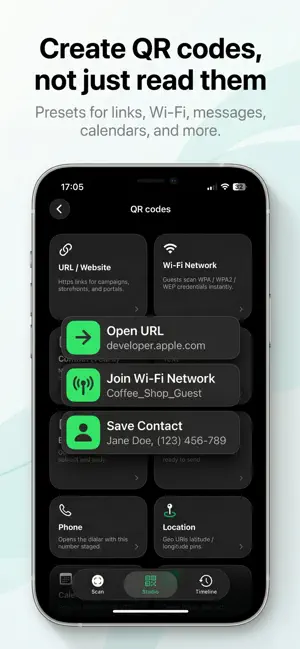
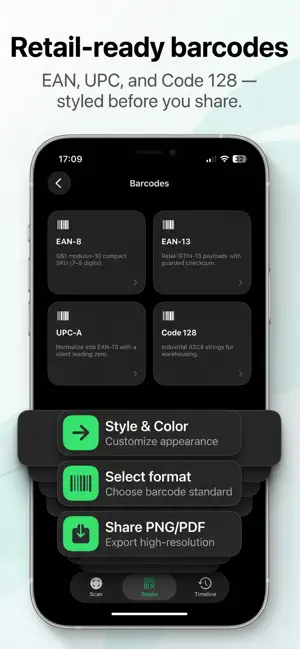
QR Code or Barcode is the everyday companion for reading codes in the real world, and turning your own content into crisp, shareable QR codes and barcodes. Built around three simple tabs, Scan, Studio, and Timeline. It keeps capture, creation, and recall in one calm, focused flow. SCAN WITH CONFIDENCE Use your camera to decode QR codes and common linear barcodes in everyday lighting. Choose Single when you want one careful read with an inspection sheet you can act on before scanning again. Or switch to Batch when you need to power through a list, a shelf, or an event line without stopping for every tap. A built-in torch helps in dim venues, and thoughtful feedback makes successful reads feel immediate. STUDIO: CREATE, DON'T JUST COPY Jump to Studio when you need a code of your own. Start from practical QR presets - think links, Wi-Fi join codes, messaging-friendly payloads, calendar-style entries, location pins, and social-style shortcuts. Then tune the look so it matches your brand or mood. For retail and logistics style needs, switch to barcode creation with guardrails for common formats like EAN-8, EAN-13, UPC-A, and Code 128, so you can validate before you style. When you are ready, export polished raster assets for slides, packaging mockups, or print tests (export capabilities may require an active subscription). TIMELINE: YOUR MEMORY, ORGANIZED Every scan can land in a chronological timeline with clear type cues, so URLs do not look like plain blobs and Wi-Fi networks are easy to spot at a glance. Open a row to copy, share, or revisit the payload later. Ideal when you are offline later or comparing two similar reads. Batch sessions can be reviewed and, where available with your plan, exported for spreadsheets or archival (CSV, PDF, and plain text options). MAKE IT YOURS Pick an accent that fits your taste, adjust batch timing to match how fast you move, and keep the interface out of the way so the camera and your content stay center stage. SUBSCRIPTION & RESTORE Some advanced exports, batch tooling, and deeper Studio options are offered through an optional in-app subscription. You can restore previous purchases anytime from Settings. Whether you are joining a guest Wi-Fi, checking a product barcode, generating a QR for a flyer, or logging dozens of codes in one pass, QR Code or Barcode is built to stay fast, legible, and respectful of your attention. Privacy Policy: https://polarisview.com/apps/qr-code-or-barcode/privacy-policy/ Terms of Service: https://www.apple.com/legal/internet-services/itunes/dev/stdeula/
What’s new
Version 1.1 · Updated September 1, 2026
Design codes that drop onto any layout. Studio now has a Transparent canvas option so QR codes and barcodes export without a solid background — PNG and SVG both keep the clear canvas. Custom corner styles now match what you see in the preview, including SVG. Data Matrix is ready to create, not just scan. Studio previews stay in view while you edit, and deleting a saved code is more reliable. Plus a new app icon.
App privacy
The developer, Isaias Batista, reported these privacy practices to Apple.
Data Not Collected
The developer does not collect any data from this app.
Alternatives to QR or Barcode
Looking for apps like QR or Barcode? Here are 6 similar apps on the App Store.
-
 QR Scanner: Reader & Maker
-
 QR Barcode Scan & Generate
-
 QR Reader & Creator
-
 QR Scanner: Barcode Maker
-
 QR Code Scanner & Maker: Skopi
-
 Scanely: QR Code Generator
| App | Rating | Price | Last updated | Compare |
|---|---|---|---|---|
| QR or Barcode | – | Free | September 1, 2026 | |
| QR Scanner: Reader & Maker | – | Free | May 19, 2026 | Compare |
| QR Barcode Scan & Generate | – | Free | May 5, 2026 | Compare |
| QR Reader & Creator | – | Free | Jun 7, 2026 | Compare |
| QR Scanner: Barcode Maker | – | Free | May 19, 2026 | Compare |
| QR Code Scanner & Maker: Skopi | – | Free | Jul 8, 2026 | Compare |
| Scanely: QR Code Generator | – | Free | Oct 19, 2026 | Compare |
Compare QR or Barcode with the top alternatives: ratings, updates, ASO score and keyword gaps →