

Noda AI
Aleksei Mikhnin Productivity iPhoneiPadiPod touch
Noda AI is a free Productivity app for iPhone and iPad by Aleksei Mikhnin. Requires iOS 14.0. Updated August 18, 2026.
- Price
- Free
- on the App Store
- Size
- 49 MB
- Age 4+
- Updated
- Aug 18
- 2026 · v1.7.3
Screenshots
About Noda AI
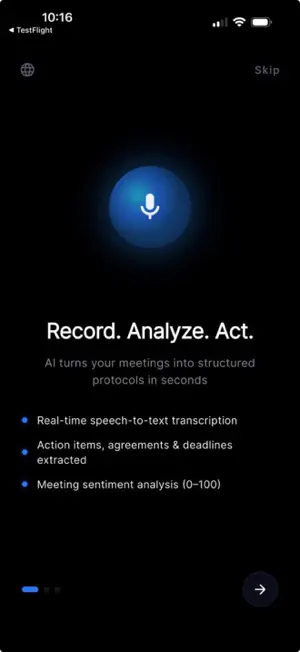
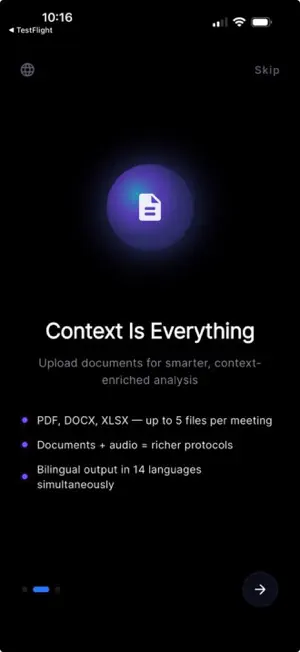
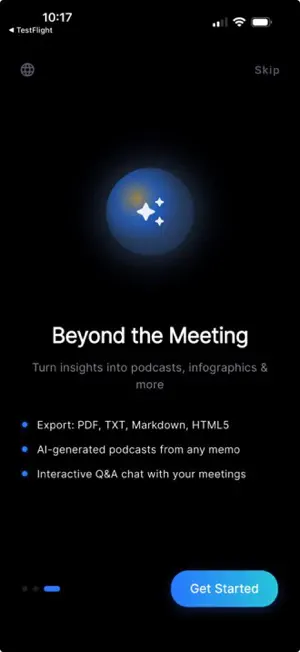
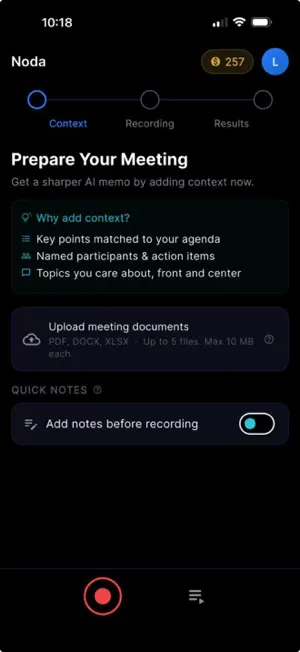
Noda — AI Business Meeting Dictaphone Stop typing meeting notes. Press record, speak naturally, and Noda's AI turns every conversation into a clean, structured protocol — with action items, decisions, and key points already separated. Available in six languages, with multi-format export and a built-in Q&A chat that lets you ask the meeting itself. AI MEETING TRANSCRIPTION - One-tap recording, up to 60 minutes per session - Local-first: recording continues even if your network drops, queued uploads survive force-quit and reboot - Transcription powered by Google Gemini Flash - Multi-speaker speech recognition AI PROTOCOL GENERATION After the recording, tap Generate Protocol and the AI produces a structured memo: - Title and key discussion points - Decisions and agreements (numbered) - Action items with assignees and deadlines - Sentiment summary Powered by Gemini Pro, with explicit anti-verbatim rules — you get a real protocol, not a transcript dump. DOCUMENT CONTEXT Upload up to 5 files (PDF, DOCX, XLSX) before the meeting and the AI will incorporate their content into the protocol. Useful for agendas, contracts, and previous-meeting follow-ups. INFOGRAPHICS Generate a single-image visual summary of the meeting in your brand style — perfect for email follow-ups or Slack updates. AUDIO RECAP (TEXT-TO-SPEECH) Turn the protocol into a podcast-style audio recap with one or two AI voices. Listen on the way home from the office. ASK THE MEETING A built-in chat with the meeting itself — ask follow-up questions like "who was responsible for the rollout date" or "summarize the budget discussion" and get answers based on the actual transcript. MULTI-FORMAT EXPORT Export as PDF, Markdown, plain text, or styled HTML5. All formats include UTF-8 BOM so Cyrillic and CJK render correctly in Notepad and legacy viewers. Share with one tap to WhatsApp, Telegram, email, or Save to Files. BRAND STYLE PRO users can set company name, brand colors, and upload a logo. The styling flows into HTML exports and infographics automatically. MEETING HISTORY All your meetings live in one timeline with TTL-based cleanup so storage stays manageable. Tap to reopen, regenerate, or chat with any previous meeting. SPEAKS YOUR LANGUAGE UI and AI generation in English, Russian, Chinese, Japanese, German, and Spanish. AI responses follow the language you choose for the protocol — independent of the device language. CLEAN, FOCUSED DESIGN Modern OLED-dark theme. No clutter, no ads, no social feed — just the tools you need to capture decisions and follow through. — SUBSCRIPTION & COIN SYSTEM — Free tier: 15 coins on registration to try out the AI features. Noda PRO unlocks 300 coins per month, refreshed on the first of each month, and exclusive access to coin top-ups. - Monthly: $9.99 - 7-day billing grace period Coin top-ups (PRO members only): - 50 coins — $4.99 - 150 coins — $9.99 - 500 coins — $24.99 What coins buy (script + result are billed separately for two-stage operations): - AI memo generation: 4 coins - AI transcription: 2 coins per 10 minutes of audio - Document context: 1 coin per uploaded file - AI infographic: up to 3 coins (1 for the plan, 2 for the image) - AI audio recap: up to 4 coins (1 for the script, 3 for the audio) - AI Q&A chat: 1 coin per question - HTML export: 2 coins Payment will be charged to your Apple ID account at confirmation of purchase. Subscriptions automatically renew unless auto-renew is turned off at least 24 hours before the end of the current period. Your account will be charged for renewal within 24 hours prior to the end of the current period. Manage your subscription and turn off auto-renewal in your Account Settings after purchase. Privacy Policy: https://noda-487720.web.app/privacy.html Terms of Service: https://noda-487720.web.app/terms.html Capture every meeting. Skip the transcription chore.
What’s new
Version 1.7.3 · Updated August 18, 2026
What's new: • Upgraded AI engine — noticeably faster transcripts, memos and answers • Redeem a Noda gift code straight from your profile to activate PRO • Stability improvements and minor fixes
App privacy
The developer, Aleksei Mikhnin, reported these privacy practices to Apple.
Data Linked to You
The following data, which may be collected and linked to your identity, may be used for the following purposes:
- Purchases: Purchase History
- Contact Info: Email Address, Name
- User Content: Audio Data, Other User Content
- Identifiers: User ID
Used for: Analytics, App Functionality
Alternatives to Noda AI
Looking for apps like Noda AI? Here are 6 similar apps on the App Store. The highest rated is Direct Chat - Simple AI Chat (5.0/5), and all 6 are free to download.





| App | Rating | Price | Last updated | Compare |
|---|---|---|---|---|
| Noda AI | – | Free | August 18, 2026 | |
| Embasis | – | Free | Oct 7, 2026 | Compare |
| Ktulhu AI | – | Free | Jan 25, 2026 | Compare |
| Direct Chat - Simple AI Chat | 5.0 / 5 (2) | Free | May 20, 2026 | Compare |
| AI Buddy 2 | – | Free | Mar 31, 2025 | Compare |
| Wikova | – | Free | Jun 11, 2026 | Compare |
| Dolos AI | – | Free | Mar 15, 2026 | Compare |
Compare Noda AI with the top alternatives: ratings, updates, ASO score and keyword gaps →