

Bloop - Swipe & Clean
Koya Nambo Photo & Video iPhoneiPadiPod touch
Bloop - Swipe & Clean is a free Photo & Video app for iPhone and iPad by Koya Nambo. Requires iOS 17.0. Updated May 5, 2026.
- Price
- Free
- on the App Store
- Size
- 2 MB
- Age 4+
- Updated
- May 5
- 2026 · v1.1.0
Screenshots

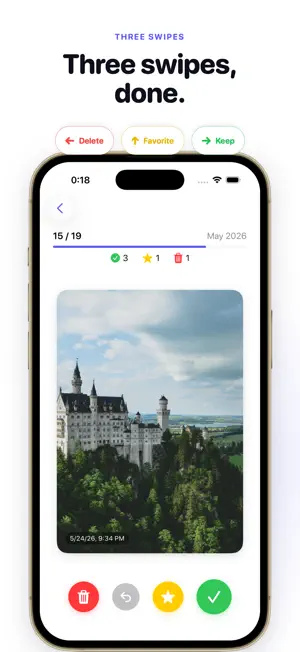


About Bloop - Swipe & Clean
Bloop is a swipe-based photo organizer that lets you sort your camera roll month-by-month — with no subscription, no ads, and a one-time purchase. ■ Month-by-month, finishable Instead of facing your entire camera roll, Bloop slices it into months. Each session has a clear finish line, so you can sort one month in a coffee break and feel done. ■ Three swipes, that's it - Swipe right → Keep - Swipe left → Mark for delete - Swipe up → Favorite (syncs with Photos) - ↶ button to undo the last action You can also tap the bottom buttons. Swipe and button exits use intentionally different speeds — buttons are slower so you can follow what happened, swipes are quick when you're flying through. ■ Bulk delete, never accidental Marked photos pile up in a delete queue. Review them in a 3-column grid before tapping "Delete All" — change your mind on any photo with a single tap. Nothing is touched in your library until you confirm. ■ Resume where you left off Pause anytime. Bloop remembers exactly which photo you stopped on, even if you quit the app or your library changes. The "Resume" card on the home screen is always one tap away. ■ Favorites, synced Swiping up flips the Photos app's heart icon — so what you favorite in Bloop shows up everywhere else. ■ Privacy Your photos never leave the device. No uploads. No analytics on your images. No third-party sharing. Bloop only views and deletes. ■ Bloop Pro (one-time purchase) The free version sorts up to 50 photos a day. Upgrade to Pro for: - Unlimited sorting - No ads, ever - No subscription — buy once, own it forever - Future updates included at no extra charge ▼ Made for - People with a chronically full iPhone - Anyone avoiding extra iCloud storage fees - Folks who can't do "all at once" but can do one month - Subscription-fatigued buyers ▼ Requirements - iPhone running iOS 17.0 or later - Photo library access required
What’s new
Version 1.1.0 · Updated May 5, 2026
Pro features and reminders are here. - Monthly filters: jump between years with tabs, isolate or exclude screenshots, exclude Live Photos, focus only on what you want to sort - Detailed stats: see your last 30 days as a calendar, monthly bytes-freed chart, streak, and lifetime totals at a glance - Local notifications: independent toggles for month-end reminder, month-start nudge for unfinished months, and streak keeper - Tap any notification to jump straight into that month's swipe deck (deep link support) - Onboarding copy refined to make the free tier explicit Monthly filters and detailed stats are Bloop Pro features. No subscription — one-time purchase unlocks everything.
App privacy
The developer, Koya Nambo, reported these privacy practices to Apple.
Data Not Collected
The developer does not collect any data from this app.
Alternatives to Bloop - Swipe & Clean
Looking for apps like Bloop - Swipe & Clean? Here are 6 similar apps on the App Store. The highest rated is SnapOut: Screenshots Cleaner (5.0/5), and 5 of the 6 are free to download.
-
 Album Craft
-
 Pocketsweep: Photo Cleaner
-
 ClearPhoto Swipe
-
 Picta - Gallery Cleaner
-
 SnapOut: Screenshots Cleaner
5.0
SnapOut: Screenshots Cleaner
5.0
-
 ClarityRoll Clean Up Storage
5.0
ClarityRoll Clean Up Storage
5.0
| App | Rating | Price | Last updated | Compare |
|---|---|---|---|---|
| Bloop - Swipe & Clean | – | Free | May 5, 2026 | |
| Album Craft | – | 3 USD | Dec 27, 2025 | Compare |
| Pocketsweep: Photo Cleaner | – | Free | May 16, 2026 | Compare |
| ClearPhoto Swipe | – | Free | Jul 24, 2026 | Compare |
| Picta - Gallery Cleaner | – | Free | Jun 26, 2026 | Compare |
| SnapOut: Screenshots Cleaner | 5.0 / 5 (1) | Free | May 30, 2026 | Compare |
| ClarityRoll Clean Up Storage | 5.0 / 5 (2) | Free | May 8, 2026 | Compare |