

SwipePhotos: Photo Cleaner
Jan Philip Wahle Utilities iPhoneiPadiPod touchMac
SwipePhotos: Photo Cleaner is a free Utilities app for iPhone and iPad by Jan Philip Wahle. Rated 4.5/5 from 2 ratings. Requires iOS 18.0.
- Rating
- 4.5
- 2 ratings
- Price
- Free
- on the App Store
- Size
- 47 MB
- Age 4+
- Updated
- Nov 23
- 2026 · v3.21.257
Screenshots
Save to Pinterest

About SwipePhotos: Photo Cleaner
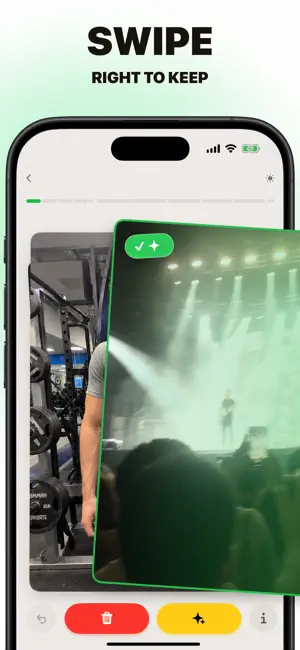
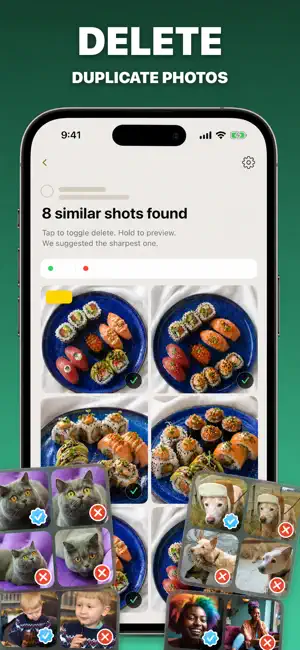
Your best memories are buried under thousands of photos: duplicates, blurry bursts, screenshots. SwipePhotos gets them back. Swipe right to keep, left to delete, tap the heart to favorite. A few minutes a day clears years of clutter, the cleanup you keep putting off finally gets finished, and the photos that matter come back to the surface. WHY SWIPEPHOTOS INSTEAD OF THE USUAL WAYS • Instead of doing it by hand. In your Photos app, every photo means select, delete, confirm, thousands of times. Here one swipe decides, a month at a time, and you pick up exactly where you left off. • Instead of a separate duplicate finder. Smart Stack shows bursts and near-identical shots together right inside your deck. Tap the weaker ones, keep the best one, keep going. • Instead of an iPhone-only cleaner. The native Mac app is included: Y keeps, X deletes, C undoes, F favorites, and the arrow keys work too. One purchase covers iPhone, iPad and Mac, with the same progress on each. • Instead of a cleaner that only counts gigabytes. SwipePhotos is about the photos you keep. On iPhone and iPad, Rewind turns forgotten trips and favorite faces into a private story, and every finished session ends with your Camera Roll Wrapped. • Instead of buying more iCloud storage. A bigger plan keeps every blurry duplicate. Clearing them out makes room in the plan you already have. SAFE AND PRIVATE • Swipes only mark photos. Nothing is deleted until you confirm, and deleted photos stay in Recently Deleted for 30 days. A double tap undoes the last swipe. • Your photos are analyzed on your device and never uploaded. There are no photo-processing servers. WORKS WITH ICLOUD PHOTOS If you use iCloud Photos, SwipePhotos works with the same library the Photos app sees. Your decisions sync across devices like other changes to your library. PRICING Try one collection free: swipe through a month, an album, or a group like Screenshots or Duplicates without paying. Deleting what you picked, and everything after that first collection, needs a purchase. Unlock with a weekly or yearly subscription, or a one-time lifetime purchase. Referral codes can add free trial time: you and a friend each get a free week after the friend's first cleanup, with a free-month bonus at three qualified friends. The current price is shown in the App Store before you buy. One purchase covers iPhone and Mac. No ads, no separate Pro tier, and you can cancel anytime in App Store settings. Subscriptions renew automatically unless turned off at least 24 hours before the end of the current period. Your account is charged for renewal within 24 hours before the current period ends. Manage or cancel your subscription in your App Store account settings. — Privacy Policy: https://swipephotos.com/privacy-policy — Terms of Use: https://swipephotos.com/terms — Support: [email protected]
What’s new
Version 3.21.257 · Updated November 23, 2026
For some people, the request to rate SwipePhotos now comes after you finish a sorting session instead of in the middle of swiping. Nothing changes in how you sort or delete.
App privacy
The developer, Jan Philip Wahle, reported these privacy practices to Apple.
Data Used to Track You
The following data may be used to track you across apps and websites owned by other companies:
- Purchases: Purchase History
- Identifiers: Device ID
- Usage Data: Product Interaction
Data Linked to You
The following data, which may be collected and linked to your identity, may be used for the following purposes:
- Identifiers: Device ID
- Usage Data: Product Interaction
- Diagnostics: Other Diagnostic Data
- Purchases: Purchase History
- Other Data: Other Data Types
Used for: Third-Party Advertising, Developer’s Advertising or Marketing, Analytics, Product Personalization, App Functionality
Data Not Linked to You
The following data, which may be collected but is not linked to your identity, may be used for the following purposes:
- Diagnostics: Crash Data, Performance Data
Used for: Analytics
Alternatives to SwipePhotos: Photo Cleaner
Looking for apps like SwipePhotos: Photo Cleaner? Here are 6 similar apps on the App Store. The highest rated is Siftly: Camera Roll Cleaner (5.0/5), and all 6 are free to download.
-
 Photo Cleaner: Swipe & Delete.
-
 PhotoClear: Swipe to Delete
4.4
-
 Siftly: Camera Roll Cleaner
5.0
-
 Swipeclean: Delete Photos
5.0
-
 Vicky: Swipe Photo Cleaner
5.0
-
 Photo Cleaner Space LimpiaPix
| App | Rating | Price | Last updated | Compare |
|---|---|---|---|---|
| SwipePhotos: Photo Cleaner | 4.5 / 5 (2 ratings) | Free | November 23, 2026 | |
| Photo Cleaner: Swipe & Delete. | – | Free | Sep 10, 2026 | Compare |
| PhotoClear: Swipe to Delete | 4.4 / 5 (16) | Free | Mar 21, 2026 | Compare |
| Siftly: Camera Roll Cleaner | 5.0 / 5 (2) | Free | Nov 23, 2026 | Compare |
| Swipeclean: Delete Photos | 5.0 / 5 (1) | Free | Nov 23, 2026 | Compare |
| Vicky: Swipe Photo Cleaner | 5.0 / 5 (1) | Free | Nov 23, 2026 | Compare |
| Photo Cleaner Space LimpiaPix | – | Free | Oct 30, 2026 | Compare |