

Orbitimer
Tomonori Kowatari Productivity iPhoneiPadiPod touch
Orbitimer is a free Productivity app for iPhone and iPad by Tomonori Kowatari. Requires iOS 17.0. Updated October 26, 2026.
- Price
- Free
- on the App Store
- Size
- 2 MB
- Age 4+
- Updated
- Oct 26
- 2026 · v1.4.1
Screenshots
Save to Pinterest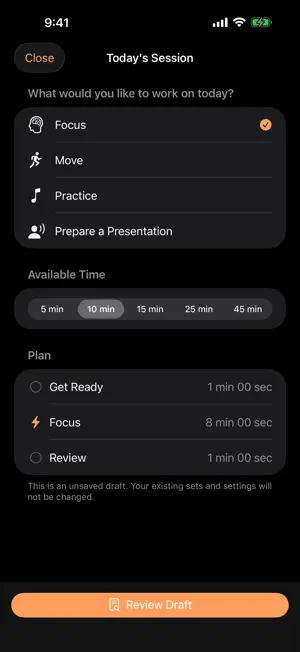


About Orbitimer
Orbitimer is an interval timer and metronome built around tempo and rhythm. Whether you're doing strength training and HIIT, staying focused while studying or working, practicing an instrument, or pacing a presentation, Orbitimer helps you break time into segments and keep a steady rhythm. ■ Today's Session - Choose a goal and the time you have to create a three-step plan on your device - Review and edit the draft before saving; existing sets and settings stay unchanged ■ Flexible interval timers - Arrange Work and Interval steps to build your own routine - Set a duration and title for each step, reorder by drag - Batch-generate rounds and rest periods with the interval generator ■ Precise metronome (with haptics) - Lock in tempo by BPM and note value (quarter, eighth, sixteenth) - Feel the beat through the Taptic Engine—great where you can't make noise - Accented downbeats ■ Per-step customization - Attach a photo, video, or recorded cue / background audio to any step - Encouragement messages and custom pre-end notifications ■ Effect packs - Built-in Standard, Energetic, Calm, and Business packs - Swap start/warning/end sounds and finish animations (fireworks / confetti / stars) - Create your own custom packs ■ Themes - 8 built-in themes plus a full custom theme editor - Export and import themes via share codes ■ Community - Discover and import timer presets and themes made by other users - Share your own presets and themes with everyone ■ Presentation mode (stealth notifications) - Route audio only to Bluetooth earphones, or use Apple Watch haptics only - Stay on time during meetings and talks without anyone noticing ■ Never stops your music - Mixes with Apple Music and other audio without interrupting playback - Turn sound off for a silent, haptics-only experience ■ Privacy & pricing - Completely free. No ads, no tracking, no account required - Your data stays on your device (with optional iCloud sync) - If you love the app, you can leave an optional tip to support development (tips unlock nothing—just our thanks) Universal app for iPhone and iPad. Start today's routine at your own rhythm.
What’s new
Version 1.4.1 · Updated October 26, 2026
Improved timer layouts for different screen sizes. Choose left, center, or right alignment for timer controls. The draft review button in Today’s Session is now easier to reach. Your existing sets and settings are preserved.
App privacy
The developer, Tomonori Kowatari, reported these privacy practices to Apple.
Data Not Linked to You
The following data, which may be collected but is not linked to your identity, may be used for the following purposes:
- User Content: Other User Content
Used for: App Functionality
Alternatives to Orbitimer
Looking for apps like Orbitimer? Here are 6 similar apps on the App Store. The highest rated is DeskTabby (5.0/5), and all 6 are free to download.
-
 DeskTabby
5.0
-
 Orbit: ADHD Time Tracker
-
 Next Step – Sequential Timers
-
 Brain Dump for ADHD: BrainSort
-
 Ding, TimeCue
-
 Simple Focus
| App | Rating | Price | Last updated | Compare |
|---|---|---|---|---|
| Orbitimer | – | Free | October 26, 2026 | |
| DeskTabby | 5.0 / 5 (2) | Free | Oct 26, 2026 | Compare |
| Orbit: ADHD Time Tracker | – | Free | Jul 25, 2026 | Compare |
| Next Step – Sequential Timers | – | Free | Mar 25, 2026 | Compare |
| Brain Dump for ADHD: BrainSort | – | Free | Nov 21, 2026 | Compare |
| Ding, TimeCue | – | Free | Jun 10, 2026 | Compare |
| Simple Focus | – | Free | Dec 4, 2023 | Compare |
Compare Orbitimer with the top alternatives: ratings, updates, ASO score and keyword gaps →