

Habit To Go
Hwiyoung Park Productivity iPhoneiPadiPod touch
Habit To Go is a free Productivity app for iPhone and iPad by Hwiyoung Park. Rated 5.0/5 from 1 ratings. Requires iOS 15.1. Updated September 26, 2026.
- Rating
- 5.0
- 1 ratings
- Price
- Free
- on the App Store
- Size
- 35 MB
- Age 4+
- Updated
- Sep 26
- 2026 · v2.0.1
Screenshots


About Habit To Go
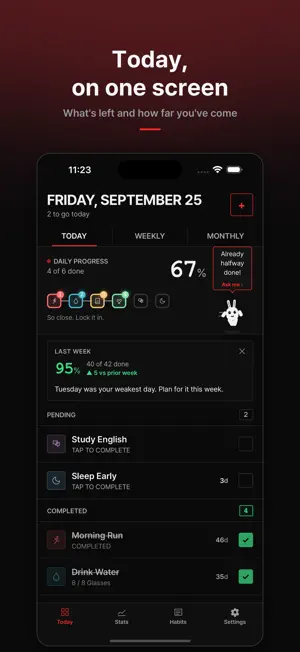
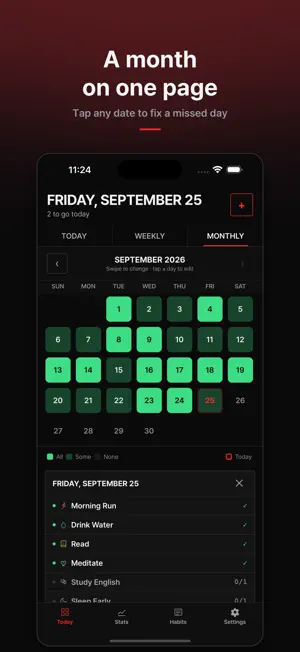
Habits are built by structure, not willpower. Habit To Go shows you what to do today, where you are slipping, and what to do about it — on one screen. ■ Today, on one screen Open the app and see what is left and how far you have come. One tap completes a habit; tap again to undo. ■ One missed day will not undo you Missing a day does not reset your streak to zero. Streaks work on "never miss twice" — they only break when you miss two days in a row, so a single slip does not end the run. ■ Know before it breaks Stats tell you which weekday you are weakest on and which habit has dropped since last week. Instead of only reporting numbers, they point at what to fix. ■ A week, a month, a year Read the shape of your week in the grid and your month in the calendar, then switch the consistency heatmap between 5 weeks, 66 days and a year. Anything within the last 7 days can be corrected with a tap. ■ 27 badges Streaks, total completions and perfect weeks — 27 badges in three families. The ones you have not earned stay visible, so the next goal is always in sight. ■ Just ask your character "What's left today?", "How was my week?", "Which day am I weakest?" — tap the character and ask. It runs entirely on your device: no account, no internet connection. ■ Say your goal, get your habits Write something like "lose weight and less stress" and it picks the habits that fit, grouped by the reason each one is there. ■ 137 habit templates Ten categories, including health, exercise, learning, mindfulness, money, focus, relationships and creativity. Start from one, or build your own with its own name, icon, colour and schedule. ■ Only the reminders you need Per-habit reminders, an evening nudge for what is still unfinished, and a Sunday review. Finish everything and the reminders stay quiet. ■ Your records stay on your phone Everything is stored on the device. There is no account to create, and you can export and import a JSON backup whenever you want. Korean and English. Light and dark. Ads can be removed with a single purchase.
What’s new
Version 2.0.1 · Updated September 26, 2026
2.0.1 • Fixed the first-run screens cutting off their body text. You no longer have to scroll to read them. • You can turn on a daily reminder during setup. Pick the time first, then switch it on — and it now tells you that each habit can carry a reminder of its own. • New habits start with no deadline instead of a 30-day goal. Begin open-ended and set a target length whenever you want. If you had already chosen a default, it is left as it is. • When you have no habits yet, the button to start one sits in the middle of the screen instead of down near the bottom.
App privacy
The developer, Hwiyoung Park, reported these privacy practices to Apple.
Data Used to Track You
The following data may be used to track you across apps and websites owned by other companies:
- Identifiers: Device ID
Data Not Linked to You
The following data, which may be collected but is not linked to your identity, may be used for the following purposes:
- Identifiers: Device ID
Used for: Third-Party Advertising
Alternatives to Habit To Go
Looking for apps like Habit To Go? Here are 6 similar apps on the App Store. The highest rated is Simple Habit Tracker - Pebble (5.0/5), and all 6 are free to download.
-
 Reminder Artik - Todo
-
 Ritlum: Habit Tracker
-
 HabitOn - Daily Habit Tracker
-
 Simple Habit Tracker - Pebble
5.0
Simple Habit Tracker - Pebble
5.0
-
 Momo Days: Daily Habit Tracker
-
 Habit Tracker - Habitee
5.0
Habit Tracker - Habitee
5.0
| App | Rating | Price | Last updated | Compare |
|---|---|---|---|---|
| Habit To Go | 5.0 / 5 (1 rating) | Free | September 26, 2026 | |
| Reminder Artik - Todo | – | Free | Jan 2, 2025 | Compare |
| Ritlum: Habit Tracker | – | Free | Oct 24, 2026 | Compare |
| HabitOn - Daily Habit Tracker | – | Free | Nov 8, 2025 | Compare |
| Simple Habit Tracker - Pebble | 5.0 / 5 (4) | Free | Oct 24, 2026 | Compare |
| Momo Days: Daily Habit Tracker | – | Free | Aug 26, 2026 | Compare |
| Habit Tracker - Habitee | 5.0 / 5 (3) | Free | Jun 20, 2026 | Compare |
Compare Habit To Go with the top alternatives: ratings, updates, ASO score and keyword gaps →