

xLibrary - Home Collection
K2 Labs Book iPhoneiPadiPod touch
xLibrary - Home Collection is a free Book app for iPhone and iPad by K2 Labs. Requires iOS 17.6. Updated September 24, 2026.
- Price
- Free
- on the App Store
- Size
- 23 MB
- Age 4+
- Updated
- Sep 24
- 2026 · v1.0.8
Screenshots

About xLibrary - Home Collection
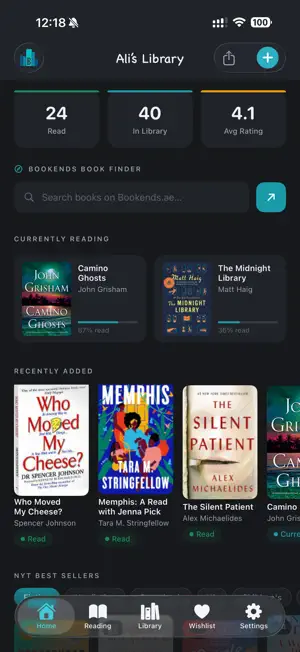
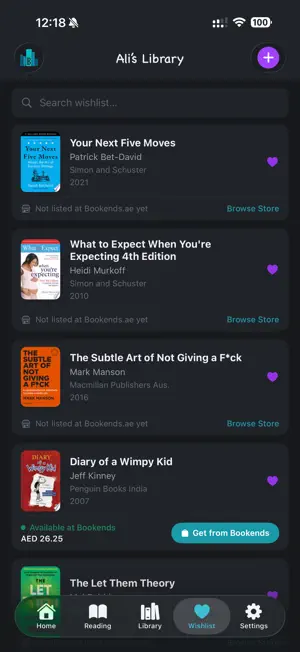
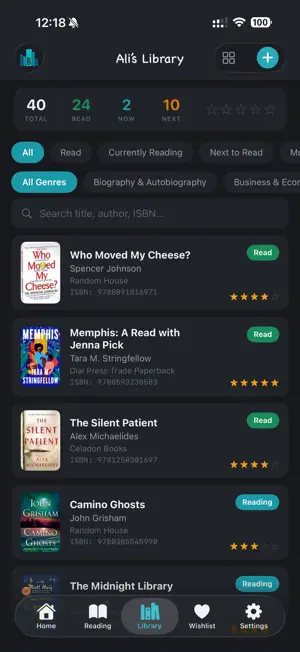
xLibrary is your personal home library manager, built for readers who want everything about their collection in one place. Whether you have 50 books or 5,000, xLibrary helps you catalogue, track, and rediscover your physical collection, and now comes with a private ebook library built right in. SCAN AND SEARCH Scan any book barcode to add it instantly, or search by title and author. Rich metadata loads automatically: cover, synopsis, publisher, genres, page count and more. TRACK YOUR READING Tag books as Currently Reading, Next to Read, Must Re-Read, Read, or Wishlist. Log your current page and watch your progress bar fill up. Rate every book out of 5 stars and write personal notes. YOUR LIBRARY, YOUR WAY Browse in list view or switch to a 2 or 3-column grid. Filter by reading status, genre, or star rating. Search instantly across your entire collection. READING STATS See your library at a glance: total books, pages read, favourite genres, top authors, and a chart of your books by publication year. WISHLIST AND STORE AVAILABILITY Connect your favourite bookstore, and your wishlist checks live availability as you browse, so you always know which books you can pick up today. SHARE YOUR WISHLIST Tap one button to generate a shareable link to your wishlist. Anyone can open it in any browser, no app required. Perfect for sending to friends or family before your birthday. NYT BEST SELLERS Browse the New York Times Best Sellers lists and add books directly to your library or wishlist with a single tap. EBOOK MODE Tap and hold the xLibrary logo to switch into your own private, on-device ebook library, kept completely separate from your physical collection. Import your own EPUBs and PDFs, browse and download thousands of free classics from Project Gutenberg, or connect your Calibre-Web server to bring in your existing ebook collection. Read with a built-in EPUB and PDF viewer, adjust fonts, themes and layout to your liking, highlight passages and jot down notes, and track your ebook reading stats separately from your physical library. Switch back any time, the same way you got in. CLOUD BACKUP Sign in with your email, no password needed, just a 6-digit code. Your entire library is securely backed up and syncs across devices automatically. Works fully offline too. CUSTOM COVERS Not happy with the automatic cover? Take a photo of your physical book and use the built-in perspective crop editor to get a perfect shot. xLibrary works offline from the moment you open it.
What’s new
Version 1.0.8 · Updated September 24, 2026
- Switch between your physical library and Ebook Mode from a new card in Settings, not just the logo. - Mode switches now show a quick animation and a nicer confirmation prompt. - Bug fixes and stability improvements.
App privacy
The developer, K2 Labs, reported these privacy practices to Apple.
Data Not Collected
The developer does not collect any data from this app.
Alternatives to xLibrary - Home Collection
Looking for apps like xLibrary - Home Collection? Here are 6 similar apps on the App Store. The highest rated is Bookends: Reading Tracker (5.0/5), and all 6 are free to download.
-
 Book Catalog: Shelf Scanner
1.0
Book Catalog: Shelf Scanner
1.0
-
 Bookends: Reading Tracker
5.0
Bookends: Reading Tracker
5.0
-
 BookWorm: Reading Tracker
4.8
BookWorm: Reading Tracker
4.8
-
 Plumerie: Home Library App
1.0
Plumerie: Home Library App
1.0
-
 Bookreign
-
 Thyle
Thyle
| App | Rating | Price | Last updated | Compare |
|---|---|---|---|---|
| xLibrary - Home Collection | – | Free | September 24, 2026 | |
| Book Catalog: Shelf Scanner | 1.0 / 5 (1) | Free | Oct 31, 2026 | Compare |
| Bookends: Reading Tracker | 5.0 / 5 (7) | Free | Oct 28, 2026 | Compare |
| BookWorm: Reading Tracker | 4.8 / 5 (6) | Free | Oct 30, 2026 | Compare |
| Plumerie: Home Library App | 1.0 / 5 (1) | Free | Sep 16, 2026 | Compare |
| Bookreign | – | Free | Oct 17, 2026 | Compare |
| Thyle | – | Free | May 8, 2026 | Compare |