

Click Me - metronome
minseok kwak Music iPhoneiPadiPod touch
Click Me - metronome is a free Music app for iPhone and iPad by minseok kwak. Rated 3.0/5 from 1 ratings. Requires iOS 17.6. Updated October 29, 2026.
- Rating
- 3.0
- 1 ratings
- Price
- Free
- on the App Store
- Size
- 10 MB
- Age 4+
- Updated
- Oct 29
- 2026 · v2.6.1
Screenshots


About Click Me - metronome
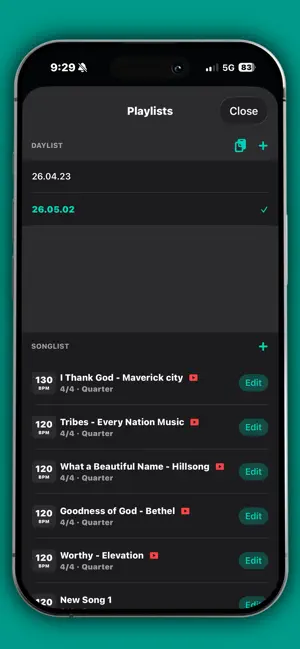
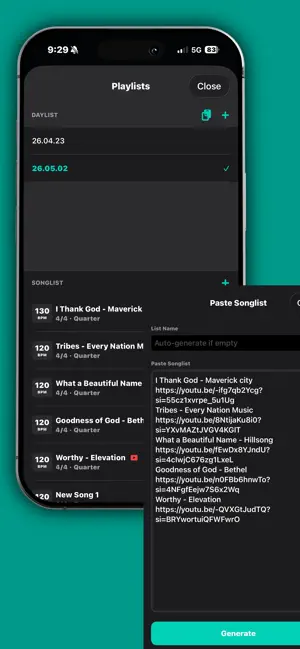
Click Me goes beyond keeping time. It brings your song settings, set order, song forms, and performance cues together, so you can stay focused from individual practice to rehearsals and live shows. SET UP EVERY SONG Save BPM, time signature, rhythm, click sound, and a YouTube link for each song. Enter the tempo directly, use Tap Tempo, or detect BPM while playing a YouTube reference. ORGANIZE WITH DAYLISTS Arrange songs in performance, rehearsal, or worship order. Paste song titles and YouTube links to build a Daylist quickly, then keep your library in sync across iPhone and iPad with iCloud. BUILD SONG FORMS AND CUES Map sections such as Intro, Verse, Chorus, Bridge, and Outro by bar. Add cues including Build-up, Breakdown, All-in, Count, and Transpose, plus bar-level tempo and meter changes, to see what comes next while you play. PRACTICE MORE EFFECTIVELY Speed Trainer raises the tempo automatically at intervals you choose, helping you work toward your target BPM step by step. Multiple click sounds, Humanize, screen flash, and keyboard shortcuts are also supported. SHARE AND CONNECT Share polished Daylists as images or PDFs. Back up and restore your data, import a setlist image from Sheet, or send a Click Me setlist to Sheet and continue preparing your charts. KEY FEATURES • Accurate metronome playback • Direct BPM entry and Tap Tempo • Multiple time signatures and rhythms • Per-song settings and YouTube links • Automatic BPM detection • Daylist and song library management • Song Form Guide and performance cues • Bar-level tempo and meter changes • Speed Trainer • Multiple click sounds and Humanize • iCloud sync between iPhone and iPad • Image, PDF, and data import/export • Setlist connection with Sheet Some features require Click Me Pro.
What’s new
Version 2.6.1 · Updated October 29, 2026
What's new • If a call comes in, Siri is triggered, or AirPods connect or disconnect during playback, the metronome no longer sits there silently while still showing it's playing. Unplugging headphones now stops playback so the click doesn't leak through the speaker. • Fixed Bluetooth headphones staying in call-quality audio after using BPM detection. • Audio now shuts off in the background when nothing is playing, saving battery. • Preview in the song editor now follows the time signature and rhythm you're editing. • Guide playback is more stable, and the voice guide is less likely to drift from the beat. • You'll now see a message if a backup file can't be imported. • Corrected how the early-supporter Pro benefit is checked: it now applies to everyone who downloaded Click before version 2.0 launched (May 31, 2026).
App privacy
The developer, minseok kwak, reported these privacy practices to Apple.
Data Not Collected
The developer does not collect any data from this app.
Alternatives to Click Me - metronome
Looking for apps like Click Me - metronome? Here are 6 similar apps on the App Store. The highest rated is Drummer's Metronome (5.0/5), and all 6 are free to download.
-
 Drummer's Metronome
5.0
-
 WorshipNote – Worship Setlist
-
 Roundabeat Metronome
5.0
-
 Metronome++: BPM Finder
-
 Tromix
5.0
-
 Metronotes3 - Live Metronome
4.6
| App | Rating | Price | Last updated | Compare |
|---|---|---|---|---|
| Click Me - metronome | 3.0 / 5 (1 rating) | Free | October 29, 2026 | |
| Drummer's Metronome | 5.0 / 5 (4) | Free | Mar 1, 2026 | Compare |
| WorshipNote – Worship Setlist | – | Free | Nov 9, 2026 | Compare |
| Roundabeat Metronome | 5.0 / 5 (4) | Free | Jul 29, 2025 | Compare |
| Metronome++: BPM Finder | – | Free | Oct 15, 2026 | Compare |
| Tromix | 5.0 / 5 (1) | Free | Apr 16, 2026 | Compare |
| Metronotes3 - Live Metronome | 4.6 / 5 (8) | Free | Oct 8, 2026 | Compare |