

AireTrac
Poker Games Interactive Productivity iPhoneiPadiPod touch
AireTrac is a free Productivity app for iPhone and iPad by Poker Games Interactive. Requires iOS 17.0. Updated October 14, 2026.
- Price
- Free
- on the App Store
- Size
- 57 MB
- Age 4+
- Updated
- Oct 14
- 2026 · v1.4.2
Screenshots

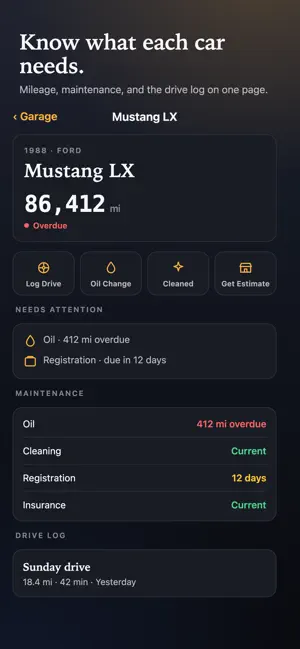


About AireTrac
AireTrac connects your home service, automotive service, payments, and personal vehicle garage in one app. Follow repairs, approve work, pay invoices, manage vehicles, track mileage, and keep a lasting service history. CONNECT ONCE, STAY CONNECTED Your service provider can send a pairing code or secure link to connect your account. Enter it once and AireTrac links you to the business servicing your home or vehicle. You can also sign in with an existing account. FOLLOW SERVICE FROM START TO FINISH Depending on the service, you can: • Request service • Follow job or work-order status • See when a technician is assigned • Track progress through completion • View technician arrival information when available • Review estimates and approvals • View invoices and payment status • Keep notes, photos, and service details together AUTOMOTIVE SERVICE When your repair shop uses AireTrac Automotive, you may be able to: • Follow your vehicle through the repair process • Review estimates and approve or decline work • Track completed and deferred services • View vehicle and service history • Pay invoices securely • Use eligible financing or pay-over-time options when offered Available features depend on your shop’s configuration. YOUR GARAGE, YOUR VEHICLE HISTORY AireTrac includes a personal Garage for your own vehicles. Organize vehicle details, photos, documents, mileage, notes, reminders, and history in one place. Garage features may include: • Vehicle profiles and odometer tracking • Photos and documents • Maintenance notes and history • Collector vehicle information • Drive history and mileage records • Vehicle health information when supported Your Garage is separate from a shop’s internal work-order system. RECORD YOUR DRIVES For supported Garage vehicles, Drive Log can record: • GPS route and distance traveled • Drive duration and moving/stopped time • Maximum recorded speed • Starting and ending odometer readings • Drive notes and purpose Use your iPhone camera to help read the vehicle’s physical odometer, then confirm the reading before it is saved. Manual mileage entry is always available. Optional OBD-II and wearable features may be enabled separately. YOUR HISTORY, IN YOUR POCKET Quickly review what was done, when it was done, what vehicle or property it involved, and what you were charged. Keep useful records for warranties, maintenance planning, collector vehicles, repeat service, and resale. ESTIMATES, APPROVALS & PAYMENTS When supported by your provider, review estimates, approve work, view invoices, and pay from your phone. Available payment methods may include cards and eligible pay-over-time options. BUILT FOR EVERYDAY USE • Clear, readable screens • Large tap targets • Simple status information • Dark-mode-friendly design • Face ID / Touch ID protection when enabled • Background location only when needed for features such as Drive Log WORKS WITH AIRETRAC-POWERED BUSINESSES Service features become available when your HVAC, plumbing, automotive, or other service provider uses AireTrac and connects you to their business. PRIVACY IN PLAIN ENGLISH AireTrac uses information needed to provide the features you choose, including account information, service history, vehicle information, photos, notes, payments, and location for map or Drive Log features. Odometer photos used for recognition are not intended to be retained unless a feature specifically tells you otherwise. We do not sell your personal data to advertisers. REQUIREMENTS • iOS 17 or later • AireTrac account or pairing code for connected service features • Location permission for map or Drive Log features • Camera permission for odometer-reading and photo features • Some automotive, payment, OBD-II, wearable, and advanced Garage features require supported hardware or provider configuration SUPPORT [email protected] airetrac.com/help Privacy Policy: airetrac.com/privacy Terms of Service: airetrac.com/terms
What’s new
Version 1.4.2 · Updated October 14, 2026
Bug fixes and improvements.. • Improved the estimate submittal process to be more clear
App privacy
The developer, Poker Games Interactive, reported these privacy practices to Apple.
Data Linked to You
The following data, which may be collected and linked to your identity, may be used for the following purposes:
- Identifiers: User ID
- Usage Data: Product Interaction
- Location: Precise Location
- Contact Info: Physical Address, Email Address, Name, Phone Number
Used for: Analytics, App Functionality
Alternatives to AireTrac
Looking for apps like AireTrac? Here are 6 similar apps on the App Store. The highest rated is SIGMA: Fuels Association (5.0/5), and all 6 are free to download.
-
 SIGMA: Fuels Association
5.0
SIGMA: Fuels Association
5.0
-
 Evidian Authenticator
1.0
Evidian Authenticator
1.0
-
 JB GO: HVAC Smart Probes
-
 QRentry
2.0
QRentry
2.0
-
 Axiad ID
3.4
Axiad ID
3.4
-
 BeHR
2.3
BeHR
2.3
| App | Rating | Price | Last updated | Compare |
|---|---|---|---|---|
| AireTrac | – | Free | October 14, 2026 | |
| SIGMA: Fuels Association | 5.0 / 5 (1) | Free | Aug 22, 2026 | Compare |
| Evidian Authenticator | 1.0 / 5 (1) | Free | Jan 5, 2026 | Compare |
| JB GO: HVAC Smart Probes | – | Free | Oct 8, 2026 | Compare |
| QRentry | 2.0 / 5 (4) | Free | Oct 14, 2026 | Compare |
| Axiad ID | 3.4 / 5 (58) | Free | Oct 17, 2026 | Compare |
| BeHR | 2.3 / 5 (15) | Free | May 20, 2025 | Compare |
Compare AireTrac with the top alternatives: ratings, updates, ASO score and keyword gaps →