

OnClock
HAIDER ALI Productivity iPhoneiPadiPod touchApple Watch
OnClock is a free Productivity app for iPhone and iPad by HAIDER ALI. Rated 5.0/5 from 1 ratings. Requires iOS 18.0. Updated October 23, 2026.
- Rating
- 5.0
- 1 ratings
- Price
- Free
- on the App Store
- Size
- 7 MB
- Age 4+
- Updated
- Oct 23
- 2026 · v1.2.5
Screenshots


About OnClock
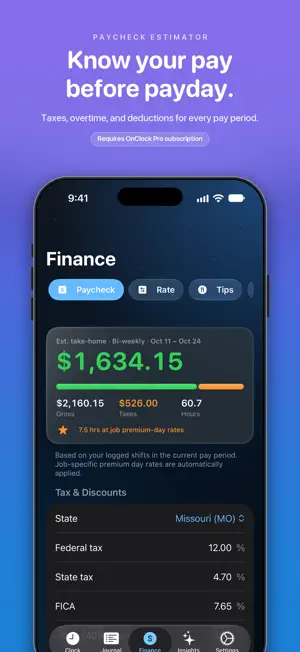
OnClock is a subscription-based premium time clock for people who want their hours, pay, breaks, and work history to feel effortless. Start with a 30-day Apple free trial. Continued access to OnClock and the features listed below requires a separate OnClock Pro subscription purchase: $2.99/month or $29.99/year. You can also unlock OnClock Pro forever with a one-time OnClock Pro Lifetime purchase of $59.99. Built for iOS 27 with Apple's Liquid Glass design, OnClock turns clocking in and out into a clean daily habit. With OnClock Pro, track shifts, lunch breaks, pay, overtime, jobs, notes, and work trends from one private app. One-tap time tracking Requires OnClock Pro subscription after the trial. Clock in, start lunch, come back, and clock out in a tap, with your main actions always pinned on screen. Lock Screen, Dynamic Island & Control Center Requires OnClock Pro subscription after the trial. A Live Activity shows your worked time, progress toward your daily goal, and Lunch and Clock Out buttons without unlocking. Add the Clock In / Out control to Control Center, the Lock Screen, or the Action button. Siri & Shortcuts Requires OnClock Pro subscription after the trial. Ask "How many hours did I work this week?" or say "Clock in to" your job. Build your own automations in Shortcuts. Know your take-home pay Requires OnClock Pro subscription after the trial. See your estimated take-home for the current pay period, with taxes, overtime, premium pay days, tips, and deductions, across multiple jobs. Your work journal Requires OnClock Pro subscription after the trial. Every shift is saved and grouped by week with totals, start and end times, breaks, notes, and editable details. Private AI insights Requires OnClock Pro subscription after the trial. Ask questions about your hours and pay and get answers from your own shift history, processed on your device. Apple Watch & widgets Requires OnClock Pro subscription after the trial. Clock in from your wrist, and keep your workday on the Home Screen and Lock Screen with widgets you can pin to a job. Private by design Your shift data is stored on your device and can sync through your personal iCloud account. OnClock does not sell your data, track you for ads, or use third-party analytics. Perfect for hourly workers, freelancers, contractors, students, part-time employees, service and hospitality workers, healthcare shifts, retail teams, gig workers, and anyone who wants a premium personal time clock. Start with a 30-day free trial, and we'll remind you before it ends. After the trial, continued access requires OnClock Pro, a separate subscription purchase for $2.99/month or $29.99/year. Or choose OnClock Pro Lifetime, a one-time purchase of $59.99 that never renews. Subscription details: - Payment is charged to your Apple ID after the free trial unless canceled. - Subscriptions renew automatically unless canceled at least 24 hours before the end of the current period. - Manage or cancel anytime in your App Store account settings. Terms of Use (EULA): https://www.apple.com/legal/internet-services/itunes/dev/stdeula/
What’s new
Version 1.2.5 · Updated October 23, 2026
OnClock 1.2.4 is built for iOS 27. • Lock Screen & Dynamic Island: Lunch, Back and Clock Out buttons, live progress toward your daily goal, and a lunch countdown. • Control Center & Action button: one-tap Clock In / Out. • Siri & Shortcuts: "How many hours did I work this week?" and "Clock in to Bluebird Cafe." • Widgets you can pin to a specific job. • Redesigned Journal, Finance, Insights, Settings and Pro screens with Liquid Glass. • Insights answers stream in live, with on-device Apple Intelligence. • OnClock Pro Lifetime: unlock Pro once and keep it forever, alongside the monthly and yearly plans. • Have a promo code? Redeem it during onboarding or on the Pro screen. • Better large-text layouts and VoiceOver labels. • Journal's Shifts / Pay Periods switch now scrolls with the page. Features require an OnClock Pro subscription.
App privacy
The developer, HAIDER ALI, reported these privacy practices to Apple.
Data Not Collected
The developer does not collect any data from this app.
Alternatives to OnClock
Looking for apps like OnClock? Here are 6 similar apps on the App Store. The highest rated is PicoCal: The Tiniest Calendar (5.0/5), and 5 of the 6 are free to download.
-
 PicoCal: The Tiniest Calendar
5.0
-
 Roomantic: Furniture Planner
5.0
-
 Behind The Scene
5.0
-
 Work Hour Tracker: Time Sheet
5.0
-
 FRAYT Driver
2.9
-
 Axon
4.8
| App | Rating | Price | Last updated | Compare |
|---|---|---|---|---|
| OnClock | 5.0 / 5 (1 rating) | Free | October 23, 2026 | |
| PicoCal: The Tiniest Calendar | 5.0 / 5 (1) | Free | Jan 19, 2025 | Compare |
| Roomantic: Furniture Planner | 5.0 / 5 (7) | 9.99 USD | Oct 23, 2026 | Compare |
| Behind The Scene | 5.0 / 5 (2) | Free | Oct 24, 2026 | Compare |
| Work Hour Tracker: Time Sheet | 5.0 / 5 (11) | Free | Oct 8, 2026 | Compare |
| FRAYT Driver | 2.9 / 5 (27) | Free | Oct 22, 2026 | Compare |
| Axon | 4.8 / 5 (1,315) | Free | Oct 13, 2026 | Compare |
Compare OnClock with the top alternatives: ratings, updates, ASO score and keyword gaps →