

Keelport
Jeremy Littlewood Developer Tools iPhoneiPadiPod touchMac
Keelport is a free Developer Tools app for iPhone and iPad by Jeremy Littlewood. Rated 5.0/5 from 1 ratings. Requires iOS 18.0. Updated October 23, 2026.
- Rating
- 5.0
- 1 ratings
- Price
- Free
- on the App Store
- Size
- 24 MB
- Age 4+
- Updated
- Oct 23
- 2026 · v1.8
Screenshots



About Keelport
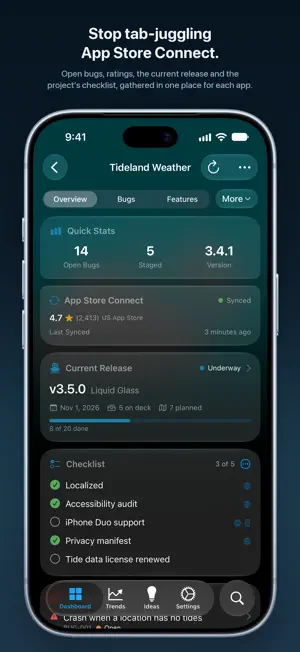
Keelport is the bug tracker, release planner, and App Store Connect command center for indie developers who ship apps in the Apple ecosystem. Built native in SwiftUI for iPhone, iPhone Duo, iPad, Mac, and Apple Vision Pro, Keelport syncs everything across your own devices through iCloud - no accounts, no servers, no subscriptions for a third party to host your roadmap. This is the tool you wish existed when you opened Xcode at 11 p.m. with a TestFlight crash report, a one-star review, and a feature request from a beta tester, and realized your bug tracker was a Notes file and your release plan was in your head. ==== What makes Keelport different ==== MCP INTEGRATION - BUILT IN, NOT BOLTED ON Keelport on Mac ships with a Model Context Protocol (MCP) server with 92 tools covering every part of your dev workflow. Point Claude, Cursor, Claude Code, or any MCP client at it and your AI assistant can file bugs, stage features for the next release, generate changelogs, query App Store reviews, reply to customer feedback, and convert TestFlight crashes into tracked bugs - all from your normal coding session. ONE SEARCH, IN YOUR OWN WORDS Search every project's bugs, features, releases, ideas, reviews and TestFlight feedback. Ask for "1-star reviews this week": Apple Intelligence reads it on device where available, and keywords work everywhere else. APP STORE CONNECT, IMPORTED AUTOMATICALLY Connect with a standard ASC API key and stop tab-juggling between dashboards. Keelport pulls in: Customer reviews: ratings, territory, developer responses, file a bug from any review Sales: daily units, proceeds, territory breakdown Analytics: impressions, page views, crash rate, conversion rate TestFlight beta feedback: screenshots and crash reports with one-tap conversion to bug or feature Performance metrics: launch time, hangs, memory, battery, per version and device Version submission history: every state from Waiting for Review to Ready for Sale Your API key is stored in the iOS Keychain and only ever sent to Apple's official api.appstoreconnect.apple.com endpoint. Never anywhere else. iCLOUD SYNC THAT JUST WORKS File a bug on your iPhone in line at the coffee shop. Fix it on your Mac an hour later - the bug is already there, marked staged for the next release. All powered by Apple's CloudKit through your own private iCloud database. The developer has zero access to your data. ==== Everything else ==== Projects, bugs, features, ideas, releases, comments and attachments Severity, priority, status, tags, platforms, effort estimates Checklists: repeating release steps, and which apps still need each item One-tap Markdown changelogs from staged items Markdown export of every project, for git or archive Widgets in every size: project status, release countdown, staged items, checklists, ratings, reviews, downloads Siri and Shortcuts: ask for your downloads, your rating, or your crash rate, or file a bug by voice Spotlight finds every project, bug, feature, release and idea Available in 11 languages Liquid Glass UI on iOS 26: clean native design down to iOS 18 ==== Privacy first, always ==== Keelport collects nothing. No analytics, no telemetry, no crash reporters, no tracking SDKs, no ads, no third-party data sharing. The developer operates no servers. Your data lives on your devices and in your own iCloud account, period. ==== Made by a working indie ==== Keelport is built by one indie developer who ships apps with these exact problems. Every feature exists because it was needed. Send feedback to [email protected] - every message is read personally.
What’s new
Version 1.8 · Updated October 23, 2026
Keelport 1.8 is ready for iPhone Duo, and brings one search for everything, checklists for every project and release, and steadier scrolling and syncing. iPhone Duo - Unfolded, your projects sit beside the project you have open - Folded, the cover display runs all of Keelport - Search, tabs and each screen's own buttons sit on the vertical bar ONE SEARCH FOR EVERYTHING - Find projects, bugs, features, releases, ideas, App Store reviews and TestFlight feedback across every project from one search - Ask in your own words, such as "1-star reviews this week" or "features on deck", then adjust what Keelport understood - Apple Intelligence reads your request on device where it is available, and a complete keyword search works everywhere else - Siri, Shortcuts and Spotlight can open a search for you - Spotlight now finds every project, bug, feature, release, idea and checklist item, and opens it in Keelport CHECKLISTS - Track items such as "Localized" across every project, and mark each one Done or Not Applicable - Add release steps that repeat on every future release - Settings > Checklists shows which projects still need each item - Siri and Shortcuts can tick off an item, tell you which projects still need it, and say what is left on a project - A new Checklist widget shows what is still to do SHIPSHAPE - Limit a bug or feature to some platforms, and see that limit wherever the item appears - An item thrown overboard or closed leaves its release, and taking an item off deck lets you choose: Back to Planned or Remove from Release - Release progress reads the same everywhere, such as "13 of 20 done" - Every Refresh button spins while its sync is running, however that sync started, and a second tap never starts another - A progress bar on the Dashboard follows each App Store Connect sync, and a long one explains why it is taking a while - App Store Connect syncs are far smoother, with screens refreshing once per app instead of every few seconds - Large sales and analytics reports from App Store Connect are now read in full, so no rows go missing - An icon you pick for a project stays, instead of being replaced by its App Store icon on the next sync - Shortcuts and widgets set to a project keep working after it is merged with a duplicate - Scrolling no longer shakes at the top of a screen - Press and hold acts on the project you pressed - New projects join the bottom of your list, and the order stays put - Icons of Mac App Store apps fill their tile, and ones that are not squircles sit on a soft plate instead of a white square Send feedback to [email protected].
App privacy
The developer, Jeremy Littlewood, reported these privacy practices to Apple.
Data Not Collected
The developer does not collect any data from this app.
Alternatives to Keelport
Looking for apps like Keelport? Here are 6 similar apps on the App Store. The highest rated is Claw Companion (5.0/5), and all 6 are free to download.
-
 githtml - GitHub Doc Reader
-
 Claw Companion
5.0
Claw Companion
5.0
-
 SymbolKit
-
 OnDevice: Local AI Studio
5.0
OnDevice: Local AI Studio
5.0
-
 VisuStruct
-
 Pushword
4.0
Pushword
4.0
| App | Rating | Price | Last updated | Compare |
|---|---|---|---|---|
| Keelport | 5.0 / 5 (1 rating) | Free | October 23, 2026 | |
| githtml - GitHub Doc Reader | – | Free | May 23, 2026 | Compare |
| Claw Companion | 5.0 / 5 (3) | Free | Jul 5, 2026 | Compare |
| SymbolKit | – | Free | May 13, 2026 | Compare |
| OnDevice: Local AI Studio | 5.0 / 5 (1) | Free | Oct 30, 2026 | Compare |
| VisuStruct | – | Free | Oct 23, 2026 | Compare |
| Pushword | 4.0 / 5 (1) | Free | Oct 15, 2026 | Compare |
Compare Keelport with the top alternatives: ratings, updates, ASO score and keyword gaps →