

Smart Cast Mirroring
NGUYEN VAN DINH Utilities iPhoneiPadiPod touch
Smart Cast Mirroring is a free Utilities app for iPhone and iPad by NGUYEN VAN DINH. Rated 5.0/5 from 1 ratings. Requires iOS 16.0. Updated August 28, 2026.
- Rating
- 5.0
- 1 ratings
- Price
- Free
- on the App Store
- Size
- 50 MB
- Age 4+
- Updated
- Aug 28
- 2026 · v1.0.7
Screenshots
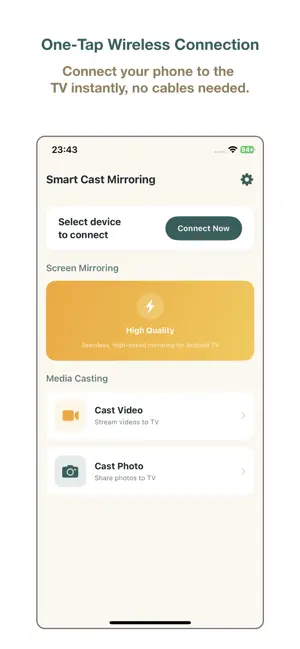
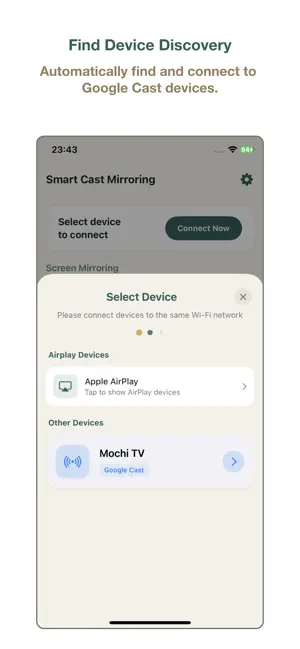


About Smart Cast Mirroring
Smart Cast Mirroring – Seamless Screen Sharing & Media Casting Smart Cast Mirroring provides a reliable way to mirror your iPhone screen and cast media content to compatible smart TVs. Designed for simplicity and performance, this app allows you to enjoy your content on a larger display with just a few taps. Key Features: Screen Mirroring: Mirror your entire device screen to the TV with low latency, perfect for presentations or browsing photos. Media Casting: Cast videos and photos directly from your library to the big screen in high quality. Instant Connection: Quickly discover and connect to available devices on the same Wi-Fi network. Versatile Use: Ideal for home entertainment, business meetings, or educational purposes. How to Use: Ensure both your iPhone and Smart TV are connected to the same Wi-Fi network. Open the app and select your TV from the list of available devices. Start mirroring or select media files to cast to your TV. Subscription Information: - Flexible subscription plans are available: Weekly Subscription (with 3-day free trial), Monthly Subscription, and Annual Subscription. - Payment will be charged to your Apple ID account at confirmation of purchase. - Subscription automatically renews unless auto-renew is turned off at least 24 hours before the end of the current period. - Account will be charged for renewal within 24 hours prior to the end of the current period. - Subscriptions can be managed or canceled in your App Store account settings at any time after purchase. - Any unused portion of a free trial period, if offered, will be forfeited when the user purchases a subscription to that publication, where applicable. * Terms of Use (EULA): https://www.apple.com/legal/internet-services/itunes/dev/stdeula/ * Privacy Policy: https://tinhtx98.github.io/smartcastmirroring.github.io/
What’s new
Version 1.0.7 · Updated August 28, 2026
* Bug fixes and performance improvements
App privacy
The developer, NGUYEN VAN DINH, reported these privacy practices to Apple.
Data Used to Track You
The following data may be used to track you across apps and websites owned by other companies:
- Identifiers: Device ID
- Usage Data: Product Interaction
Data Linked to You
The following data, which may be collected and linked to your identity, may be used for the following purposes:
- Identifiers: Device ID
- Usage Data: Product Interaction
Used for: Third-Party Advertising, Analytics, App Functionality
Data Not Linked to You
The following data, which may be collected but is not linked to your identity, may be used for the following purposes:
- Diagnostics: Crash Data, Performance Data
Used for: Third-Party Advertising, Analytics, App Functionality
Alternatives to Smart Cast Mirroring
Looking for apps like Smart Cast Mirroring? Here are 6 similar apps on the App Store. The highest rated is Screen Mirroring+ ™ (5.0/5), and all 6 are free to download.
-
 Cast to TV + Screen Mirroring
3.3
-
 Screen Mirroring+ ™
5.0
-
 Smart Cast TV: Mirror & View
-
 Miracast Screen Mirroring
5.0
-
 Screen Mirroring for Miracast
4.5
-
 Screen Mirroring・Miracast TV
5.0
| App | Rating | Price | Last updated | Compare |
|---|---|---|---|---|
| Smart Cast Mirroring | 5.0 / 5 (1 rating) | Free | August 28, 2026 | |
| Cast to TV + Screen Mirroring | 3.3 / 5 (3) | Free | Jun 22, 2026 | Compare |
| Screen Mirroring+ ™ | 5.0 / 5 (1) | Free | Jun 25, 2026 | Compare |
| Smart Cast TV: Mirror & View | – | Free | Jun 17, 2026 | Compare |
| Miracast Screen Mirroring | 5.0 / 5 (1) | Free | Jul 13, 2026 | Compare |
| Screen Mirroring for Miracast | 4.5 / 5 (35) | Free | Oct 17, 2026 | Compare |
| Screen Mirroring・Miracast TV | 5.0 / 5 (3) | Free | Aug 14, 2026 | Compare |