

Beacon: Wi-Fi & LAN
David Weisz Utilities iPhoneiPadiPod touchApple Watch
Beacon: Wi-Fi & LAN is a free Utilities app for iPhone and iPad by David Weisz. Requires iOS 26.0. Updated May 2, 2026.
- Price
- Free
- on the App Store
- Size
- 4 MB
- Age 4+
- Updated
- May 2
- 2026 · v1.0.2
Screenshots

About Beacon: Wi-Fi & LAN
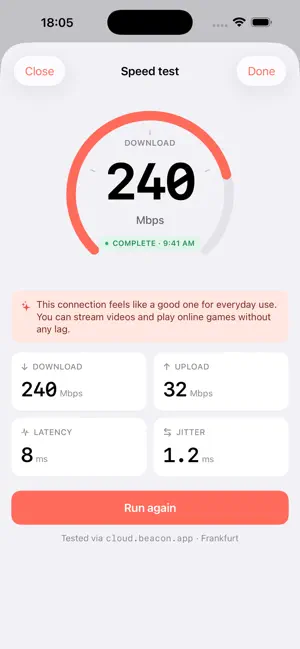
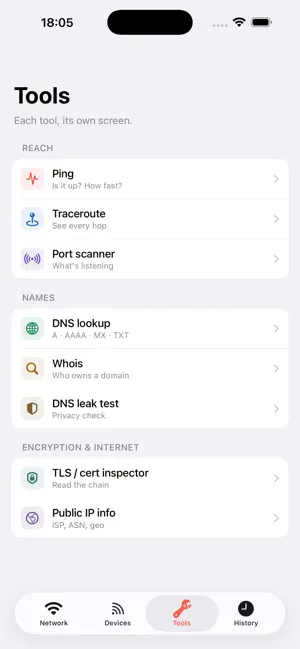
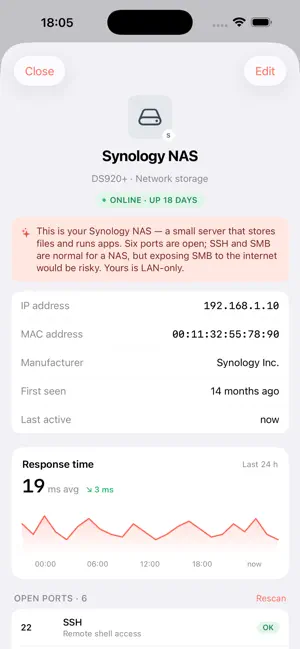
Beacon is a fast, opinionated Wi-Fi analyzer for iPhone, Apple Watch, and Lock Screen. It scans your local network, lists every device, runs the tools network people actually use, and translates the jargon for you in plain English using AI. It is built around three rules: 1. Stay on the phone. Scans, ports, latencies, MAC addresses — none of it ever leaves your device. There are no analytics, no telemetry, no accounts. 2. Show, don't gate. Every tool, every screen, every device is one tap away. No "Pro" tier. No subscription. No locked features. 3. Translate the jargon. The on-device AI explainer (Apple Foundation Models) tells you what an open port is, why a hop is slow, or whether a new device is something to worry about. In one or two sentences. No emojis. WHAT'S INSIDE • Home — live speed, signal, latency, and device count, with an AI summary that reads your network the way a friend who knows networks would. • Devices — every device on your LAN, grouped by role. Fingerprint chips show the device kind plus a manufacturer initial. Pull-to-rescan; new devices show up as a top group, not a badge. • Device detail — identity, response-time graph, open ports with descriptions. The AI calls out which ports are normal for that device kind and which are worth a second look. • Speed test — single-purpose, animated 270° gauge. Result quartet of download, upload, latency, jitter. AI verdict instead of a raw percentile. • Tools — Ping, Traceroute, Port scanner, DNS lookup, Whois, DNS leak test, TLS / cert inspector, Public IP info. Each is its own screen, never a tab inside a tab. • Traceroute — geo-mapped hops with ASN and country. AI summary calls out the slow link by hop number. • History — a timeline of every scan, day-grouped. New and departed devices flagged inline. Compare any two scans side by side. • Apple Watch — devices count is the hero. Network identity, signal, current speed. Tap to open the iPhone app. • Lock Screen widgets — inline, circular, and rectangular. Add one or all three. Tap-through opens the relevant tab. • Home Screen widget — the full hero stat with a coral background. • Privacy — read the actual privacy statement, not a link to legalese, the first time you open Settings. WHAT'S NOT INSIDE No accounts. No subscriptions. No ads. No tracking SDKs. No "free trial". No ML model trained on your data. No background uploads. No share-with-friends nag. Pay once - use forever. REQUIREMENTS iOS 26 or later. Apple Intelligence is required for on-device AI explainers; Beacon falls back to plainspoken static text if it's off. Location permission is required by iOS to read your Wi-Fi network name (SSID); Beacon never records or shares your location.
App privacy
The developer, David Weisz, reported these privacy practices to Apple.
Data Not Collected
The developer does not collect any data from this app.
Alternatives to Beacon: Wi-Fi & LAN
Looking for apps like Beacon: Wi-Fi & LAN? Here are 6 similar apps on the App Store. The highest rated is Wifi Check Utility (5.0/5), and all 6 are free to download.
-
 Wifi Check Utility
5.0
Wifi Check Utility
5.0
-
 Pulse: System Network Monitor
4.6
Pulse: System Network Monitor
4.6
-
 Prism – AI Playground
-
 ShortShot
-
 AudioWeaver: Noise Reducer
4.3
AudioWeaver: Noise Reducer
4.3
-
 Simple Viewer
| App | Rating | Price | Last updated | Compare |
|---|---|---|---|---|
| Beacon: Wi-Fi & LAN | – | Free | May 2, 2026 | |
| Wifi Check Utility | 5.0 / 5 (4) | Free | Apr 9, 2026 | Compare |
| Pulse: System Network Monitor | 4.6 / 5 (7) | Free | Apr 13, 2026 | Compare |
| Prism – AI Playground | – | Free | Apr 30, 2026 | Compare |
| ShortShot | – | Free | May 2, 2026 | Compare |
| AudioWeaver: Noise Reducer | 4.3 / 5 (6) | Free | Oct 5, 2026 | Compare |
| Simple Viewer | – | Free | Jun 18, 2026 | Compare |