

Voce Spesa: Gestione Spese
PAOLO CAPPELLETTI INSERRA Finance iPhoneiPadiPod touch
Voce Spesa: Gestione Spese is a free Finance app for iPhone and iPad by PAOLO CAPPELLETTI INSERRA. Requires iOS 15.1. Updated August 26, 2026.
- Price
- Free
- on the App Store
- Size
- 49 MB
- Age 4+
- Updated
- Aug 26
- 2026 · v1.0.8
Screenshots


About Voce Spesa: Gestione Spese
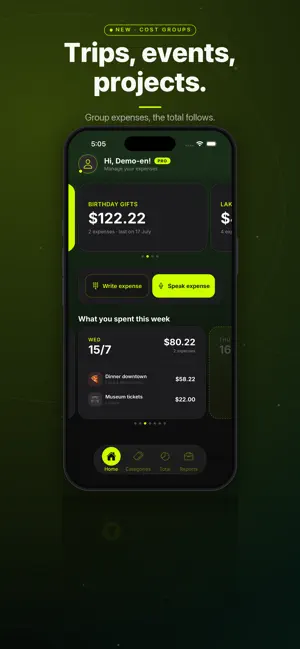
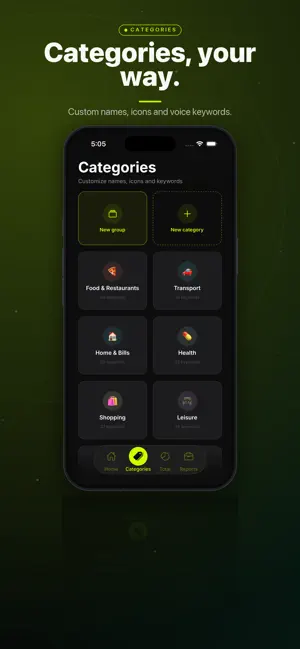
How much did you spend today? With Voce Spesa you'll know in 3 seconds. Talk to your iPhone: "I spent 35 euros at the mechanic". VoceSpesa transcribes, extracts the amount and files the expense in the right category — all automatically. No more spreadsheets, no typing. Just your voice. - - - HOW IT WORKS 1. Tap the microphone 2. Speak naturally (e.g. "Spent 12 euros for coffee and a croissant") 3. The app detects amount, description and category 4. Confirm with one tap. Done. You can also type expenses manually. - - - KEY FEATURES SMART VOICE INPUT Native iOS speech recognition in English and Italian. Speak naturally: VoceSpesa understands numbers as digits or words ("thirty-five euros" = €35). Automatic classification into 10 categories, even in the free version. COST GROUPS (new) Group expenses around what really matters: a trip, a move, an event, a project. Create a group and assign expenses with one tap as you log them. Each group keeps its own total, even when the event spans several months, and your expenses always stay part of your overall total: a group is a view, not a separate wallet. When the event ends, archive the group without losing a single expense. INTERACTIVE DASHBOARD Ring chart of your spending by category. Weekly, monthly and yearly filters. See where your money goes at a glance. WEEKLY REPORTS Every week you get an automatic summary: total spent, daily average, comparison with the previous week, top categories. Your spending, calculated for you — no spreadsheet required. YOUR DATA IS YOURS Your expenses are stored locally on your iPhone, not on third-party servers. Cloud backup (with Pro) is optional: turn it on only if you want your expenses safe and ready when you switch phones. SMART CATEGORIES 10 built-in categories designed for everyday life: Food & Restaurants, Transport, Home & Bills, Health, Shopping, Leisure, Education, Work, Gifts and Other. With Pro you can create unlimited custom categories. - - - FREE VERSION - 30 expenses per month - 5 categories + Other - Automatic expense categorization - Dashboard with monthly filter - Basic weekly reports VOCESPESA PRO - Unlimited expenses - Cost groups for trips, events and projects - All categories + custom categories - Dashboard with all filters (week, month, year) - Detailed reports - Budgets per category - PDF and CSV export - Cloud backup - - - PERFECT IF YOU WANT TO - Track daily expenses without wasting time - Keep an eye on spending for trips, events and projects - Understand where your money goes every month - Manage personal and family finances with ease - Start saving without spreadsheets - - - Download VoceSpesa and take control of your spending. Just say it. Subscriptions: VoceSpesa Pro Monthly: €3.99/month VoceSpesa Pro Yearly: €29.99/year (save 37%) Payment will be charged to your iTunes account at confirmation of purchase. The subscription renews automatically unless auto-renew is turned off at least 24 hours before the end of the current period. Your account will be charged for renewal within 24 hours prior to the end of the current period. You can manage and turn off auto-renewal in your iTunes account settings after purchase. Terms of Use (EULA): https://www.apple.com/legal/internet-services/itunes/dev/stdeula/
What’s new
Version 1.0.8 · Updated August 26, 2026
What's new • A short intro the first time you open the app: how it works, in under a minute. • A help centre, "How VoceSpesa works", in the profile menu: seven short chapters, illustrated with the app's real screens. • An interactive guide for your first expense, plus tips that appear right where they're needed. Fixes • Amounts typed with a comma are now correct: "5.90" written as "5,90" was saved as 5, dropping the cents. • If you already use VoceSpesa, the intro won't show up again. • Profile and guide refinements.
App privacy
The developer, PAOLO CAPPELLETTI INSERRA, reported these privacy practices to Apple.
Data Linked to You
The following data, which may be collected and linked to your identity, may be used for the following purposes:
- Contact Info: Email Address
- Identifiers: Device ID
- Usage Data: Product Interaction
Used for: App Functionality
Alternatives to Voce Spesa: Gestione Spese
Looking for apps like Voce Spesa: Gestione Spese? Here are 6 similar apps on the App Store.
-
 EasyMoney
-
 Lupi: Bills & Subscriptions
-
 Family Budget: Spend & Save
-
 ElleZen
-
 FiscalFiles: Italian Tax & VAT
-
 Spendly PRO
| App | Rating | Price | Last updated | Compare |
|---|---|---|---|---|
| Voce Spesa: Gestione Spese | – | Free | August 26, 2026 | |
| EasyMoney | – | Free | Aug 30, 2026 | Compare |
| Lupi: Bills & Subscriptions | – | Free | May 28, 2026 | Compare |
| Family Budget: Spend & Save | – | Free | Sep 2, 2026 | Compare |
| ElleZen | – | Free | Sep 30, 2026 | Compare |
| FiscalFiles: Italian Tax & VAT | – | Free | Aug 22, 2026 | Compare |
| Spendly PRO | – | Free | Dec 4, 2025 | Compare |