

QuickMark: Markdown Editor
Doan Nguyen Productivity iPhoneiPadiPod touchMac
QuickMark: Markdown Editor is a free Productivity app for iPhone and iPad by Doan Nguyen. Requires iOS 17.0. Updated October 6, 2026.
- Price
- Free
- on the App Store
- Size
- 12 MB
- Age 4+
- Updated
- Oct 6
- 2026 · v3.3.21
Screenshots


About QuickMark: Markdown Editor
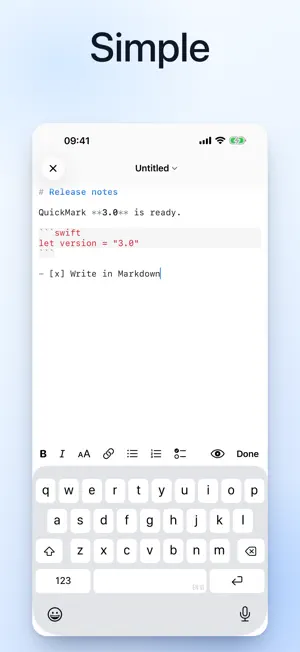
A lightweight Markdown app that opens fast and stays out of your way. Tap any .md file to read it rendered, with code, math and diagrams exactly right. Edit it, publish it as a web link, or export it when you need to. EVERYTHING BELOW IS FREE - Beautiful live rendering - Mermaid diagrams and KaTeX math appear inline as you type, no plugins, no setup - Write and preview with one tap; on iPad, work side by side with synced split view - 36 code themes plus 6 reading themes: Light, Dark, Notion, Essay, Terminal and more - Syntax highlighting for 30+ languages, find-in-page, one-tap copy on code blocks - Tabs are free and unlimited - keep every note open and switch in a tap QUICKMARK PRO - ONE-TIME, NOT A SUBSCRIPTION - Export your document to PDF, HTML, DOCX, EPUB, PNG, or Rich Text (free: 10 exports a month per device) - Publish to Web - turn any document into a clean shareable link at quickmarkmd.com (free: up to 3 live pages, links expire 30 days after publishing) - Pro removes every limit: unlimited exports, unlimited pages, links that never expire One one-time purchase of $9.99 unlocks Pro on all your Apple devices - Mac, iPhone and iPad. No subscription, ever. PRIVACY YOU CAN TRUST Your documents stay on your device. Reading and editing never upload a thing. Anonymous crash reports help us fix bugs - never your content. Nothing leaves your device unless you choose to publish it. PERFECT FOR - Writing notes, READMEs, and technical docs on the go - Reading Markdown with code, math, and diagrams that look right - Sharing a document as a clean web link in one tap - Exporting polished PDFs and more from your phone or iPad REQUIREMENTS iOS and iPadOS 17 or later.
What’s new
Version 3.3.21 · Updated October 6, 2026
Favorites. Star the documents you keep coming back to and they are listed under Favorites, next to Recent. Long-press a recent file to add it, or open the … menu in a document and choose Favorites, where you can also jump to your other favorites without leaving the page. You can rename a favorite, and each one shows where it lives. A file that can't be found stays in the list until you remove it.
App privacy
The developer, Doan Nguyen, reported these privacy practices to Apple.
Data Linked to You
The following data, which may be collected and linked to your identity, may be used for the following purposes:
- Contact Info: Email Address
- User Content: Other User Content
- Identifiers: User ID
Used for: App Functionality
Data Not Linked to You
The following data, which may be collected but is not linked to your identity, may be used for the following purposes:
- Usage Data: Product Interaction
- Diagnostics: Crash Data, Performance Data, Other Diagnostic Data
Used for: Analytics, App Functionality
Alternatives to QuickMark: Markdown Editor
Looking for apps like QuickMark: Markdown Editor? Here are 6 similar apps on the App Store. The highest rated is smrtkbd (5.0/5), and all 6 are free to download.
-
 Markd.ly - Markdown Editor
-
 smrtkbd
5.0
smrtkbd
5.0
-
 mdReview - Markdown Editor
-
 Meow & Purr
-
 Local PDF Toolbox
-
 HipMark - Markdown Editor
| App | Rating | Price | Last updated | Compare |
|---|---|---|---|---|
| QuickMark: Markdown Editor | – | Free | October 6, 2026 | |
| Markd.ly - Markdown Editor | – | Free | Oct 7, 2026 | Compare |
| smrtkbd | 5.0 / 5 (1) | Free | Oct 7, 2026 | Compare |
| mdReview - Markdown Editor | – | Free | Sep 22, 2026 | Compare |
| Meow & Purr | – | Free | Jun 2, 2026 | Compare |
| Local PDF Toolbox | – | Free | Aug 5, 2026 | Compare |
| HipMark - Markdown Editor | – | Free | Jul 2, 2026 | Compare |