

Kinship Vault: Docs & Photos
Abhishek Mishra Productivity iPhoneiPadiPod touchMac
Kinship Vault: Docs & Photos is a free Productivity app for iPhone and iPad by Abhishek Mishra. Rated 5.0/5 from 2 ratings. Requires iOS 17.0.
- Rating
- 5.0
- 2 ratings
- Price
- Free
- on the App Store
- Size
- 22 MB
- Age 4+
- Updated
- Sep 22
- 2026 · v3.0.5
Screenshots

About Kinship Vault: Docs & Photos
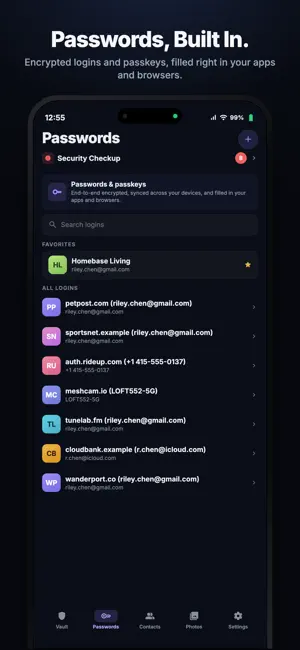
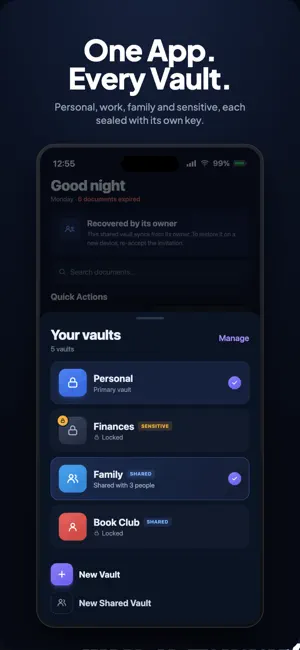
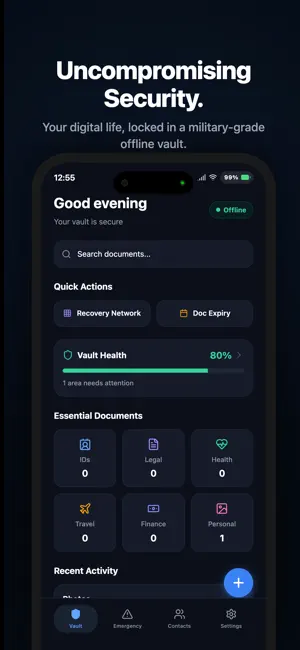
Kinship Vault Your private place for the documents, photos, and passwords that matter most. Keep personal, work, family, or project information in separate vaults, each with its own lock. Store IDs, passports, cards, documents, photos, passwords, passkeys, and 2FA codes in one encrypted vault system built around privacy and control. Now with passwords, multi-vaults, and secure sharing. • Separate your life Create separate vaults for personal, work, family, or other parts of your life. Each vault has its own lock. • Share only what you choose Share a specific vault with your partner, family, or team without exposing your other vaults. Invite people with Face ID or a QR code. Remove access whenever you choose. • Keep your passwords with everything else Store logins, passkeys, and 2FA codes alongside your documents. Autofill passwords across apps and websites, generate strong passwords, identify weak or breached passwords, and share access with people you trust. BUILT FOR PRIVACY Your encryption keys are generated and protected on your device using secure hardware. They are not stored on our servers or database, and documents are encrypted before they leave your device. Recovery is designed around your choices, whether you lose your phone, switch devices, or need to give someone trusted access later. WHAT YOU CAN DO • Scan and organize documents Scan or import passports, IDs, tax forms, visas, health records, and 100+ other document types. On-device OCR extracts useful information. Everything is processed locally. • Never miss an expiration Get automatic reminders 90, 30, 7, and 1 day before important documents expire. • Recover your vault your way Choose from a passphrase, trusted recovery circle using cryptographic key shares, or an optional time-based recovery mechanism. • Hand your records to someone you trust Choose what to pass on and name one trustee. If you stop checking in, they can unlock a read-only copy of what you chose. Everything stays end-to-end encrypted, and only their device can open it. • Protect sensitive information Sensitive documents can remain local by default, require biometric authentication, and are excluded from unencrypted exports. • See what happened A tamper-evident activity log records important actions such as views, edits, and recovery events. • Emergency protection Use biometric protection, duress PIN support, and an emergency screen fallback after repeated failed attempts. • Keep encrypted backups Create encrypted backups in iCloud or export them manually. Data is encrypted on-device before backup, and your backup encryption key is never sent to iCloud. • Keep emergency information ready Store emergency contacts, allergies, blood type, and travel ID references for quick access. WHY KINSHIP VAULT? Most vaults are built around a single account and collection of data. Kinship Vault lets you separate your information and decide exactly what you share. • Separate vaults with independent locks • Share individual vaults without exposing the rest • On-device by default • No server-side access to documents or encryption keys • On-device OCR and structured document extraction • Encrypted backups you control PRICING Free Passwords, passkeys, and 2FA codes with AutoFill, unlimited. Up to 10 documents across every category. Encrypted backups to iCloud or a file, plus every recovery option. Solo Everything in Free, plus unlimited documents, separate vaults with individual locks, Sensitive vaults, custom record types, and expiry reminders. Available monthly, yearly, or as a lifetime purchase. Shared Everything in Solo, plus vaults you can share with your partner, family, or team. Share passwords and documents while keeping everything encrypted and private. Available monthly, yearly, or as a lifetime purchase. Your documents. Your passwords. Your people. Your control. Terms of Use (EULA): https://www.apple.com/legal/internet-services/itunes/dev/stdeula/
What’s new
Version 3.0.5 · Updated September 22, 2026
Moving your passwords from another password manager app is now easier. • Transfer passwords, passkeys, verification codes, notes, Wi-Fi networks, SSH keys and more directly into Kinship Vault. • Review everything before importing, including exactly how many items will be added. • Apple Passwords folders become login folders in Kinship Vault. • Cards, passports and licences are clearly separated so you know what still needs to be added. Also improved syncing: • Fixed scrambled data that could appear after moving to a new iPhone. • Document tags now stay intact across devices. • Sync can repair affected data automatically. • Restoring a backup now updates your iCloud copy with the repaired data.
App privacy
The developer, Abhishek Mishra, reported these privacy practices to Apple.
Data Not Collected
The developer does not collect any data from this app.
Alternatives to Kinship Vault: Docs & Photos
Looking for apps like Kinship Vault: Docs & Photos? Here are 6 similar apps on the App Store. The highest rated is Clipboard AI - Paste Keyboard (5.0/5), and all 6 are free to download.
-
 Kinty: Contact Reminders
-
 Asterex: Password Manager
4.8
Asterex: Password Manager
4.8
-
 Teleprompter Pro: Read Script
-
 DoneAgo - Last Time Tracker
4.8
DoneAgo - Last Time Tracker
4.8
-
 Clipboard AI - Paste Keyboard
5.0
Clipboard AI - Paste Keyboard
5.0
-
 Contractor Invoice Maker: Invo
4.0
Contractor Invoice Maker: Invo
4.0
| App | Rating | Price | Last updated | Compare |
|---|---|---|---|---|
| Kinship Vault: Docs & Photos | 5.0 / 5 (2 ratings) | Free | September 22, 2026 | |
| Kinty: Contact Reminders | – | Free | Sep 21, 2026 | Compare |
| Asterex: Password Manager | 4.8 / 5 (6) | Free | Oct 7, 2026 | Compare |
| Teleprompter Pro: Read Script | – | Free | Sep 4, 2026 | Compare |
| DoneAgo - Last Time Tracker | 4.8 / 5 (5) | Free | Oct 6, 2026 | Compare |
| Clipboard AI - Paste Keyboard | 5.0 / 5 (28) | Free | Sep 19, 2026 | Compare |
| Contractor Invoice Maker: Invo | 4.0 / 5 (1) | Free | Apr 20, 2026 | Compare |