

SplitEasy Bill Splitter
MUHAMMAD ZAID TAUFIQ YASYAF Finance iPhoneiPadiPod touch
SplitEasy Bill Splitter is a free Finance app for iPhone and iPad by MUHAMMAD ZAID TAUFIQ YASYAF. Requires iOS 15.5. Updated October 22, 2026.
- Price
- Free
- on the App Store
- Size
- 70 MB
- Age 4+
- Updated
- Oct 22
- 2026 · v1.2.2
Screenshots


About SplitEasy Bill Splitter
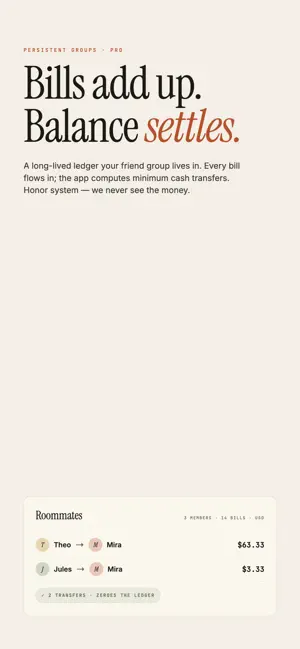
SPLITEASY — WHO PAID WHAT, EXACTLY? Snap the receipt. Tap who had what. SplitEasy does the math — tax, tip, and all the awkward bits — so dinner with friends ends with a clean number, not a calculator app. HOW IT WORKS 1. Add who's at the table. 2. Snap the receipt or type it in by hand. 3. Tap each item to assign people. 4. Send each person their share with one tap. FEATURES • Quick scan: on-device OCR pulls line items, qty and prices. • Multi-page bills: snap a long restaurant ticket as 2 photos (Pro), or unlimited pages plus PDF receipts (Pro+) for hotel folios, ride-app trips, food-delivery orders and emailed invoices. • Per-item assignment: one item to one person, a few people, or the whole table. • Proportional tax & tip: split by each person's share — not 4-way equal that punishes the friend who only had a salad. • Receipt-match check: per-person totals always sum to the receipt. • Persistent groups with running balance: roommates, trips, weekly poker. Bills accumulate across the group, the app computes minimum cash transfers, "Settle up with Mira" zeroes the balance. Honor system — we never see the money. • Trip mode with manual FX: log bills in any currency on a multi-day trip; you set the exchange rate once per currency pair and we convert the whole trip total to your home currency. • Recurring splits: rent shared 4 ways, Netflix shared 3 ways, gym membership. New bill auto-generates on schedule. • Saved payment methods: store your Gopay, PayPal, bank handles once. "Send Mira her share" pre-fills WhatsApp / iMessage with the amount and your payment options. Mark each share paid as it lands. • Monthly spending insights (Pro+): per-group category breakdown — food, lodging, transport, utilities — across the whole month. • Share-to-SplitEasy: forward a receipt photo from WhatsApp, Photos, or Telegram straight into the scan flow. • 10 currencies: USD, EUR, GBP, JPY, AUD, CAD, KRW, INR, THB, IDR. PRICING • Free — for dinners with friends. Up to 4 people per bill, one photo per bill, unlimited quick scans, 1 persistent group, 1 trip, 1 recurring split. • Pro — $1.99 / month or $14.99 / year. Unlimited people, up to 2 photos per bill, unlimited groups with running balance, unlimited multi-currency trips, up to 5 recurring splits, cloud sync of bills and groups, saved payment methods (kept on this device), saved-people groups, bill history, receipt photo archive, CSV / PDF export. • Pro+ — $4.99 / month or $39.99 / year. Everything in Pro plus unlimited photos per bill, PDF receipts, unlimited recurring splits and monthly spending insights per group. PRIVACY We don't run analytics or crash-reporting SDKs in the app, and we don't sell your data. Quick scan runs on your phone. On Pro, receipt photos are archived automatically to our cloud storage in Jakarta and are deleted when you delete your account. If you choose to send a photo with scan feedback, it is stored there too. Full details: https://spliteasy.uncle-z.com/privacy.html Subscription auto-renews unless cancelled at least 24 hours before the end of the period. Manage in your App Store account. Privacy: https://spliteasy.uncle-z.com/privacy.html Terms: https://spliteasy.uncle-z.com/terms.html
What’s new
Version 1.2.2 · Updated October 22, 2026
Sign-in is now by email. • Sign in with your email address and a one-time code. WhatsApp sign-in is gone. • Quick scan parser fixes. • Per-person totals now add up exactly to the bill in IDR and JPY. • Your saved payment handles (Gopay, PayPal, bank) stay on your phone and are no longer synced. • AI scan is no longer in the app. Quick scan and manual entry work as before.
App privacy
The developer, MUHAMMAD ZAID TAUFIQ YASYAF, reported these privacy practices to Apple.
Data Linked to You
The following data, which may be collected and linked to your identity, may be used for the following purposes:
- Purchases: Purchase History
- Financial Info: Payment Info
- Contact Info: Email Address, Phone Number
- User Content: Photos or Videos, Customer Support, Other User Content
- Identifiers: User ID
Used for: App Functionality
Data Not Linked to You
The following data, which may be collected but is not linked to your identity, may be used for the following purposes:
- Identifiers: Device ID
Used for: App Functionality
Alternatives to SplitEasy Bill Splitter
Looking for apps like SplitEasy Bill Splitter? Here are 6 similar apps on the App Store. The highest rated is MeetFinn (5.0/5), and all 6 are free to download.
-
 SplitEasy: Split Bills & Debts
-
 MeetFinn
5.0
-
 SplitSnap – AI Bill Splitter
-
 SplitEasy – Expense Splitter
-
 iLoveBills: Bill Tracker
-
 Spliiit - Split Expenses
| App | Rating | Price | Last updated | Compare |
|---|---|---|---|---|
| SplitEasy Bill Splitter | – | Free | October 22, 2026 | |
| SplitEasy: Split Bills & Debts | – | Free | Jan 13, 2026 | Compare |
| MeetFinn | 5.0 / 5 (2) | Free | Sep 30, 2026 | Compare |
| SplitSnap – AI Bill Splitter | – | Free | Oct 15, 2026 | Compare |
| SplitEasy – Expense Splitter | – | Free | Oct 25, 2026 | Compare |
| iLoveBills: Bill Tracker | – | Free | Oct 20, 2026 | Compare |
| Spliiit - Split Expenses | – | Free | Sep 29, 2026 | Compare |