

Capture: AI Assistant
Elena Rodina Productivity iPhoneiPadiPod touch
Capture: AI Assistant is a free Productivity app for iPhone and iPad by Elena Rodina. Rated 5.0/5 from 1 ratings. Requires iOS 26.0. Updated August 28, 2026.
- Rating
- 5.0
- 1 ratings
- Price
- Free
- on the App Store
- Size
- 176 MB
- Age 4+
- Updated
- Aug 28
- 2026 · v1.6.9
Screenshots

About Capture: AI Assistant
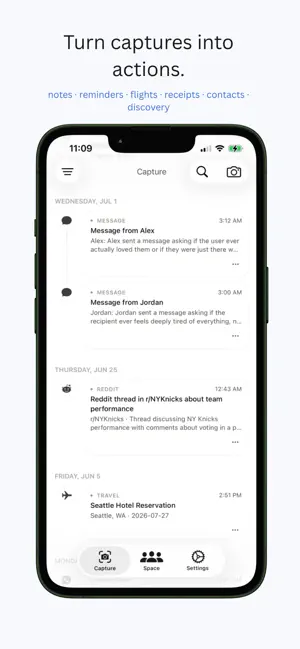
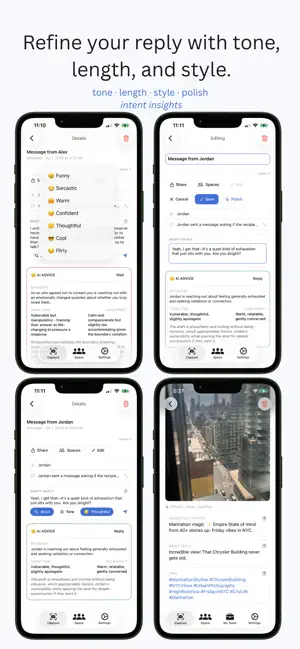
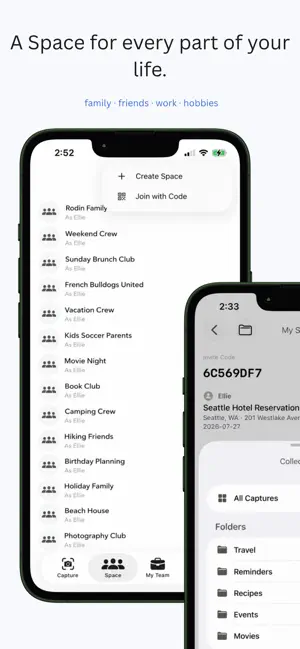
Capture is an AI-powered screenshot assistant that turns anything you capture into the right action automatically. Take a screenshot, use your camera, or share from any app. Capture understands what you've captured and instantly routes it into the right workflow. Try Capture free with 3 captures and experience it in seconds. WHAT CAPTURE DOES — Receipts → organize merchant, total, and purchase date — Business cards → save directly to Contacts — Flight confirmations → add to Google Calendar — Messages → generate AI-powered replies ready for iMessage — Emails → create Gmail drafts automatically — Social media → generate replies for X (Twitter), Instagram, WhatsApp, Telegram, TikTok, Reddit, and LinkedIn — Products → search instantly on Amazon — Restaurants → reserve a table on OpenTable — Movies & Shows → instantly find where to watch — Photos → generate AI captions, hashtags, tags, and draft replies (Pro) AI THAT LEARNS YOU — Polish any reply with one tap — Learn your writing style from previous replies — Choose the length, tone, and personality of every response SHARED SPACES Create Spaces with family, friends, or teammates. Share an invite code and keep everything in sync in real time. — Share captures instantly — Comment, react, and send voice messages — Post directly to your Space — Organize captures with Collections — Assign captures to teammates CAPTURE UNLIMITED ($9.99 one-time) — Unlimited captures forever — Access to every destination — Early adopter pricing (price increases in future versions) CAPTURE PRO ($6.99/month) — Everything in Unlimited — Notion integration for your workspace — Secure screenshot storage with original images — Photo destination with AI captions and tags — Early access to upcoming integrations CAPTURE TEAM ($8.99/user/month) — Everything in Pro — Shared team workspace — Slack, Asana, Jira, Trello, and Linear integrations — Work tab with AI-generated reply drafts — Invite teammates by email — Team notifications for assignments and comments Terms of Use: https://www.apple.com/legal/internet-services/itunes/dev/stdeula/
What’s new
Version 1.6.9 · Updated August 28, 2026
Capture camera now has focus and zoom Capture History view now lets you create a card for a draft/note Fixed integrations into a separate sheet Photo detection — capture any image, get AI caption, tags and draft reply (Pro) Amazon Shopping — capture any product, search on Amazon instantly Restaurant — capture any restaurant, reserve on OpenTable Streaming — capture any movie/show, find where to watch Polish with AI — improve any draft reply or note with one tap Consistent action buttons across all cards (Share, Spaces, platform actions) Gmail section redesigned Calendar section redesigned Filter sheet redesigned (native iOS style) Photo card in History shows full image Photo tags with copy button Direct posts in Spaces Separate Length, Tone, and Character reply buttons Team notifications AI learns your writing style Widget fixed (home + lock screen) Bug fixes throughout the app UI/UX improvements across all screens
App privacy
The developer, Elena Rodina, reported these privacy practices to Apple.
Data Not Collected
The developer does not collect any data from this app.
Alternatives to Capture: AI Assistant
Looking for apps like Capture: AI Assistant? Here are 6 similar apps on the App Store. The highest rated is SnapAction (5.0/5), and 5 of the 6 are free to download.
-
 Shotbox: Screenshot Actions
-
 SnapAction
5.0
SnapAction
5.0
-
 SnapAction AI
-
 ScreenClip AI Notes
-
 AGENTS.inc
-
 Cloud Snippets - Mobile
4.0
Cloud Snippets - Mobile
4.0
| App | Rating | Price | Last updated | Compare |
|---|---|---|---|---|
| Capture: AI Assistant | 5.0 / 5 (1 rating) | Free | August 28, 2026 | |
| Shotbox: Screenshot Actions | – | Free | Sep 10, 2026 | Compare |
| SnapAction | 5.0 / 5 (1) | Free | Jun 7, 2026 | Compare |
| SnapAction AI | – | Free | Mar 24, 2026 | Compare |
| ScreenClip AI Notes | – | Free | Jun 3, 2026 | Compare |
| AGENTS.inc | – | Free | Aug 30, 2026 | Compare |
| Cloud Snippets - Mobile | 4.0 / 5 (1) | 2.99 USD | Mar 31, 2026 | Compare |