

SnapTask - Quick Task Capture
hideyuki hori Productivity iPhoneiPadiPod touch
SnapTask - Quick Task Capture is a free Productivity app for iPhone and iPad by hideyuki hori. Requires iOS 15.1. Updated May 20, 2026.
- Price
- Free
- on the App Store
- Size
- 57 MB
- Age 4+
- Updated
- May 20
- 2026 · v1.0.1
Screenshots
About SnapTask - Quick Task Capture
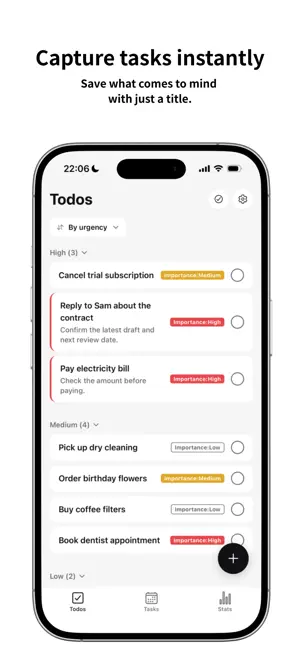
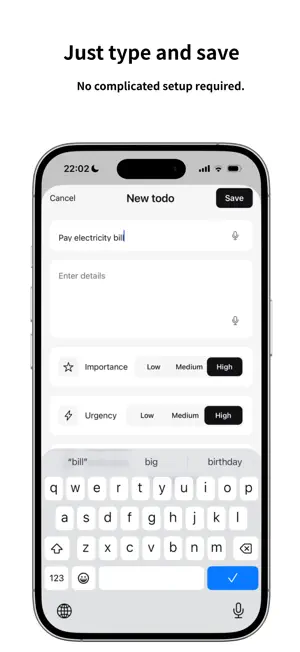
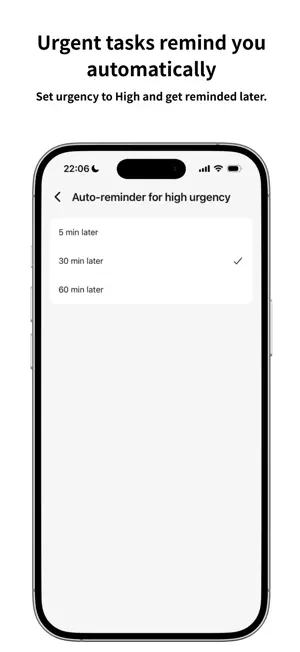
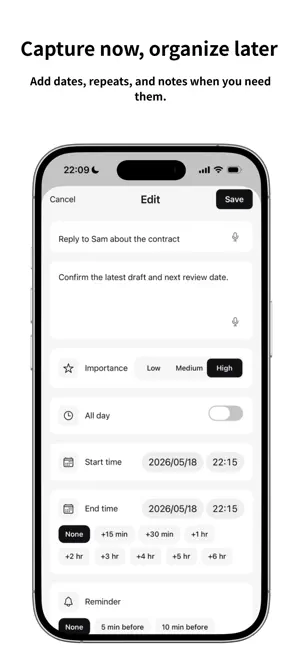
Quickly save tasks as soon as they come to mind. If something is urgent, SnapTask can remind you automatically. You can add due dates, repeats, and notes later, and organize your ideas into actionable tasks. SnapTask is a simple task management app for capturing things you do not want to forget, even when you do not have time to organize them right away. ■ Key Features ▼ Save with just a title Open the app and start typing right away. Enter a title, tap Save, and you are done. You can add details such as due dates, repeats, and notes later when you need them. SnapTask is designed to help you capture first and organize later. ▼ Automatic reminders for urgent tasks When you set urgency to “High,” SnapTask automatically sends you a reminder 30 minutes after registration. You can also change the reminder timing to 5 minutes, 30 minutes, or 1 hour. It helps reduce the burden of remembering everything by yourself. ▼ Capture first, organize later First, save your idea as a simple “to-do.” When needed, add a due date, time, or repeat setting to turn it into a scheduled task. Tasks are displayed in a timeline, so you can easily see what you need to do for the day. ▼ Voice input support Use the microphone button in the title or notes field to enter text by voice. Even when your hands are full, you can quickly capture what comes to mind. ▼ Calm black-and-white design SnapTask uses a clean, minimal black-and-white design so you can focus on input. Dark mode is also supported. ■ What You Can Do with SnapTask Pro The free plan includes SnapTask’s core experience: quick title-based capture and automatic reminders for high-urgency items. SnapTask Pro is an optional upgrade for users who want more flexibility and customization. ・Set up to 3 reminders per task (free plan: 1 reminder) ・Display multiple calendars at the same time ・Use advanced repeat settings, including monthly, custom intervals, and yearly repeats ・Pin important items to the top of your list ・Add more color themes ・Attach up to 3 images per task ・View detailed statistics to track your progress ■ Recommended For ・People who have tried task management apps but found them too complicated ・People who often forget small things that come to mind ・People who want to manage work, errands, and household tasks in one place ・People managing multiple projects ・People who prefer simple, minimal app designs ■ Privacy Your data is stored securely and separated by user account. No one other than you can access your data. We do not display ads or sell your data to third parties. For more details, please see our Privacy Policy. ■ Subscription SnapTask Pro is an auto-renewing subscription. ・Plan: SnapTask Pro Monthly Plan / SnapTask Pro Yearly Plan ・Duration and price: Shown on the App Store purchase screen ・Payment: Charged to your Apple ID at confirmation of purchase ・Auto-renewal: The subscription automatically renews unless canceled at least 24 hours before the end of the current period ・Cancellation: You can cancel anytime from iPhone Settings > Apple ID > Subscriptions. You can continue using Pro features until the end of the current subscription period ・Terms of Use (EULA): https://snaptask.no9.app/en/terms/ ・Privacy Policy: https://snaptask.no9.app/en/privacy/ ■ Contact We welcome your feedback and requests through the form below. Your feedback helps us keep improving SnapTask and reduce the small frictions in everyday task management. https://docs.google.com/forms/d/1H8vTwfJnVTEqd-auq3d5Io0Xwkb46NZAYSUbYixY0Js/preview
What’s new
Version 1.0.1 · Updated May 20, 2026
- Added new small widgets for Todos and Tasks. - You can now place a dedicated Todos widget or a dedicated Tasks widget on your Home Screen. - The combined Todos + Tasks widget is now available as a medium widget only.
App privacy
The developer, hideyuki hori, reported these privacy practices to Apple.
Data Linked to You
The following data, which may be collected and linked to your identity, may be used for the following purposes:
- Purchases: Purchase History
- Contact Info: Email Address
- User Content: Photos or Videos, Other User Content
- Identifiers: User ID
- Other Data: Other Data Types
Used for: App Functionality
Alternatives to SnapTask - Quick Task Capture
Looking for apps like SnapTask - Quick Task Capture? Here are 6 similar apps on the App Store. The highest rated is Snap N Do: Photo to Tasks AI (5.0/5), and all 6 are free to download.




| App | Rating | Price | Last updated | Compare |
|---|---|---|---|---|
| SnapTask - Quick Task Capture | – | Free | May 20, 2026 | |
| SnapTask+ | – | Free | Apr 25, 2026 | Compare |
| Snap N Do: Photo to Tasks AI | 5.0 / 5 (3) | Free | Apr 3, 2026 | Compare |
| Bump Task | 1.0 / 5 (1) | Free | Jan 2, 2026 | Compare |
| SingleVue | 5.0 / 5 (3) | Free | Jun 24, 2026 | Compare |
| PowerNspection | 5.0 / 5 (1) | Free | Jul 28, 2026 | Compare |
| B&W To-Do | – | Free | Oct 3, 2026 | Compare |