

BIKECOMM
Open Road Solutions, Inc. Utilities iPhoneiPadiPod touch
BIKECOMM is a free Utilities app for iPhone and iPad by Open Road Solutions, Inc. Requires iOS 16.6. Updated September 24, 2026.
- Price
- Free
- on the App Store
- Size
- 61 MB
- Age 4+
- Updated
- Sep 24
- 2026 · v2.0.1
Screenshots
About BIKECOMM
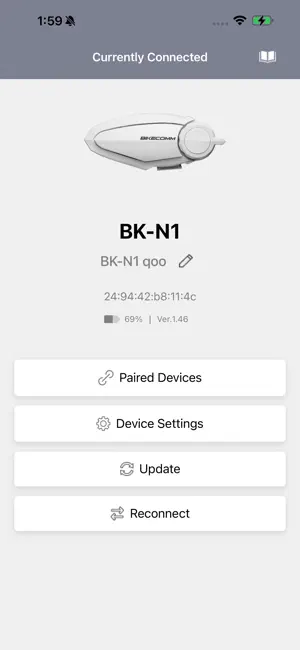
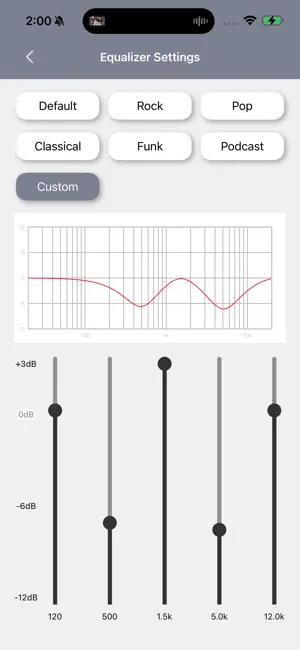
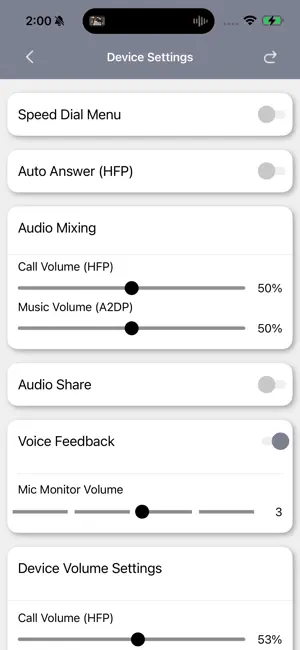
BIKECOMM App is a dedicated smartphone application compatible with the BIKECOMM BK Series Bluetooth headsets (BK-N1 and later models). With this app, you can easily operate and manage various functions of your Bluetooth headset directly from your smartphone. ## Main Features ### 1. Firmware Update You can easily update the firmware of your Bluetooth headset using your smartphone. By keeping the device updated with the latest software, you can smoothly add new features and fix bugs. Compared to traditional updates using a computer or dedicated equipment, this method makes it much easier to keep your headset up to date. ### 2. Settings Configuration You can intuitively change various settings on your smartphone screen, including dial menus and audio mixing options. Detailed settings can be adjusted clearly and easily. You can also disable unnecessary functions to reduce operation mistakes, making the app user-friendly even for first-time users. ### 3. Sound Adjustment (Equalizer) Freely customize the equalizer settings to match your preferred sound quality. Multiple preset profiles are also available, allowing you to switch settings according to your preferences. ### 4. Pairing List Displays a list of paired BIKECOMM Bluetooth headsets (excluding Bluetooth headsets from other manufacturers). You can connect intercom calls according to the order shown in the list. Riding in this order helps achieve ideal communication conditions and improved connection stability. ### 5. Battery Level Display Check the remaining battery level of your Bluetooth headset directly from your smartphone. You can monitor the battery level before or during your ride to help prevent unexpected battery depletion. ### 6. User Support Manual Access the user manual and frequently asked questions directly within the app. If you encounter any issues, support information is always available on your smartphone for added peace of mind. ## Compatible Models This application is compatible with BIKECOMM BK Series Bluetooth headsets, BK-N1 and later models. *Not compatible with BK-S1 / BK-S1+ / BK-T1 / BK-S2 / BK-T2.* ## How to Use 1. Install the “BIKECOMM App” on your smartphone. 2. Turn on the Bluetooth headset and pair it with your smartphone. 3. Launch the app, and it will automatically connect to the Bluetooth headset. 4. Once connected, you can perform firmware updates, change settings, adjust the equalizer, and more. The BIKECOMM App is a dedicated tool designed to greatly enhance the convenience of BIKECOMM BK Series Bluetooth headsets. With just your smartphone, you can easily manage updates, customize settings, and adjust sound quality smoothly and efficiently. Use this essential app to support a safer and more comfortable riding experience.
What’s new
Version 2.0.1 · Updated September 24, 2026
Fixed some bugs Added device functionality
App privacy
The developer, Open Road Solutions, Inc., reported these privacy practices to Apple.
Data Not Collected
The developer does not collect any data from this app.
Alternatives to BIKECOMM
Looking for apps like BIKECOMM? Here are 6 similar apps on the App Store.


| App | Rating | Price | Last updated | Compare |
|---|---|---|---|---|
| BIKECOMM | – | Free | September 24, 2026 | |
| SPRS X_Audio | – | Free | Aug 2, 2024 | Compare |
| Bluetooth SPS | – | Free | Dec 15, 2025 | Compare |
| ToneTone高分 | – | Free | Sep 30, 2026 | Compare |
| PulseCore鋰電池 | – | Free | Sep 3, 2026 | Compare |
| OnTime Clock | – | Free | May 23, 2026 | Compare |
| Wireless Tire Inspection | – | Free | Jan 18, 2024 | Compare |
Compare BIKECOMM with the top alternatives: ratings, updates, ASO score and keyword gaps →