

MarkWell — Bookmark Manager
Benjamin Dansby Productivity iPhoneiPadiPod touchMac
MarkWell — Bookmark Manager is a paid Productivity app for iPhone and iPad by Benjamin Dansby. Rated 5.0/5 from 1 ratings. Requires iOS 17.0.
- Rating
- 5.0
- 1 ratings
- Price
- 4.99 USD
- on the App Store
- Size
- 6 MB
- Age 4+
- Updated
- Oct 22
- 2026 · v1.5.0
Screenshots



About MarkWell — Bookmark Manager
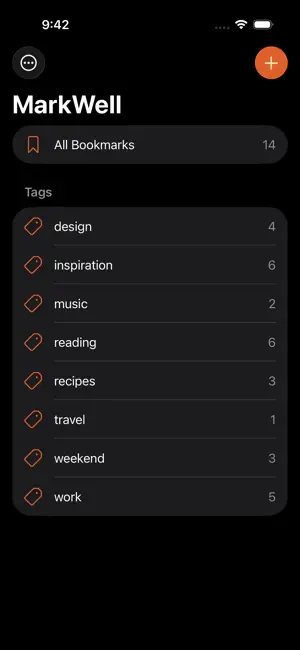
MarkWell is a native bookmark manager for Mac, iPhone, and iPad. Save links from anywhere, organize them with tags, and find them again later — across all your devices, with no separate account to manage. SAVE FROM ANYWHERE Share any URL from Safari, Mail, Messages, or any other app, straight into MarkWell using the system share sheet. The app fetches the page's title and favicon for you, so the bookmark looks right the moment it lands. TAGS, NOT FOLDERS Tag a link with as many ideas as it has. Filter the sidebar by tag to find things by mood, topic, or project — whatever sticks in your head. No nested folders to maintain, no rigid structure to fight against. IN YOUR MENU BAR On the Mac, MarkWell can run from the menu bar instead of the Dock. Its menu adds a bookmark, brings the window back, and quits — or set a single click on the icon to open New Bookmark straight away. SYNCED THROUGH YOUR OWN ICLOUD Bookmarks sync end-to-end through your own iCloud account using Apple's CloudKit framework. There is no MarkWell account, no MarkWell server, and no analytics. Your data stays under your Apple ID, and the same bookmark you save on your iPhone shows up on your Mac a few seconds later. BRING YOUR BROWSER BOOKMARKS Import the bookmarks file that Safari, Chrome, Firefox, Edge, or Vivaldi exports. Folders become tags, so the way you sorted things comes with you, and duplicates are flagged before they land. Export your library any time — as JSON for a complete MarkWell backup, or as a standard bookmarks file any browser can import. PRIVACY-FIRST MarkWell collects nothing. The only network call the app makes on its own is to read the title and favicon of a URL when you save it. There are no third-party SDKs, no advertising, no telemetry. The privacy policy at bendansby.com/apps/markwell/privacy.html spells it out in detail. REQUIREMENTS - Mac running macOS 14 Sonoma or later - iPhone or iPad running iOS / iPadOS 17 or later - Optional: iCloud account for cross-device sync (works fully offline without one) Feedback welcome — [email protected].
What’s new
Version 1.5.0 · Updated October 22, 2026
• Add tags while you save from the share sheet, with suggestions like New Bookmark’s. • Tag suggestions now work on iPhone and iPad, and they’re smarter: tags you already use come first — from the same site, or named in the title or description — and new ones pick up product names and words a page repeats. • Searching narrows the sidebar’s tags, and their counts, to the matching bookmarks. • Pages that block apps from reading them still save with their real title. When nothing can be read, the link stands in. • MarkWell appears in the share sheet when a link comes with other items, as it does from Mail. • The share sheet’s fields now all match, and on iPad the sidebar no longer shows a second + beside the list’s own. • Fixed new bookmarks sometimes being drawn on top of each other in the list.
App privacy
The developer, Benjamin Dansby, reported these privacy practices to Apple.
Data Not Collected
The developer does not collect any data from this app.
Alternatives to MarkWell — Bookmark Manager
Looking for apps like MarkWell — Bookmark Manager? Here are 6 similar apps on the App Store. The highest rated is Notelane - Markdown Editor (5.0/5), and 5 of the 6 are free to download.
-
 Linkable
-
 Notelane - Markdown Editor
5.0
Notelane - Markdown Editor
5.0
-
 Bookmark Links: PostPocket
4.5
Bookmark Links: PostPocket
4.5
-
 Zavala
4.8
Zavala
4.8
-
 Safe + Password Manager
4.8
Safe + Password Manager
4.8
-
 Quire
4.6
Quire
4.6
| App | Rating | Price | Last updated | Compare |
|---|---|---|---|---|
| MarkWell — Bookmark Manager | 5.0 / 5 (1 rating) | 4.99 USD | October 22, 2026 | |
| Linkable | – | Free | Aug 21, 2026 | Compare |
| Notelane - Markdown Editor | 5.0 / 5 (5) | Free | Jul 1, 2026 | Compare |
| Bookmark Links: PostPocket | 4.5 / 5 (31) | Free | Feb 1, 2026 | Compare |
| Zavala | 4.8 / 5 (69) | Free | Oct 7, 2026 | Compare |
| Safe + Password Manager | 4.8 / 5 (471) | 2.99 USD | Oct 22, 2026 | Compare |
| Quire | 4.6 / 5 (104) | Free | Oct 15, 2026 | Compare |