

AmberNote
Daichi Takikawa Photo & Video iPhoneiPadiPod touch
AmberNote is a free Photo & Video app for iPhone and iPad by Daichi Takikawa. Requires iOS 26.0. Updated May 1, 2026.
- Price
- Free
- on the App Store
- Size
- 3 MB
- Age 4+
- Updated
- May 1
- 2026 · v1.0
Screenshots
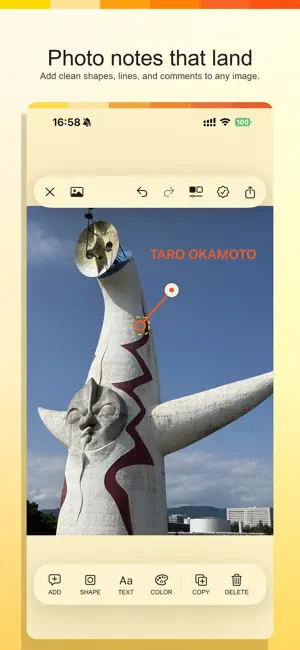


About AmberNote
AmberNote is a simple photo annotation editor designed for clean, focused visual notes. Place a small marker anywhere on a photo, draw a line from it, and add a comment at the end. It is useful for design feedback, review notes, repair instructions, visual explanations, and any moment when a photo needs clear context. Key Features - Add shapes, lines, and text annotations to photos - Marker shapes including circle, square, diamond, and star - Solid, dashed, dotted, and wavy lines - Text size, bold, italic, and underline controls - Zoom in and out while editing - Export edited photos - Local-only editing on your device AmberNote Premium Unlock black, custom colors, and all fonts with a one-time purchase. This is not a subscription. Privacy AmberNote does not upload your photos to a server. Selected photos and edits are processed locally on your device.
App privacy
The developer, Daichi Takikawa, reported these privacy practices to Apple.
Data Not Collected
The developer does not collect any data from this app.
Alternatives to AmberNote
Looking for apps like AmberNote? Here are 6 similar apps on the App Store.


| App | Rating | Price | Last updated | Compare |
|---|---|---|---|---|
| AmberNote | – | Free | May 1, 2026 | |
| True Tone Studio | – | Free | May 25, 2026 | Compare |
| Kakuカメ | – | Free | Jul 4, 2026 | Compare |
| LumaTone: Film Looks | – | Free | Aug 8, 2026 | Compare |
| PointImageBlur | – | Free | Sep 24, 2026 | Compare |
| AMERA | – | Free | Jan 12, 2026 | Compare |
| WyKub: Photo HDR & Presets | – | Free | Jan 19, 2026 | Compare |
Compare AmberNote with the top alternatives: ratings, updates, ASO score and keyword gaps →