

Artificial PDF — PDF to Text
Alperen Eroglu Productivity iPhoneiPadiPod touch
Artificial PDF — PDF to Text is a free Productivity app for iPhone and iPad by Alperen Eroglu. Rated 1.0/5 from 1 ratings. Requires iOS 15.0.
- Rating
- 1.0
- 1 ratings
- Price
- Free
- on the App Store
- Size
- 82 MB
- Age 4+
- Updated
- Aug 10
- 2026 · v1.1.0
Screenshots

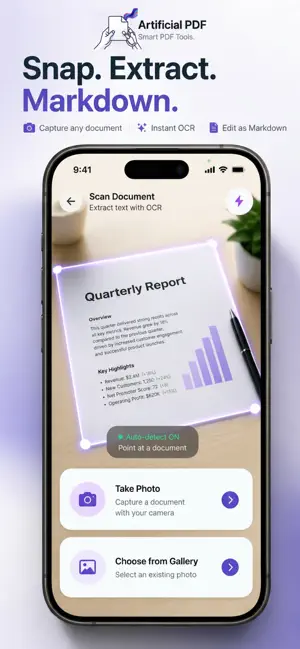


About Artificial PDF — PDF to Text
Stop retyping. Start extracting. Artificial PDF turns any PDF, webpage, or photo into clean, editable text in seconds — powered by a Rust extraction engine and on-device OCR. No uploads, no cloud, no waiting. EXTRACT FROM ANYTHING • Text PDFs — Lightning-fast extraction preserves headings, lists, and reading order • Scanned PDFs — On-device OCR reads what copy-paste can't • Mixed PDFs — Auto-detects text and scanned pages, handles both in one pass • Web URLs — Strips away ads and clutter, keeps the article • Camera — Snap a photo of any document and get editable text instantly EDIT BEFORE YOU EXPORT Extracted content opens in a clean editor. Fix a title, remove a section, adjust formatting — then export exactly what you need. • Markdown mode — Edit with raw syntax (##, **, -) for full control • Rich text mode — Visual editing with bold, italic, lists, and undo/redo EXPORT TO ANY FORMAT One extraction, every format you need: • PDF — Clean, reformatted document • Word (.docx) — Ready for Microsoft Word or Google Docs • Excel (.xlsx) — Tables preserved in spreadsheet format • Plain Text (.txt) — Universal, lightweight • Markdown (.md) — Perfect for Notion, Obsidian, GitHub • Image (.jpg) — Screenshot-quality capture BUILT FOR SPEED The extraction engine is written in Rust and compiled natively for your device. Most PDFs process in under 100ms. Scanned documents use Google ML Kit OCR — entirely on-device, no internet required. PRIVACY FIRST Your documents never leave your device. There are no servers, no uploads, no analytics on your content. What you extract stays on your phone. ADVANCED OCR (PRO) Pro users get 300 DPI high-resolution OCR processing for scanned documents — sharper recognition for small text, faded prints, and complex layouts. HISTORY & WORKFLOW Every extraction is saved automatically. Search your history, re-export in a different format, or pick up where you left off. FREE TO START Extract up to 5 documents per day for free. Copy text and export to TXT and PDF — no account required, no trial expiration. Upgrade to Pro for unlimited extractions, all export formats, batch processing, advanced OCR, and watermark-free sharing. — Artificial PDF is built by Artists Company for people who work with documents every day. Fast, private, no clutter. Terms of Use (EULA): https://www.apple.com/legal/internet-services/itunes/dev/stdeula/
What’s new
Version 1.1.0 · Updated August 10, 2026
Artificial PDF now opens Word, Excel, PowerPoint, OpenDocument, RTF, EPUB, and CSV files alongside PDFs and images. This update also improves document scanning, extraction accuracy, navigation, performance, privacy, and overall reliability.
App privacy
The developer, Alperen Eroglu, reported these privacy practices to Apple.
Data Not Collected
The developer does not collect any data from this app.
Alternatives to Artificial PDF — PDF to Text
Looking for apps like Artificial PDF — PDF to Text? Here are 6 similar apps on the App Store. The highest rated is Sila Messenger (5.0/5), and all 6 are free to download.
-
 Notic - Bookmark organizer
-
 ML Data Factory
-
 CleanScan: PDF Scanner & OCR
-
 Sila Messenger
5.0
-
 Markdown.md - Notes & Preview
-
 Merkdown
| App | Rating | Price | Last updated | Compare |
|---|---|---|---|---|
| Artificial PDF — PDF to Text | 1.0 / 5 (1 rating) | Free | August 10, 2026 | |
| Notic - Bookmark organizer | – | Free | Jul 24, 2025 | Compare |
| ML Data Factory | – | Free | Sep 17, 2026 | Compare |
| CleanScan: PDF Scanner & OCR | – | Free | Aug 5, 2026 | Compare |
| Sila Messenger | 5.0 / 5 (1) | Free | Oct 19, 2026 | Compare |
| Markdown.md - Notes & Preview | – | Free | Apr 18, 2026 | Compare |
| Merkdown | – | Free | Jun 20, 2026 | Compare |