

BlueSpot Finder
NATHANAEL LOUIS SCHNELL Utilities iPhoneiPadiPod touch
BlueSpot Finder is a free Utilities app for iPhone and iPad by NATHANAEL LOUIS SCHNELL. Rated 3.7/5 from 3 ratings. Requires iOS 17.0.
- Rating
- 3.7
- 3 ratings
- Price
- Free
- on the App Store
- Size
- 1 MB
- Age 4+
- Updated
- Apr 29
- 2026 · v1.0
Screenshots


About BlueSpot Finder
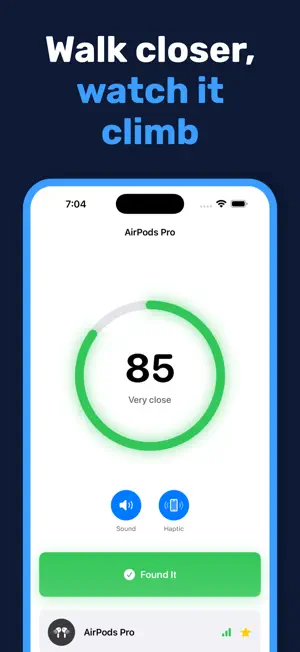
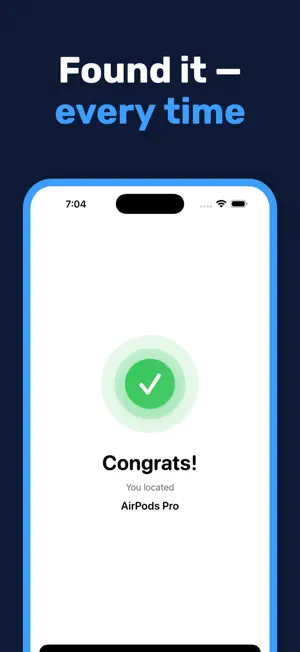
Tap Scan. BlueSpot lists every nearby Bluetooth device — AirPods, headphones, speakers, watches, fitness trackers — and shows which one is closest. Pick the one you've lost, then watch the number climb from "Far" to "Getting warm" to "Very close" with every step you take. Haptic pulses and optional beeps confirm when you're on top of it. No accounts. No subscriptions. No ads. Nothing to set up. Open the app, tap Scan, and find your stuff in seconds. WHAT YOU CAN FIND • AirPods, AirPods Pro, AirPods Max • Beats, Sony, Bose, Jabra, and other wireless headphones • Bluetooth speakers (HomePod, JBL, Sonos, Bose Soundlink) • Fitness trackers (Fitbit, Whoop, Amazfit, Oura, Mi Band) • Apple Watch, Garmin, Galaxy Watch • Any Bluetooth LE device broadcasting a name HOW IT WORKS BlueSpot reads radio signal strength (RSSI) from nearby Bluetooth devices. Stronger signal = closer. A built-in filter smooths out the noise so you see a steady 0-to-100 proximity score instead of jumpy numbers, and haptic and audio alerts let you know when you've nailed it. This is proximity tracking, not GPS. BlueSpot tells you whether you're getting closer or farther — perfect for "I know it's in this room somewhere" moments. It is not a replacement for location-based tracking services. WHY PEOPLE LIKE IT • Instant scan — every nearby Bluetooth device, in seconds • Auto-categorized — AirPods, headphones, watches, speakers, and trackers grouped for you • Smooth proximity meter — real-time 0-to-100, no wild jumps • Haptic guidance — your phone pulses faster as you get closer • Audio cues — optional beeps that speed up near the target • Favorites — pin the devices you lose most so they're one tap away next time • Adjustable alert threshold — tune the "found it!" trigger • Full dark mode • Works offline — no internet required • No signup — open and go PRIVACY FIRST BlueSpot collects nothing. No analytics, no cloud, no accounts, no ads. Everything happens on your device. Your scans never leave your phone. Full privacy policy: https://apps.builtfastai.com/bluespot/privacy COMPATIBLE DEVICES BlueSpot requires iOS 17 or later and Bluetooth LE hardware (iPhone 5s and newer). It works with any Bluetooth Low Energy device advertising a name, even unpaired ones. Devices that aren't actively broadcasting (a closed AirPods case, a powered-off speaker) cannot be detected. SUPPORT Email [email protected] — we read every message.
App privacy
The developer, NATHANAEL LOUIS SCHNELL, reported these privacy practices to Apple.
Data Not Collected
The developer does not collect any data from this app.
Alternatives to BlueSpot Finder
Looking for apps like BlueSpot Finder? Here are 6 similar apps on the App Store. The highest rated is Bluetooth Device Finder: Findr (5.0/5), and all 6 are free to download.
-
 Find Lost Bluetooth Devices
-
 Poddi: Bluetooth Device Finder
-
 Bluetooth Finder - Locator
-
 Bluetooth Finder & BLE Scanner
1.0
Bluetooth Finder & BLE Scanner
1.0
-
 Bluetooth Device Finder: Findr
5.0
Bluetooth Device Finder: Findr
5.0
-
 Purixa: AI Phone Cleaner
| App | Rating | Price | Last updated | Compare |
|---|---|---|---|---|
| BlueSpot Finder | 3.7 / 5 (3 ratings) | Free | April 29, 2026 | |
| Find Lost Bluetooth Devices | – | Free | Feb 20, 2026 | Compare |
| Poddi: Bluetooth Device Finder | – | Free | May 11, 2026 | Compare |
| Bluetooth Finder - Locator | – | Free | Oct 9, 2026 | Compare |
| Bluetooth Finder & BLE Scanner | 1.0 / 5 (1) | Free | Sep 29, 2026 | Compare |
| Bluetooth Device Finder: Findr | 5.0 / 5 (2) | Free | Oct 13, 2025 | Compare |
| Purixa: AI Phone Cleaner | – | Free | Aug 8, 2026 | Compare |
Compare BlueSpot Finder with the top alternatives: ratings, updates, ASO score and keyword gaps →