

Fun Customizable Keyboard
Majd Salloum Utilities iPhoneiPadiPod touch
Fun Customizable Keyboard is a free Utilities app for iPhone and iPad by Majd Salloum. Rated 4.4/5 from 8 ratings. Requires iOS 18.0. Updated May 21, 2026.
- Rating
- 4.4
- 8 ratings
- Price
- Free
- on the App Store
- Size
- 11 MB
- Age 4+
- Updated
- May 21
- 2026 · v1.4
Screenshots


About Fun Customizable Keyboard
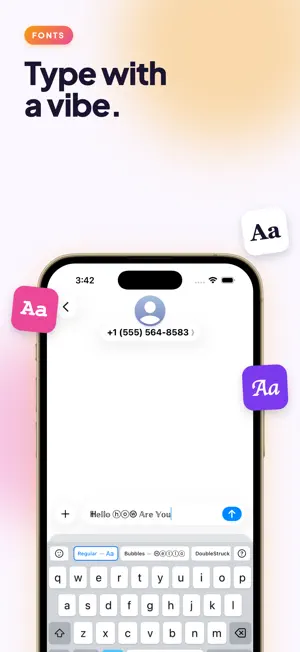
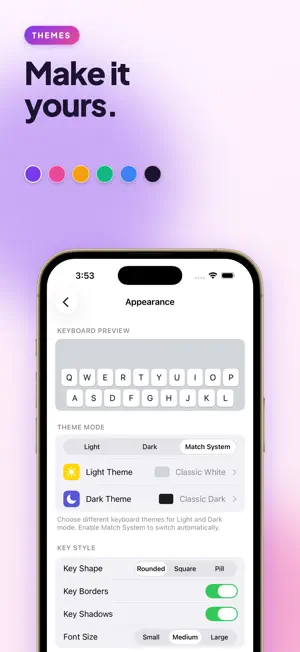
Fun Keyboard is a custom iOS keyboard with built-in mini-games. Tap the bird key from any text field to open a game without leaving your conversation. Tap ABC to jump back to typing. EIGHT GAMES, ALL INSIDE THE KEYBOARD • Echo — replay the growing color-and-sound sequence. One pad longer every round. • Tic Tac Toe — three-in-a-row against the keyboard. Pick a difficulty, chase a streak. • Peg Drop — release fifteen balls and watch them bounce into scoring slots. Stack drops, climb the total. • Pipe Hopper (Pro) — tap to flap, weave through the gaps. One mistake and it's over. • Block Breaker (Pro) — slide the paddle, shatter every brick. Power-ups for wide paddle, fire ball, multi-ball, and shield. • Pixel Run (Pro) — endless runner that keeps scrolling until you misjudge a jump. • TypeBolt (Pro) — typing-speed sprint. Correct letters fill in white, mistakes glow red but the run keeps going. • Glow Coil (Pro) — neon snake on a wrap-around grid. Eat apples to grow, just don't cross yourself. A FULL KEYBOARD FIRST Fun Keyboard is a real, full-featured keyboard — the games are a bonus. Hold a letter for accent variants. Press and hold space to drag the cursor. Double-tap shift for caps lock. Full emoji picker with search, recents, and skin-tone variants. Type comfortably in English, Arabic, French, or Russian, and switch languages with a long-press on the globe. MAKE IT YOURS • Light and dark themes with auto-switch to match system mode • Customizable fonts for all supported languages • Built-in palettes (Classic White, Soft Cream, Mint Frost, OLED Black, Midnight Blue, and more) • Custom themes — pick every color: background, keys, key text, special keys, accent • Drop in a photo as your keyboard background (Pro) • Three key shapes (rounded, square, pill), three font sizes, optional borders and shadows • Per-key sound and haptic feedback toggles PRIVATE BY DEFAULT Fun Keyboard does not collect or transmit anything you type. The keyboard does not request Open Access — no network permission, no clipboard access — so what you type stays on your device. There are no ads. The companion app uses TikTok and Meta SDKs only to attribute the marketing campaigns we run on those platforms; you can opt out at any time through iOS App Tracking Transparency. FUN KEYBOARD PRO Pro unlocks the five premium games, unlimited custom themes, and custom background images. Available as: • Weekly subscription • Monthly subscription • Yearly subscription (best value) • One-time Lifetime purchase The free tier includes Echo, Tic Tac Toe, and Peg Drop, plus one custom theme — so you can try the keyboard before deciding. GETTING STARTED After installing, go to Settings → General → Keyboard → Keyboards → Add New Keyboard → Fun Keyboard. Tap the globe key in any app to switch to it. Long-press the globe to choose between Fun Keyboard's languages. Subscriptions auto-renew unless cancelled at least 24 hours before the period ends. Manage or cancel any time from Settings → [Your Name] → Subscriptions, or at apps.apple.com/account/subscriptions. Terms of Service: https://majds.dev/funkeyboard/terms.html Privacy Policy: https://majds.dev/funkeyboard/privacy.html
Ratings & reviews
4.4
8 ratings
What’s new
Version 1.4 · Updated May 21, 2026
Five new games and a full emoji picker — Fun Keyboard now has eight mini-games inside the keyboard. • Echo — Simon-says color and sound memory (free) • Tic Tac Toe — three-in-a-row against the keyboard (free) • Pixel Run — endless runner (Pro) • TypeBolt — typing-speed sprint (Pro) • Glow Coil — neon snake on a wrap-around grid (Pro) • Full emoji picker with search, recents, and skin-tone variants • Polish across the game picker and plan-comparison screens
App privacy
The developer, Majd Salloum, reported these privacy practices to Apple.
Data Used to Track You
The following data may be used to track you across apps and websites owned by other companies:
- Purchases: Purchase History
- Location: Coarse Location
- Identifiers: User ID, Device ID
- Usage Data: Product Interaction, Advertising Data
- Diagnostics: Crash Data, Performance Data, Other Diagnostic Data
Data Linked to You
The following data, which may be collected and linked to your identity, may be used for the following purposes:
- Purchases: Purchase History
- Location: Coarse Location
- Identifiers: User ID, Device ID
- Usage Data: Product Interaction, Advertising Data
- Diagnostics: Crash Data, Performance Data, Other Diagnostic Data
Used for: Third-Party Advertising, Developer’s Advertising or Marketing, Analytics
Alternatives to Fun Customizable Keyboard
Looking for apps like Fun Customizable Keyboard? Here are 6 similar apps on the App Store. The highest rated is AImoji -AI Stickers & Keyboard (5.0/5), and all 6 are free to download.
-
 Charging Animation Effects
-
 StreamHub 2025
3.0
StreamHub 2025
3.0
-
 AImoji -AI Stickers & Keyboard
5.0
AImoji -AI Stickers & Keyboard
5.0
-
 WhoDialed Plus Call
1.0
WhoDialed Plus Call
1.0
-
 VibeSpark Keyboard&Emojis
4.5
VibeSpark Keyboard&Emojis
4.5
-
 ScreenVibe: Wallpapers & Icons
4.6
ScreenVibe: Wallpapers & Icons
4.6
| App | Rating | Price | Last updated | Compare |
|---|---|---|---|---|
| Fun Customizable Keyboard | 4.4 / 5 (8 ratings) | Free | May 21, 2026 | |
| Charging Animation Effects | – | Free | Jun 19, 2026 | Compare |
| StreamHub 2025 | 3.0 / 5 (2) | Free | May 14, 2025 | Compare |
| AImoji -AI Stickers & Keyboard | 5.0 / 5 (6) | Free | Oct 17, 2026 | Compare |
| WhoDialed Plus Call | 1.0 / 5 (1) | Free | Feb 16, 2026 | Compare |
| VibeSpark Keyboard&Emojis | 4.5 / 5 (102) | Free | Apr 14, 2026 | Compare |
| ScreenVibe: Wallpapers & Icons | 4.6 / 5 (116) | Free | Oct 22, 2026 | Compare |