

AuBackup
亚男 辛 Utilities iPhoneiPadiPod touch
AuBackup is a free Utilities app for iPhone and iPad by 亚男 辛. Requires iOS 15.6. Updated May 8, 2026.
- Price
- Free
- on the App Store
- Size
- 4 MB
- Age 4+
- Updated
- May 8
- 2026 · v1.0
Screenshots

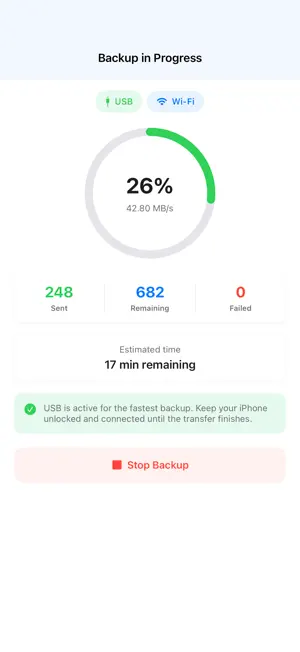

About AuBackup
AuBackup moves photos and videos from your iPhone to your PC without routing your library through the cloud. Pair in seconds by scanning a QR code from AuSearch on your desktop, then transfer full-quality items over Wi-Fi or switch to USB for even faster backups. Reconnect to the same desktop later and keep your library moving with a simple, privacy-friendly workflow. Why AuBackup: • Direct iPhone-to-PC backup • Full-quality photo and video transfer • Fast QR pairing with your desktop • Works over Wi-Fi and USB • Local transfer flow designed for privacy • Easy reconnects to previously paired desktops Start on your PC, add a Mobile Folder in AuSearch, scan the QR code, and back up your library in minutes.
App privacy
The developer, 亚男 辛, reported these privacy practices to Apple.
Data Not Linked to You
The following data, which may be collected but is not linked to your identity, may be used for the following purposes:
- Usage Data: Product Interaction
- Diagnostics: Crash Data, Performance Data, Other Diagnostic Data
Used for: Analytics, Product Personalization
Alternatives to AuBackup
Looking for apps like AuBackup? Here are 6 similar apps on the App Store. The highest rated is Tidytech - Item Tracking (5.0/5), and all 6 are free to download.
-
 ColdCopy
-
 MagicNFC - One-Tap NFC Tags
-
 KeyConfig
-
 Markever: Photo Backup
4.5
-
 zDrivePro: USB Storage & Tool
-
 Tidytech - Item Tracking
5.0
| App | Rating | Price | Last updated | Compare |
|---|---|---|---|---|
| AuBackup | – | Free | May 8, 2026 | |
| ColdCopy | – | Free | Aug 20, 2026 | Compare |
| MagicNFC - One-Tap NFC Tags | – | Free | Aug 21, 2026 | Compare |
| KeyConfig | – | Free | Jun 9, 2026 | Compare |
| Markever: Photo Backup | 4.5 / 5 (2) | Free | Aug 20, 2026 | Compare |
| zDrivePro: USB Storage & Tool | – | Free | May 19, 2026 | Compare |
| Tidytech - Item Tracking | 5.0 / 5 (3) | Free | Apr 13, 2026 | Compare |
Compare AuBackup with the top alternatives: ratings, updates, ASO score and keyword gaps →