

Synctodo: Task List & Subtasks
Ali Alsawad Productivity iPhoneiPadiPod touch
Synctodo: Task List & Subtasks is a free Productivity app for iPhone and iPad by Ali Alsawad. Requires iOS 15.1. Updated September 8, 2026.
- Price
- Free
- on the App Store
- Size
- 44 MB
- Age 4+
- Updated
- Sep 8
- 2026 · v1.0.8
Screenshots
About Synctodo: Task List & Subtasks
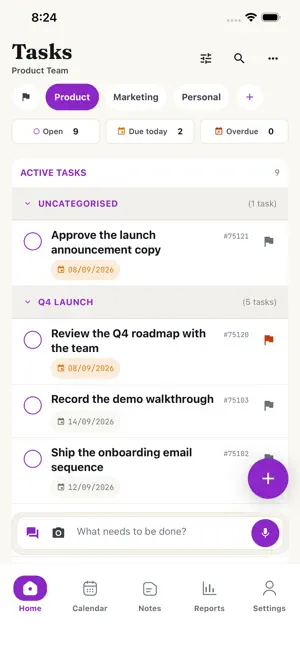
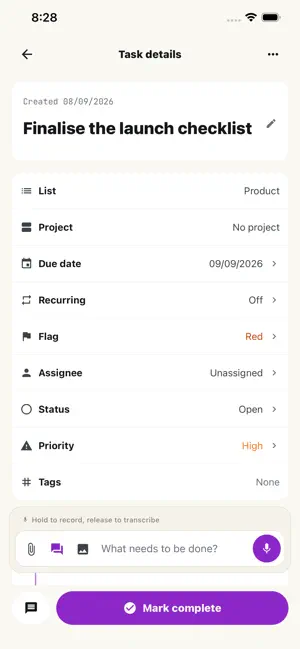
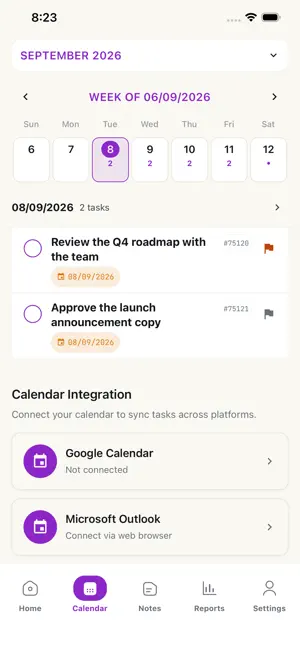
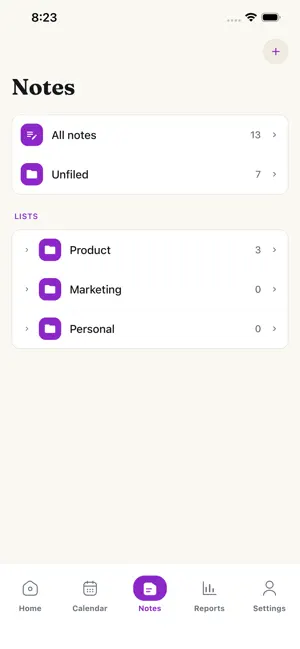
Break big work into subtasks, ten levels deep - then open any subtask as its own list and work on nothing else. Notes, a calendar, reports, a team workspace, and capture from a photo, a voice note or a PDF. Fully bilingual: English and Arabic, with real right-to-left layout. DEPTH THAT HOLDS - Break a task into subtasks, ten levels deep. Your workspace can set the limit anywhere from 1 to 10. - The limit is enforced on the server, so dragging a whole branch under a new parent keeps the structure valid instead of quietly breaking it. - Connector rails down the tree, inline "add subtask" at any level, and drag to reorder. EVERYTHING A TASK NEEDS - Four statuses: open, done, cancelled, on hold. - Four priorities: low, medium, high, urgent. - Four flag colours - red, yellow, blue, green - for your own system. - Start date, due date, and a due time - not just a day. - Tags, an assignee, and a completion date. - Photos and files attached from your library or straight from the camera. - Comments with @mentions, plus a full activity timeline on every task. REPEATING WORK THAT ACTUALLY REPEATS - Daily on an interval, weekly on the days you pick, monthly, quarterly, twice a year, or yearly. - Preview the next five occurrences before you save. - Every new occurrence arrives with the parent's entire subtask tree already built. CAPTURE IT HOWEVER IT ARRIVES - Type it, hold to record a voice note, send a photo of a whiteboard, or hand it a PDF, Word or PowerPoint file - you get structured tasks back. - An AI chat assistant that drafts the change, shows it to you, and waits for your confirmation before writing anything. - Connect Telegram and send the bot a message, a voice note, a photo or a PDF from wherever you are. It replies with confirm buttons. FOCUS - A ranked shortlist of what deserves your attention today, with done, skip and pin. - A focus session timer: 25, 45, 60 or 90 minutes, screen kept awake, long-press to quit. NOTES Rich notes with formatting, checklists and links, organised by list and section, autosaved as you type. Pin the ones you keep coming back to. WORK WITH YOUR TEAM - Invite people to your workspace by email, as admins or members. - Organise them into departments. - Assign any task to a member, and @mention them in comments. CALENDAR, REPORTS, EXPORTS - A week view with an expandable mini-month and a tap-through day view. - Reports by period, grouped by project, with CSV and PDF download. - Handover exports as PDF, Word or Excel, and handover import back in. BUILT FOR ARABIC, NOT RETROFITTED - Switch to Arabic and the whole layout mirrors: the task tree, the connector rails, the drawers, all of it. - Dates are written dd/mm/yyyy. SIGN IN HOWEVER YOU LIKE Sign in with Apple, Google, Microsoft, a six-digit code from your authenticator app, or a password. ALSO IN THERE Multi-select with bulk status, priority and flag changes, and bulk delete with undo. Six sort orders. Dark mode that follows your device. iPad supported. There is a web app at synctodo.com on the same account and the same data, with a command palette, keyboard shortcuts and offline queueing for desk work. Built in Bahrain.
What’s new
Version 1.0.8 · Updated September 8, 2026
This update fixes issues reported after 1.0.7: - Projects now appear immediately when you open a list, instead of only after pulling to refresh. - A task's project is shown correctly on the task details screen. - The date picker no longer draws over the new-task sheet, and the time picker no longer covers the form. - Overdue tasks are marked overdue, and due dates show the correct day outside UTC. - Arabic: back arrows now point the right way, and error messages are translated. - Task descriptions written on the web keep their formatting. - Notes shared from the app keep their paragraphs. - Faster loading on large lists, and faster note search.
App privacy
The developer, Ali Alsawad, reported these privacy practices to Apple.
Data Linked to You
The following data, which may be collected and linked to your identity, may be used for the following purposes:
- Contact Info: Email Address, Name
- User Content: Other User Content
- Identifiers: User ID
- Usage Data: Product Interaction
- Diagnostics: Crash Data
Used for: App Functionality
Alternatives to Synctodo: Task List & Subtasks
Looking for apps like Synctodo: Task List & Subtasks? Here are 6 similar apps on the App Store. The highest rated is DailyOS: task manager (5.0/5), and all 6 are free to download.
-
 Taskly: Smart To-Do
-
 DailyOS: task manager
5.0
DailyOS: task manager
5.0
-
 Onelify: Tasks & Habits
-
 Perspective Tasks
-
 Caeron
-
 Focus Blocks: App Blocker
| App | Rating | Price | Last updated | Compare |
|---|---|---|---|---|
| Synctodo: Task List & Subtasks | – | Free | September 8, 2026 | |
| Taskly: Smart To-Do | – | Free | Sep 29, 2026 | Compare |
| DailyOS: task manager | 5.0 / 5 (2) | Free | Apr 15, 2026 | Compare |
| Onelify: Tasks & Habits | – | Free | Oct 14, 2026 | Compare |
| Perspective Tasks | – | Free | Jul 21, 2026 | Compare |
| Caeron | – | Free | Sep 2, 2025 | Compare |
| Focus Blocks: App Blocker | – | Free | Sep 26, 2026 | Compare |