

QR-Verse
Marc Bruinsma Productivity iPhoneiPadiPod touch
QR-Verse is a free Productivity app for iPhone and iPad by Marc Bruinsma. Requires iOS 17.0. Updated September 15, 2026.
- Price
- Free
- on the App Store
- Size
- 19 MB
- Age 4+
- Updated
- Sep 15
- 2026 · v1.3.1
Screenshots
About QR-Verse
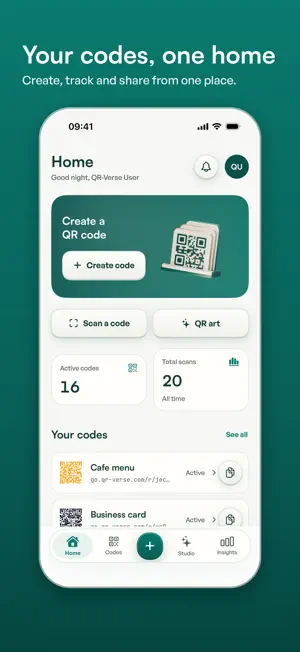
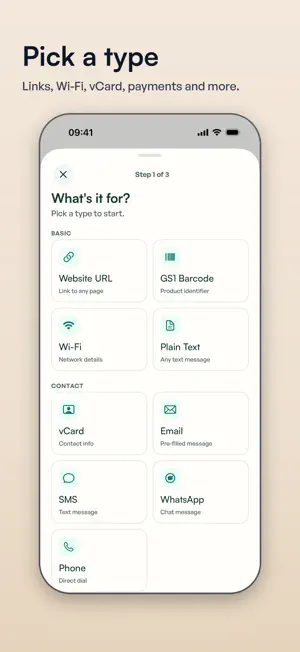
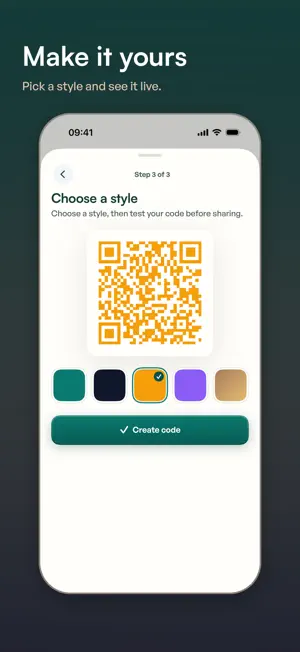
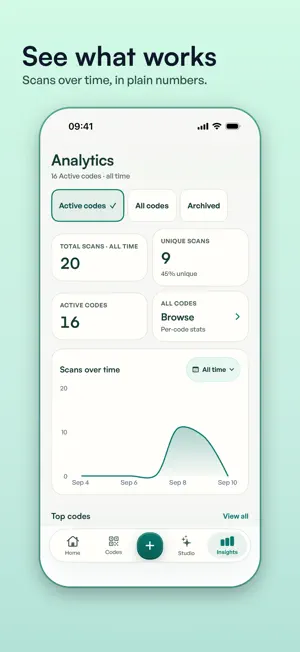
Most QR codes look like something a printer coughed up. QR-Verse makes ones you would actually put on a menu, a poster or a business card, and then shows you what happens after people scan them. MAKE A CODE 27 code types, grouped five ways. • Basic: website link, plain text, Wi-Fi, GS1 barcode • Contact: vCard, email, SMS, WhatsApp, phone • Social: Instagram, Facebook, TikTok, LinkedIn, X, YouTube • Media: PDF, image, video, audio • Business: location, event, payment, App Store link, menu, review request, Digital Product Passport, GS1 Digital Link Pick a type, fill in the fields, tap create. Static codes are unlimited on every plan. Media codes hand the file upload over to qr-verse.com and come straight back. STYLE IT WITH AI Open AI Studio, describe the look you want in your own words, and the app designs variants of your code. Not sure where to start? The gallery holds sixteen looks our team trained, scanned and validated, each with its own scan score out of 100. Free generations unlock after two short ads. Paid plans drop the ads. SEE WHAT YOUR CODES DO Your dashboard counts total scans and unique scanners, ranks the codes that are actually pulling their weight, and shows which countries your scans came from and whether people scanned on a phone or a computer. Dynamic codes point at a short link instead of a fixed address, so you can edit the destination after the code is printed. The sticker stays. The link moves. SCAN WITHOUT LEAVING THE APP The built-in scanner reads links, Wi-Fi, contacts, email, SMS, phone numbers, locations, events and plain text, and recognises a QR-Verse code on sight. Copy it, open it, share it, or save the image to your library. STAY IN THE LOOP Notifications are optional and off until you say otherwise. When you turn them on, you hear about it when scans spike or drop, when a code is about to expire, when your AI art is ready, and once a week in summary. SEVEN LANGUAGES, ONE ACCOUNT English, Dutch, German, French, Spanish, Italian and Portuguese. Switch language in the app and it changes on the spot. Sign in with your QR-Verse account and your codes are the same ones you see on qr-verse.com. PLANS Free: unlimited static codes, one dynamic code, the scanner, scan counts, and AI art after a short ad. Banner ads appear on the home and analytics screens. Pro: more dynamic codes, the full analytics dashboard, your logo on your codes, a bigger AI Studio allowance, and no ads anywhere. Business: everything in Pro, plus the Digital Product Passport and GS1 Digital Link code types. Prices are shown inside the app in your own currency. A subscription renews until you cancel it, and you can manage or cancel it any time in your App Store account settings. You will need a free QR-Verse account. It takes an email address and about thirty seconds. Terms of Use (EULA): https://qr-verse.com/en/terms Privacy Policy: https://qr-verse.com/en/privacy QR Code is a registered trademark of Denso Wave Incorporated.
What’s new
Version 1.3.1 · Updated September 15, 2026
One code, several links. Pick Multi-link at the top of the type list, or tap Add another link on a Website URL code, and your code opens a page that holds them all. How many links fit in one code depends on your plan. Buy a plan in the app and you see it straight away. The new plan appears as soon as the purchase is confirmed, without reopening the app. Alongside that, small refinements and steadier running. Still new in the 1.3 line, if you are coming from an older version: • The app was redesigned throughout: Home, creating a code, the style gallery, your insights and the subscription page. • Choose your language in Settings and the whole app switches on the spot, in any of the seven languages. • Analytics reads correctly. The scan chart fills up and the time ranges show real numbers. • Sharing, sign-in, email confirmation and password reset all work inside the app, with an honest message when a link has expired. • Your subscription stays tied to your account, prices come from the App Store in your own currency, and Restore Purchases works from the subscription page and from Settings. • All seven languages are complete, VoiceOver reads labels as sentences and Wi-Fi passwords stay masked.
App privacy
The developer, Marc Bruinsma, reported these privacy practices to Apple.
Data Used to Track You
The following data may be used to track you across apps and websites owned by other companies:
- Identifiers: Device ID
Data Linked to You
The following data, which may be collected and linked to your identity, may be used for the following purposes:
- Identifiers: Device ID, User ID
- Purchases: Purchase History
- Contact Info: Email Address
- Usage Data: Product Interaction
- Diagnostics: Crash Data, Performance Data, Other Diagnostic Data
Used for: Third-Party Advertising, Analytics, App Functionality
Alternatives to QR-Verse
Looking for apps like QR-Verse? Here are 6 similar apps on the App Store. The highest rated is Chronos Authenticator (5.0/5), and all 6 are free to download.
-
 SHYFT: Box Organizer QR
-
 QR-K - Scan, Generate, Share
-
 Fancy QR - AI Code Generator
3.1
Fancy QR - AI Code Generator
3.1
-
 QRVerse - QR Art AI
-
 Mon Cube
-
 Chronos Authenticator
5.0
Chronos Authenticator
5.0
| App | Rating | Price | Last updated | Compare |
|---|---|---|---|---|
| QR-Verse | – | Free | September 15, 2026 | |
| SHYFT: Box Organizer QR | – | Free | Jun 15, 2026 | Compare |
| QR-K - Scan, Generate, Share | – | Free | Oct 6, 2026 | Compare |
| Fancy QR - AI Code Generator | 3.1 / 5 (17) | Free | Sep 2, 2026 | Compare |
| QRVerse - QR Art AI | – | Free | Dec 16, 2023 | Compare |
| Mon Cube | – | Free | Dec 20, 2023 | Compare |
| Chronos Authenticator | 5.0 / 5 (3) | Free | Sep 15, 2026 | Compare |
Compare QR-Verse with the top alternatives: ratings, updates, ASO score and keyword gaps →