

DOT Notebook
Aaron Roodhart Lifestyle iPhoneiPadiPod touch
DOT Notebook is a free Lifestyle app for iPhone and iPad by Aaron Roodhart. Requires iOS 15.0. Updated October 5, 2026.
- Price
- Free
- on the App Store
- Size
- 186 MB
- Age 4+
- Updated
- Oct 5
- 2026 · v1.2.0
Screenshots

About DOT Notebook
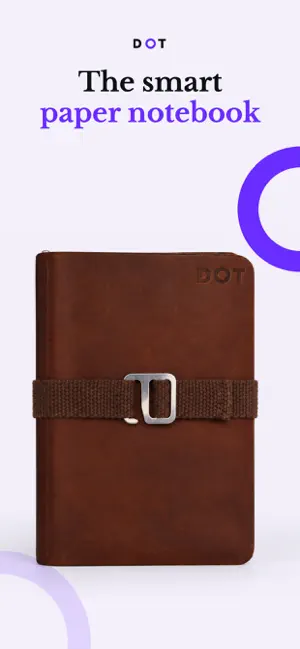
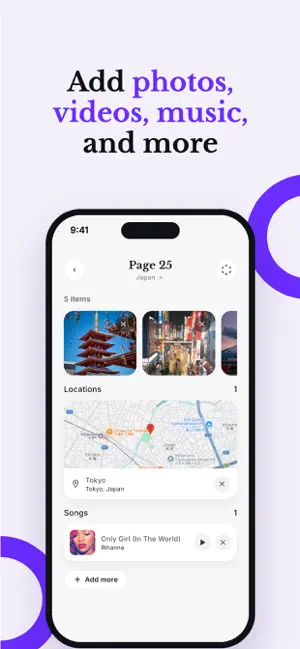
Your life is more than what you just write paper. It’s the music you have on repeat, the photos of your first trip, and the places you love. DOT is the bridge between your physical notebook and your digital life. Designed for journalers, travelers, and stationery lovers, DOT uses NFC technology to turn your favorite paper notebook into a multimedia experience. No smart pens, no clunky tablets just you, your notebook, and your memories. ### **How it Works:** 1. **Write:** Use your DOT physical notebook as you always do. 2. **Tap:** Touch your phone to a DOT tag on the cover. 3. **Link:** Instantly attach photos, videos, voice memos, or locations to that specific spot. 4. **Relive:** Anytime you tap the book with your phone in the future, your digital memories appear instantly. ### **Key Features:** - **Total Integration:** Connect photos, videos, and links directly to physical pages. - **Voice Memos:** Capture the "sound" of a moment without leaving your journal. - **Maps:** Save locations to your pages so you never forget where you were. - **Timeless Style:** Keeps the tactile feel of paper while giving you the power of digital organization. - **Privacy First:** All your memories are encrypted keeping your story safe Stop choosing between the charm of paper and the convenience of digital. Capture the full story with DOT. **The DOT System:** This app is designed specifically to work with the DOT Journal System
What’s new
Version 1.2.0 · Updated October 5, 2026
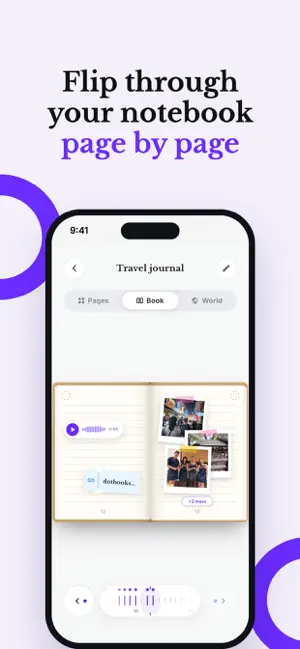
Meet your notebook in a whole new way with the DOT Public Release. - Book view: flip through your notebook page by page, just like the real thing. Tap any photo to see it full size and play music right from the page. - World view: see every place and photo location from your notebook on a spinning globe, then zoom all the way into the street map. - Google Drive storage: everyone now gets 1 GB free, and you can connect your Google Drive to save memories to your own storage. - Tap your cover to send: memories now sync to your book with a tap on your notebook's cover. If you skip it, the memory is still saved and the page shows a reminder to sync later. - Swipe between Pages, Book and World. - A fresh new app icon and a quick tour of the new views. - Faster loading with photo and video caching, plus smoother handling of photos removed from Drive.
App privacy
The developer, Aaron Roodhart, reported these privacy practices to Apple.
Data Linked to You
The following data, which may be collected and linked to your identity, may be used for the following purposes:
- Contact Info: Name
- User Content: Photos or Videos, Audio Data
- Identifiers: User ID
Used for: Product Personalization, App Functionality
Data Not Linked to You
The following data, which may be collected but is not linked to your identity, may be used for the following purposes:
- Diagnostics: Crash Data, Performance Data
- Location: Precise Location
Used for: Analytics, App Functionality
Alternatives to DOT Notebook
Looking for apps like DOT Notebook? Here are 6 similar apps on the App Store. The highest rated is ChurchPad (5.0/5), and all 6 are free to download.
-
 Rhema Chapel Edmonton
-
 ChurchPad
5.0
ChurchPad
5.0
-
 UAlberta Library Checkout
-
 AI Detector - Detect AI Image
4.4
AI Detector - Detect AI Image
4.4
-
 Twig - Journal for Couples
4.6
Twig - Journal for Couples
4.6
-
 Whiskers Pets & Friends
4.9
Whiskers Pets & Friends
4.9
| App | Rating | Price | Last updated | Compare |
|---|---|---|---|---|
| DOT Notebook | – | Free | October 5, 2026 | |
| Rhema Chapel Edmonton | – | Free | Sep 29, 2026 | Compare |
| ChurchPad | 5.0 / 5 (4) | Free | Sep 29, 2026 | Compare |
| UAlberta Library Checkout | – | Free | Oct 13, 2026 | Compare |
| AI Detector - Detect AI Image | 4.4 / 5 (98) | Free | Sep 30, 2026 | Compare |
| Twig - Journal for Couples | 4.6 / 5 (539) | Free | Sep 17, 2026 | Compare |
| Whiskers Pets & Friends | 4.9 / 5 (712) | Free | Oct 14, 2026 | Compare |
Compare DOT Notebook with the top alternatives: ratings, updates, ASO score and keyword gaps →