

SplitClip: Video Splitter
Dongsik Son Photo & Video iPhoneiPadiPod touch
SplitClip: Video Splitter is a free Photo & Video app for iPhone and iPad by Dongsik Son. Requires iOS 13.0. Updated May 5, 2026.
- Price
- Free
- on the App Store
- Size
- 62 MB
- Age 4+
- Updated
- May 5
- 2026 · v1.05
Screenshots


About SplitClip: Video Splitter
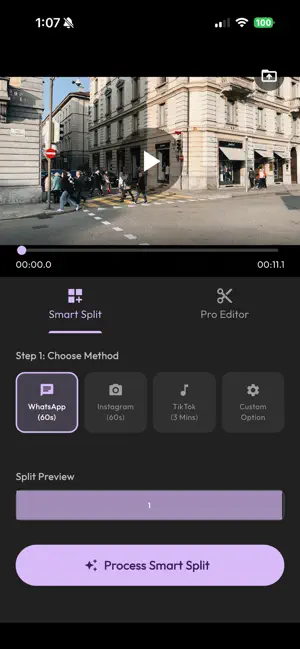
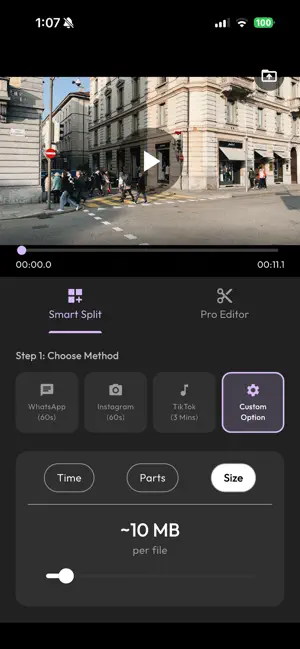
SplitClip is the easiest way to split your long videos into short, shareable clips perfect for social media stories and status updates. Have a long video you want to share? Don't worry about duration limits. SplitClip acts as your personal easy video cutter, automatically slicing your content into seamless segments that fit perfectly on your favorite platforms. Why SplitClip? Perfect for Social Media: WhatsApp Status: Automatically split videos into 60-second clips to share your full story. Instagram & Facebook: Create seamless cuts for Stories and Reels. TikTok: Prepare longer content (up to 3 minutes) for your audience. Custom Split: Define your own duration to fit any platform or video grid layout. All-in-One Tools: Smart Split: Just choose a target platform, and we handle the rest. Trim & Cut: Precisely trim unwanted parts from the beginning or end of your video. Delete Segments: Remove boring middle sections to keep your real clips exciting. No Crop: Maintains your original video aspect ratio. Premium Experience: No Watermark: Clean, professional video output. High Quality: Keeps your original video resolution. Fast Processing: Split and cut videos in seconds. Built-in Player: Watch and verify your media clips before saving. How to Use: Select a video from your gallery. Choose a preset (WhatsApp, Instagram, TikTok) or set a Custom time. Tap "Process" and let SplitClip do the magic. Share your feed videos directly to social media! Whether you are capturing memories, creating entertainment clips, or sharing moments with friends, SplitClip makes it simple. No complex editing skills needed. Just split, save, and share. Download SplitClip now – The essential tool for every story teller!
What’s new
Version 1.05 · Updated May 5, 2026
Fix bugs and annoying notifications
App privacy
The developer, Dongsik Son, reported these privacy practices to Apple.
Data Used to Track You
The following data may be used to track you across apps and websites owned by other companies:
- Identifiers: User ID, Device ID
- Usage Data: Product Interaction, Advertising Data, Other Usage Data
Data Not Linked to You
The following data, which may be collected but is not linked to your identity, may be used for the following purposes:
- Identifiers: User ID, Device ID
- Usage Data: Product Interaction, Advertising Data, Other Usage Data
- Diagnostics: Crash Data, Performance Data, Other Diagnostic Data
Used for: Third-Party Advertising, Developer’s Advertising or Marketing, Analytics, Product Personalization, App Functionality, Other Purposes
Alternatives to SplitClip: Video Splitter
Looking for apps like SplitClip: Video Splitter? Here are 6 similar apps on the App Store.
-
 Tau34 - Video Splitter
-
 Rivela: AI Photo Editor
-
 Pixel Form
-
 Pauseless: Auto Silence Cutter
-
 SplitFast
-
 HLG to HDR
| App | Rating | Price | Last updated | Compare |
|---|---|---|---|---|
| SplitClip: Video Splitter | – | Free | May 5, 2026 | |
| Tau34 - Video Splitter | – | Free | Nov 10, 2025 | Compare |
| Rivela: AI Photo Editor | – | Free | Oct 31, 2026 | Compare |
| Pixel Form | – | Free | Oct 24, 2026 | Compare |
| Pauseless: Auto Silence Cutter | – | Free | Aug 6, 2026 | Compare |
| SplitFast | – | Free | Sep 20, 2024 | Compare |
| HLG to HDR | – | Free | Oct 25, 2026 | Compare |