

RiseOrPay - Alarm
Roger Lee Productivity iPhoneiPadiPod touch
RiseOrPay - Alarm is a free Productivity app for iPhone and iPad by Roger Lee. Requires iOS 15.1. Updated May 14, 2026.
- Price
- Free
- on the App Store
- Size
- 53 MB
- Age 4+
- Updated
- May 14
- 2026 · v1.1.33
Screenshots

About RiseOrPay - Alarm
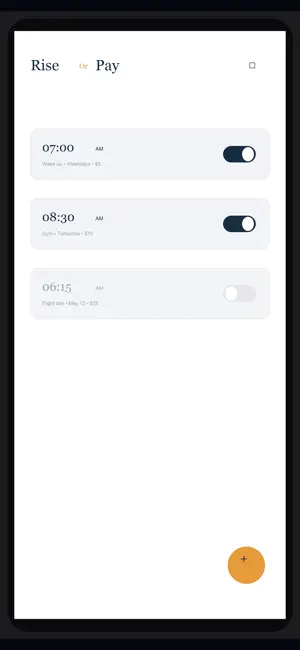
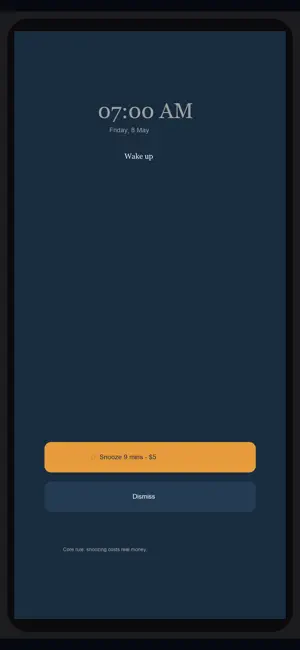
The alarm clock that costs you when you snooze. RiseOrPay flips the script on the snooze button. You set a small commitment fee — an amount that stings just enough to matter to you. Hit snooze, and that fee gets charged. Wake up on time, and it never does. This isn't a punishment app. It's a commitment device. You decide the amount. You decide which alarms enforce it. You decide if it's $1 or $20. The app simply holds you to the promise you made yourself last night. HOW IT WORKS 1. Set an alarm. 2. Choose a commitment fee — $1, $5, $20, whatever moves you. 3. Wake up when the alarm rings, dismiss it, and you keep your money. 4. Hit snooze, and your committed fee is charged. Yes, really. WHY IT WORKS Alarms don't fail because they're too quiet. They fail because the cost of staying in bed is zero. RiseOrPay makes the cost real. For most people, even a small charge breaks the cycle in 3-4 days. WHAT'S INSIDE - Multi-alarm scheduling with custom labels and repeat days - 10+ alarm sounds: radar, beacon, chimes, circuit, reflection, and more - Reliable wake-up: exact alarms, full-screen alerts, background audio - Dismiss action that requires more than a single tap (so you can't sleep-dismiss) - Daily, weekly, and monthly stats: how often you woke up clean vs. paid up - Commitment fees fully optional — set $0 if you just want a great alarm PAYMENTS & SAFETY - All charges are processed via the App Store. No card numbers stored on our servers. - You can change or remove the commitment fee on any alarm at any time. - Charges only apply when YOU snooze YOUR own alarm. There is no penalty for missing the alarm entirely or for app errors. - Refund any unintended charge within 24 hours via in-app support. - Free to download. Use it forever with $0 commitment if you want. PRIVACY - Alarm settings are stored on your device. - No personal data is sold or shared. - Read the full privacy policy at the link below. Stop negotiating with your snooze button. Download RiseOrPay.
App privacy
The developer, Roger Lee, reported these privacy practices to Apple.
Data Linked to You
The following data, which may be collected and linked to your identity, may be used for the following purposes:
- Purchases: Purchase History
Used for: App Functionality
Data Not Linked to You
The following data, which may be collected but is not linked to your identity, may be used for the following purposes:
- Identifiers: Device ID
- Diagnostics: Crash Data, Performance Data
Used for: App Functionality
Alternatives to RiseOrPay - Alarm
Looking for apps like RiseOrPay - Alarm? Here are 6 similar apps on the App Store. The highest rated is Alarmaze - Solve To Stop (5.0/5), and all 6 are free to download.
-
 FineTime - Money Alarm Clock
4.2
FineTime - Money Alarm Clock
4.2
-
 Alarmaze - Solve To Stop
5.0
Alarmaze - Solve To Stop
5.0
-
 Workle
5.0
Workle
5.0
-
 Haptics presets - Pulsar
5.0
Haptics presets - Pulsar
5.0
-
 Bx Website Blocker,Block Sites
4.5
Bx Website Blocker,Block Sites
4.5
-
 Regain: Screen Time Control
4.3
Regain: Screen Time Control
4.3
| App | Rating | Price | Last updated | Compare |
|---|---|---|---|---|
| RiseOrPay - Alarm | – | Free | May 14, 2026 | |
| FineTime - Money Alarm Clock | 4.2 / 5 (10) | Free | Sep 11, 2026 | Compare |
| Alarmaze - Solve To Stop | 5.0 / 5 (1) | Free | May 22, 2026 | Compare |
| Workle | 5.0 / 5 (1) | Free | Oct 15, 2026 | Compare |
| Haptics presets - Pulsar | 5.0 / 5 (2) | Free | Sep 10, 2026 | Compare |
| Bx Website Blocker,Block Sites | 4.5 / 5 (279) | Free | Jul 20, 2026 | Compare |
| Regain: Screen Time Control | 4.3 / 5 (30) | Free | Oct 23, 2026 | Compare |
Compare RiseOrPay - Alarm with the top alternatives: ratings, updates, ASO score and keyword gaps →