

OneAlbum: Photo Collage
Hapitsuku Studio Photo & Video iPhoneiPadiPod touch
OneAlbum: Photo Collage is a free Photo & Video app for iPhone and iPad by Hapitsuku Studio. Requires iOS 17.0. Updated October 9, 2026.
- Price
- Free
- on the App Store
- Size
- 12 MB
- Age 4+
- Updated
- Oct 9
- 2026 · v1.18.0
Screenshots


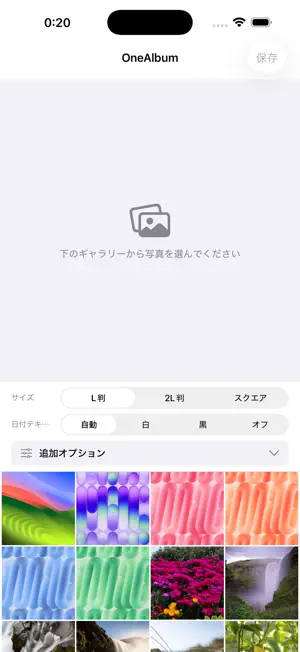
About OneAlbum: Photo Collage
Turn travel and family photos into a single collage. OneAlbum automatically arranges up to 9 photos. Choose L-size, 2L-size, or Square, adjust the date labels and borders, then save or share your album image. ■ Arrange photos in one image • Automatically lay out up to 9 photos • Free output sizes: L-size, 2L-size, and Square • A5 output is available through a separate in-app purchase • Reorder photos to adjust the result ■ Adjust photos and date labels • Zoom, move, and rotate each photo • Show or hide capture dates and adjust text size, color, position, and orientation • Change border color and width • Adjust saturation, brightness, and color temperature ■ Save and share Save the finished image to your Photo Library or use the share button to send it to another app. ■ Free features and in-app purchases Photo layout, editing, saving, and sharing in L-size, 2L-size, and Square are free. Color adjustments are also free to try. Saving multiple named presets for your color adjustments and border settings requires a one-time purchase. A5 output and ad removal are separate one-time purchases. ■ Photo processing and ads Collages are generated on your device. The free version displays Google AdMob banner and full-screen ads. Ads and purchases use a network connection. You can use the app without granting tracking permission. ■ Terms of Use This app is provided under Apple's Standard End User License Agreement: https://www.apple.com/legal/internet-services/itunes/dev/stdeula/
What’s new
Version 1.18.0 · Updated October 9, 2026
A5 output is now available through an in-app purchase. L-size, 2L-size, and Square remain free to use.
App privacy
The developer, Hapitsuku Studio, reported these privacy practices to Apple.
Data Used to Track You
The following data may be used to track you across apps and websites owned by other companies:
- Identifiers: Device ID
- Usage Data: Product Interaction, Advertising Data
Data Linked to You
The following data, which may be collected and linked to your identity, may be used for the following purposes:
- Identifiers: Device ID
- Usage Data: Product Interaction, Advertising Data
Used for: Third-Party Advertising
Data Not Linked to You
The following data, which may be collected but is not linked to your identity, may be used for the following purposes:
- Diagnostics: Crash Data, Performance Data
Used for: App Functionality
Alternatives to OneAlbum: Photo Collage
Looking for apps like OneAlbum: Photo Collage? Here are 6 similar apps on the App Store.
-
 Remixit:Creative Photo Collage
-
 # Simple Photo Collage
-
 らくらく透過 - AI背景切り抜き
-
 Trash Snap
-
 PicFile: Smart Album Maker
-
 Photo Video Storage - CloudNAS
| App | Rating | Price | Last updated | Compare |
|---|---|---|---|---|
| OneAlbum: Photo Collage | – | Free | October 9, 2026 | |
| Remixit:Creative Photo Collage | – | Free | May 28, 2026 | Compare |
| # Simple Photo Collage | – | Free | Sep 16, 2026 | Compare |
| らくらく透過 - AI背景切り抜き | – | Free | Jun 8, 2026 | Compare |
| Trash Snap | – | Free | Jul 10, 2026 | Compare |
| PicFile: Smart Album Maker | – | Free | Oct 26, 2026 | Compare |
| Photo Video Storage - CloudNAS | – | Free | Oct 27, 2026 | Compare |