

LittleSteps_Math at kid's pace
에브리데이썸머 Education iPhoneiPadiPod touch
LittleSteps_Math at kid's pace is a free Education app for iPhone and iPad by 에브리데이썸머. Rated 4.5/5 from 4 ratings. Requires iOS 16.4.
- Rating
- 4.5
- 4 ratings
- Price
- Free
- on the App Store
- Size
- 161 MB
- Age 4+
- Updated
- Oct 16
- 2026 · v1.2.16
Screenshots

About LittleSteps_Math at kid's pace
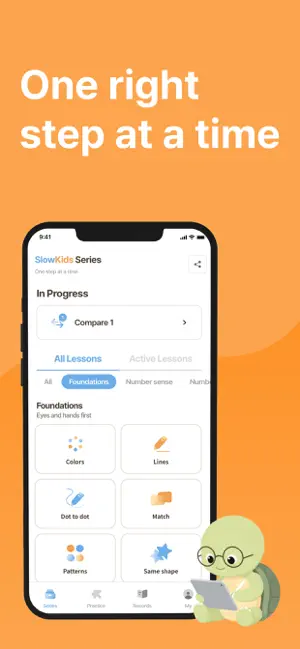
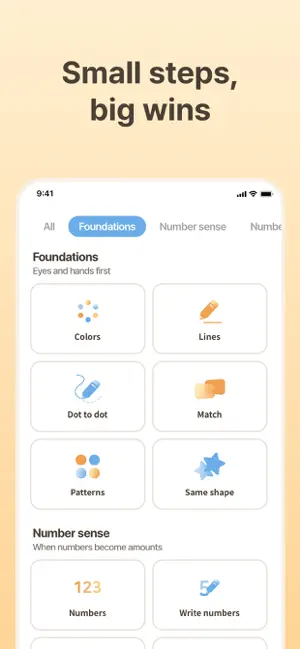
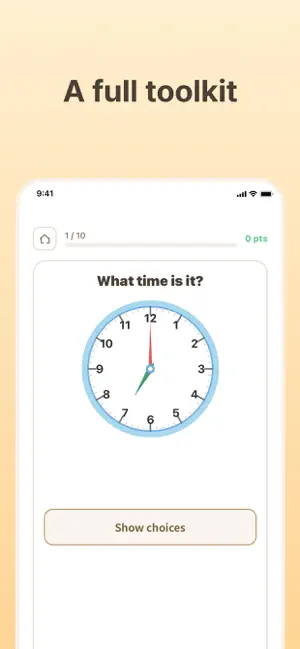
One step at a time. Basic cognition and basic math practice, at your child's pace. "Every other learning app moves too fast for my child." LittleSteps began with that worry, shared by so many parents. It's a learning tool designed for children with developmental delays, borderline intellectual functioning, or slower learning profiles — and for any child who simply learns more slowly than their peers — so they can work through basic cognition and basic math one careful step at a time. ■ Slow, but in the right direction LittleSteps isn't training children to answer quickly. It gives them room to think, to try once more, and to reach the answer on their own — building that experience up little by little. When small successes repeat, children gain confidence, and that confidence becomes fuel for the next challenge. ■ Design principles • Time to think — Nothing rushes an answer. If your child pauses or starts over, the screen simply waits. • Step-by-step hints — When your child gets stuck, the answer isn't handed over all at once. Support arrives in stages, so they can still finish it themselves. • Voice guidance — Questions and instructions are read aloud, so a child who can't read well yet can still practice on their own. • Sensory-friendly — Flashing screens, sudden loud sounds, and fast-moving characters have been deliberately removed. • One activity per screen — Only one activity appears at a time, to reduce distraction. • Real achievement instead of flashy rewards — Rather than sound effects and animations, what remains is the small success your child worked out for themselves. ■ Practice, stage by stage From basic cognition through multiplication, the practice is organized into 8 stages, so your child can move forward one step at a time from wherever they are now. • Basic Cognition — Learning Colors, Learning Shapes, Drawing Lines, Drawing Shapes, Connecting the Dots, Matching the Same, Matching the Opposite, Pattern Practice, Memory Game, Finding the Same Shape • Number Concepts — Learning Numbers, Writing Numbers, Counting, Counting by Tens, Number Matching, Learning Fractions • Clock, Calendar & Money — Telling Time, Reading a Calendar, Coins and Bills, Counting Money, Making Change • Number Relationships — Comparing Basics, Comparing Quantities, Odd and Even Numbers, Number Intervals, Number Interval Practice, Comparing Fractions • Before Addition — Composing Numbers, Decomposing Numbers, Number Bonds • Addition — Adding 1, 2, 3, Single-Digit Addition, Single-Digit Addition Practice, Carrying Practice, Column Addition • Subtraction — Subtracting 1, 2, 3, Single-Digit Subtraction, Single-Digit Subtraction Practice, Borrowing Practice, Column Subtraction • Multiplication — Times Tables Practice, Single-Digit Multiplication, Column Multiplication ■ Who is it for? • Families whose child keeps giving up because other learning apps move too fast • Parents supporting a child with developmental delays or borderline intellectual functioning • Homeschooling families who want to move through one stage at a time • Special education teachers and cognitive therapists looking for a classroom aid • Children just beginning to learn number concepts ■ Together with parents Practice records are saved automatically, so you can see at a glance where your child gets stuck and which stages have become familiar. Nothing pushes your child into the next stage — it's there to help you decide, yourself, when they're truly ready. This isn't practice in solving the fastest. There are no dazzling rewards. It was made for something else: a place where a child can stay at their own pace, and the moment when those small successes add up and they take the next step on their own. ■ Terms & Policies Terms of Service: https://littlesteps.everydaysummer.net/en/terms Privacy Policy: https://littlesteps.everydaysummer.net/en/privacy End User License Agreement (EULA): https://www.apple.com/legal/internet-services/itunes/dev/stdeula/
What’s new
Version 1.2.16 · Updated October 16, 2026
What's new • New stars in Study stamps on the Records tab now drop in from above onto their day. • In Same shape, Shapes and Compare 1, the correct shape now flies over and overlaps when you pick it. • In Odd & Even, the On a ten-frame mode now circles the pairs one at a time. • Calendar now shows a season picture next to the month name. • Fixed text that spilled out of its box or broke in the middle of a word in some languages.
App privacy
The developer, 에브리데이썸머, reported these privacy practices to Apple.
Data Linked to You
The following data, which may be collected and linked to your identity, may be used for the following purposes:
- Purchases: Purchase History
- Contact Info: Email Address
- Identifiers: User ID
Used for: App Functionality
Alternatives to LittleSteps_Math at kid's pace
Looking for apps like LittleSteps_Math at kid's pace? Here are 6 similar apps on the App Store. The highest rated is 토키랜드 (5.0/5), and all 6 are free to download.
-
 톨러 알엑스 - 집중력과 사고력을 키우는 두뇌 트레이닝
-
 나의AAC
나의AAC
-
 토키랜드
5.0
토키랜드
5.0
-
 두부팡 - 영유아 두뇌 훈련 (2세+)
-
 커뮤니샷
커뮤니샷
-
 gemgem400: Pinkfong × Gemgem
5.0
gemgem400: Pinkfong × Gemgem
5.0
| App | Rating | Price | Last updated | Compare |
|---|---|---|---|---|
| LittleSteps_Math at kid's pace | 4.5 / 5 (4 ratings) | Free | October 16, 2026 | |
| 톨러 알엑스 - 집중력과 사고력을 키우는 두뇌 트레이닝 | – | Free | Aug 31, 2026 | Compare |
| 나의AAC | – | Free | Sep 17, 2026 | Compare |
| 토키랜드 | 5.0 / 5 (2) | Free | Aug 11, 2026 | Compare |
| 두부팡 - 영유아 두뇌 훈련 (2세+) | – | Free | Dec 3, 2025 | Compare |
| 커뮤니샷 | – | Free | Aug 14, 2026 | Compare |
| gemgem400: Pinkfong × Gemgem | 5.0 / 5 (1) | Free | Oct 11, 2026 | Compare |