

Peptide Tracker Log & Reminder
Flat Six Labs LLC Health & Fitness iPhoneiPadiPod touch
Peptide Tracker Log & Reminder is a free Health & Fitness app for iPhone and iPad by Flat Six Labs LLC. Rated 4.9/5 from 2,860 ratings. Requires iOS 16.4.
- Rating
- 4.9
- 2.8K ratings
- Price
- Free
- on the App Store
- Size
- 87 MB
- Age 17+
- Updated
- Oct 30
- 2026 · v3.1.0
Screenshots


About Peptide Tracker Log & Reminder
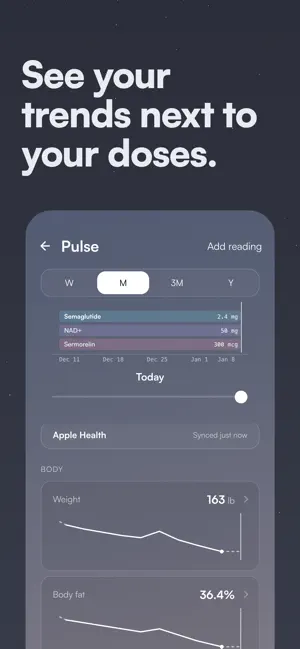
Peptide Tracker is used by over 100,000 people. Track peptides and GLP-1s in one free app. Build your stack, log every dose, manage vials and supplies, monitor injection sites, visualize estimated plasma levels, sync Apple Health, follow your progress, and connect with people using the same compounds. Whether you’re managing one compound or a complex stack, keep your schedules, dose history, and inventory organized in one place. TRACK YOUR PROTOCOL Build Your Stack Create protocols with custom doses, schedules, frequencies, and durations. Add common peptides in seconds or create your own custom compounds. Log Every Dose Record scheduled or past doses, add notes, track injection sites, and edit entries anytime. When you correct a dose or change the vial it came from, your inventory updates automatically. Manage Vials and Supplies Keep track of mixed and unmixed vials, remaining volume, blend components, bacteriostatic water, and other supplies so you always know what you have on hand. See Your Estimated Levels Visualize how each compound builds and fades over time with an estimated plasma level curve based on your logged doses and the compound's half-life. Stay on Schedule Optional reminders help you stay consistent. See taken, skipped, and missed doses at a glance, follow your week with a simple checklist, and watch your consistency build a night sky you can share. FOLLOW YOUR PROGRESS Sync Apple Health Connect Apple Health to see your weight and body measurements, blood pressure, resting heart rate, HRV, sleep, steps, active energy, and nutrition in Pulse, on the same timeline as your doses. Peptide Tracker only reads from Apple Health and asks your permission first. Connect it from Settings or from Pulse. Track Your Weight Log your weight over time, follow the trend, and see your progress alongside the protocols you're running. Compare Progress Photos Take consistent progress photos with alignment tools that help you match your framing each time. Browse your photos by month, compare any two side by side, and share the result. Review Your History Browse your complete dose history in a calendar and quickly see what you took, when you took it, and which protocol it belonged to. CONNECT WITH PEOPLE ON THE SAME COMPOUNDS Ask questions and hear from people who have actually used the compounds you're researching or tracking. Share your own experience through structured answers, reply directly to others, and continue the conversation in open threads with quotes and mentions. Everyone participates under a username rather than a real name, with reporting, blocking, and community notes built in. LEARN AND EXPLORE Browse educational content covering peptide basics and use the Peptide Assistant for general peptide information. YOUR DATA STAYS YOURS Your protocol and progress are yours. Export your data by contacting us at any time or delete your account directly from the app. BUILT FOR PEPTIDE USERS Peptide Tracker was built around the real workflows, terminology, and challenges that come with managing peptide protocols. Track semaglutide, tirzepatide, retatrutide, BPC-157, TB-500, GHK-Cu, CJC-1295, ipamorelin, NAD+, TRT, HRT, custom compounds, blends, and more. Built by peptide users, for peptide users. Peptide Tracker is for tracking and education only. Estimated plasma levels are provided for informational purposes and are not medical guidance. Peptide Tracker does not provide medical advice or replace guidance from a qualified medical professional. 100% free. No paywalls. No feature limits. Download Peptide Tracker and build your first protocol in minutes. Review our Terms of Use at https://peptidetracker.ai/terms and our Privacy Policy at https://peptidetracker.ai/privacy. Questions? Email us at [email protected]
Ratings & reviews
4.9
2.8K ratings
What’s new
Version 3.1.0 · Updated October 30, 2026
Peptide Tracker no longer calculates doses or draws. When you set up an injection protocol, you enter the amount, the draw in syringe units or pen clicks, or both. The draw you enter is the only draw the app shows. Inventory shows what each vial or supply holds instead of how many doses are left. Peptide Tracker now runs full screen on the iPhone Duo and keeps every screen clear of its status bar. On the open Duo and on iPad, screens like Today, Log dose, Protocol details, and your vials and supplies split into two columns. The summary and the actions you need stay in view beside the details. Connect Apple Health from the new Apple Health row in Settings to see your weight, sleep, and heart rate next to your doses in Pulse. Share a protocol's schedule as an image from the protocol screen. You choose whether the card includes dose amounts and your username. Protocol details now has an Upcoming card for your next dose, one Schedule card for every block and titration phase, and a Dose history card with your adherence. Tap In your system to open a full plasma level chart. You can switch a protocol between as-needed and scheduled when you edit it, without losing its history. Vial details show the day you first drew from a vial. You can set or change that date when you add or edit the vial. Tap the plus button on a vial, supply, or BAC water to add more of the same. The Add form opens with its contents, brand, and pharmacy already filled in. Appearance in Settings now offers Light and Dark alongside Dawn and Dusk. Choose Light or Dark to pick an accent, including the new Ink accent with slate blue buttons.
App privacy
The developer, Flat Six Labs LLC, reported these privacy practices to Apple.
Data Linked to You
The following data, which may be collected and linked to your identity, may be used for the following purposes:
- Usage Data: Product Interaction
- Health & Fitness: Health
- Contact Info: Email Address
- Identifiers: User ID, Device ID
- Diagnostics: Crash Data, Performance Data, Other Diagnostic Data
Used for: Analytics, App Functionality
Alternatives to Peptide Tracker Log & Reminder
Looking for apps like Peptide Tracker Log & Reminder? Here are 6 similar apps on the App Store. The highest rated is Peptide Tracker & Calculator (4.8/5), and all 6 are free to download.
-
 PeptidePal – Peptide Tracker
4.7
-
 Pep AI: GLP-1 Tracker App
4.7
-
 Peptide Tracker & Calculator
4.8
-
 PeptIQ: Peptide Tracker
4.7
-
 Stackr - Peptide GLP-1 Tracker
4.4
-
 PepPedia
3.6
| App | Rating | Price | Last updated | Compare |
|---|---|---|---|---|
| Peptide Tracker Log & Reminder | 4.9 / 5 (2,860 ratings) | Free | October 30, 2026 | |
| PeptidePal – Peptide Tracker | 4.7 / 5 (4,917) | Free | Oct 28, 2026 | Compare |
| Pep AI: GLP-1 Tracker App | 4.7 / 5 (3,993) | Free | Oct 28, 2026 | Compare |
| Peptide Tracker & Calculator | 4.8 / 5 (592) | Free | Oct 31, 2026 | Compare |
| PeptIQ: Peptide Tracker | 4.7 / 5 (953) | Free | Oct 20, 2026 | Compare |
| Stackr - Peptide GLP-1 Tracker | 4.4 / 5 (204) | Free | Oct 26, 2026 | Compare |
| PepPedia | 3.6 / 5 (73) | Free | Oct 29, 2026 | Compare |