

Pebble - Paycheck Budget
CLMS Studio LLC Finance iPhoneiPadiPod touchApple Watch
Pebble - Paycheck Budget is a free Finance app for iPhone and iPad by CLMS Studio LLC. Rated 5.0/5 from 8 ratings. Requires iOS 18.0.
- Rating
- 5.0
- 8 ratings
- Price
- Free
- on the App Store
- Size
- 14 MB
- Age 4+
- Updated
- Oct 21
- 2026 · v3.2.0
Screenshots


About Pebble - Paycheck Budget
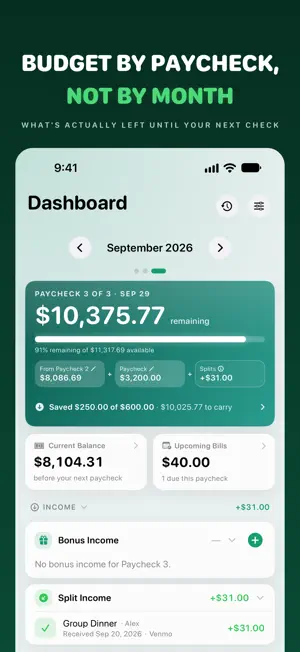
Pebble - Budget by Paycheck Most budgeting apps think in months. Your money doesn't. Pebble budgets the way you actually get paid — paycheck by paycheck — so you always know what's safe to spend before the next one lands. Set your pay schedule once (semi-monthly, biweekly, or weekly) and Pebble pages every month into its real paychecks. Each paycheck gets its own dashboard with a clear "Remaining" number after bills, card payments, and everyday spending settle. See where you're heading. Pebble projects your paychecks forward and shows where each month ends up — what lands, what goes out, and what's left when it does. It tells you your tightest point and warns you when you'd run short, and it counts your everyday spending, not just your bills, so the months ahead aren't quietly optimistic. Track a loan the way your lender does. Enter what you owe today and Pebble projects the payoff forward from there, tells you which month makes the last payment, and stops charging it after that. Planning to pay extra? Add a one-off or monthly extra principal payment and Pebble shows how many months sooner the loan ends and how much interest you keep. Moving money to savings? Record the transfer and Pebble counts it as saving, not spending — with a Savings home that tracks your balance month by month, and a linked savings account (Pro) that updates as your moves land. Set a monthly limit on any category and Pebble shows what you've spent against it — with the transactions behind every figure — and Pebble Pro draws your net worth month by month, so you can see exactly what moved it. PLAN EVERY PAYCHECK • A paycheck dashboard with a live Remaining hero card • Upcoming bills for the selected paycheck, sorted by date • Reorderable cards so the layout matches how you think • Variable paycheck amounts, bonus income, and start-balance overrides TRANSACTIONS, YOUR WAY • A clean ledger with search, category, and card filters • Browse any month with the new month switcher • Multi-select bulk edit: move to paycheck, move to card, or delete • Per-expense paycheck assignment with smart defaults CREDIT + DEBIT CARDS • Charges attribute to the paycheck that will actually pay the statement • Carry-in / carry-out badges show what's settling this cycle vs next • Track balances and log payments; debit cards settle instantly SPLIT EXPENSES • Split any expense across as many people as you need • Request via Venmo, Zelle, Cash App, or cash and track who has paid • Received shares flow back in as income on the right paycheck ACCOUNTS & NET WORTH (Pro) • Manual-balance accounts for assets and liabilities • A net-worth roll-up: assets − liabilities − card debt • Per-account and per-card "include in net worth" toggles • Always your numbers — Pebble never fetches or guesses balances RECURRING & REMINDERS • Set a bill once; it materializes each cycle on its due date • Recurring income templates for predictable extra money • Optional local reminders a few days before each bill is due • Subscription health view with monthly + yearly totals EVERYWHERE YOU ARE • iPhone and iPad, with an adaptive layout • Apple Watch app — glance, bills due, quick-add, and complications (free) • Home and Lock Screen widgets for Remaining, next bill, and splits • Private iCloud sync across your devices, plus daily iCloud Drive backups PRIVACY FIRST Your data lives in your own private iCloud. No account to create, no ads, no third-party trackers, no bank connections. Pebble never sees your finances. PEBBLE PRO — ONE-TIME PURCHASE The free tier covers everyday paycheck budgeting. Pebble Pro is a single $9.99 purchase (no subscription) that unlocks: • Unlimited cards, recurring templates, and split participants • Accounts and net-worth tracking • Full history and year recap • Unlimited future-month planning • CSV and PDF export Budget the way you get paid. Download Pebble and take control of every paycheck.
Ratings & reviews
5.0
8 ratings
What’s new
Version 3.2.0 · Updated October 21, 2026
Your Apple Watch now shows its working. • Three pages on the wrist. Turn the Digital Crown from the glance to This paycheck — what you've spent, what your cards draw, what's in savings, your spending limits and the previous paycheck, each opening its own list — and on to Sync, which says when the Watch last heard from iCloud, checks your data's health and has a Sync now button. • Every transaction this paycheck. Tap Spent for the same list your iPhone's Transactions tab shows, newest first, and tap one for its detail: the date, the paycheck, the card, how it was added and which device last changed it. • How Remaining is calculated. Tap the glance's big number and the Watch lays it out term by term — starting balance, paycheck, bonuses, splits received, card payments, other spending — the same numbers as your iPhone, so if the two ever differ you can see which term does. • It tells you when it's out of date. If the Watch hasn't heard from iCloud in six hours, the glance says so and dims its tiles; after a day it sends one notification. You can also mark a bill paid from the wrist. • Three new complications: Spent This Paycheck, Spending Limits and Sync Freshness, each in every family. • Recent Changes. Settings → iCloud & Sync → Recent Changes lists every add, edit and delete from every device signed into your iCloud, newest first, and Other Devices shows each device's latest figures beside this one's — with "As of …" when a device is behind. Fixed: "Bills due this paycheck" is now one number on the iPhone, the Watch and the widgets, at your share of a split bill. The Watch's Owed tile and the widgets count only what is still owed to you. Cleaning up a duplicate month no longer deletes bills your other devices already have, and a second device no longer creates its own copy of a new month before iCloud delivers yours. Deleting a split bill from Transactions no longer crashes, and a card you've already paid no longer counts as due. Questions or feedback? Reach us at clmsstudio.com/apps/pebble/support.
App privacy
The developer, CLMS Studio LLC, reported these privacy practices to Apple.
Data Not Collected
The developer does not collect any data from this app.
Alternatives to Pebble - Paycheck Budget
Looking for apps like Pebble - Paycheck Budget? Here are 6 similar apps on the App Store. The highest rated is PayAnchor: Paycheck Budget (5.0/5), and all 6 are free to download.
-
 NextPayPlanner:Paycheck Budget
4.0
-
 Payday: Paycheck Planner
-
 Finolid: Budget by Paycheck
-
 PayTrackr: Paycheck Budget
4.5
-
 Allot: Budget By Paycheck
4.6
-
 PayAnchor: Paycheck Budget
5.0
| App | Rating | Price | Last updated | Compare |
|---|---|---|---|---|
| Pebble - Paycheck Budget | 5.0 / 5 (8 ratings) | Free | October 21, 2026 | |
| NextPayPlanner:Paycheck Budget | 4.0 / 5 (1) | Free | Mar 30, 2026 | Compare |
| Payday: Paycheck Planner | – | Free | Jul 13, 2026 | Compare |
| Finolid: Budget by Paycheck | – | Free | Jul 31, 2026 | Compare |
| PayTrackr: Paycheck Budget | 4.5 / 5 (2) | Free | Jul 16, 2026 | Compare |
| Allot: Budget By Paycheck | 4.6 / 5 (8) | Free | Oct 3, 2026 | Compare |
| PayAnchor: Paycheck Budget | 5.0 / 5 (2) | Free | Oct 12, 2026 | Compare |