

signAPP
Wei Dai Finance iPhoneiPadiPod touch
signAPP is a free Finance app for iPhone and iPad by Wei Dai. Requires iOS 15.1. Updated August 12, 2026.
- Price
- Free
- on the App Store
- Size
- 24 MB
- Age 4+
- Updated
- Aug 12
- 2026 · v5.4.0
Screenshots



About signAPP
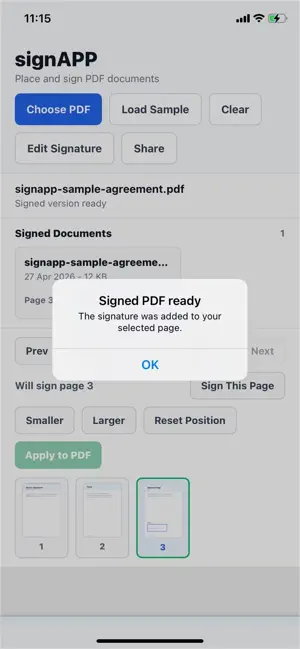
signAPP helps you sign PDF documents directly on your iPhone. Pick a PDF from your device, draw a handwritten signature, choose the page, drag the signature into position, resize it, and save a signed copy. Signed documents stay in your local history so you can reopen, rename, share, or delete them later. Key features: - Select PDF files from your device. - Preview PDF pages before signing. - Draw a handwritten signature. - Choose the exact page to sign. - Drag and resize the signature before applying it. - Save signed PDFs locally. - Reopen, rename, share, or delete signed documents from history. - Share signed PDFs using the native iOS share sheet.
What’s new
Version 5.4.0 · Updated August 12, 2026
• Improved PDF editor toolbar layout for better readability. • Improved Photo to PDF editing reliability. • Fixed incorrect “Photo editor unavailable” messages. • Improved overall stability and user experience.
App privacy
The developer, Wei Dai, reported these privacy practices to Apple.
Data Not Collected
The developer does not collect any data from this app.
Alternatives to signAPP
Looking for apps like signAPP? Here are 6 similar apps on the App Store. The highest rated is EZRemit (5.0/5), and all 6 are free to download.


| App | Rating | Price | Last updated | Compare |
|---|---|---|---|---|
| signAPP | – | Free | August 12, 2026 | |
| BookWell | – | Free | Jun 19, 2026 | Compare |
| EZRemit | 5.0 / 5 (1) | Free | Sep 11, 2026 | Compare |
| AustMilBank | 4.8 / 5 (10) | Free | Oct 13, 2026 | Compare |
| Coposit | – | Free | Sep 29, 2026 | Compare |
| Kogan Money Credit Cards | – | Free | Sep 11, 2026 | Compare |
| BillOut - Bill Tracker | 4.8 / 5 (300) | Free | Jun 22, 2026 | Compare |
Compare signAPP with the top alternatives: ratings, updates, ASO score and keyword gaps →