

Video to Text Converter
Code Stars Productivity iPhoneiPadiPod touch
Video to Text Converter is a free Productivity app for iPhone and iPad by Code Stars. Requires iOS 16.6. Updated August 23, 2026.
- Price
- Free
- on the App Store
- Size
- 108 MB
- Age 4+
- Updated
- Aug 23
- 2026 · v1.0.2
Screenshots



About Video to Text Converter
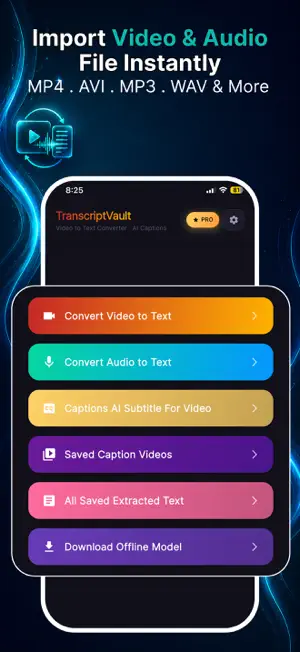
TranscriptVault turns any video or audio file into accurate text — completely offline. No internet. No uploads. No privacy risk. Your files never leave your device. Whether you're transcribing a lecture, generating subtitles for a video, or captioning content for social media, TranscriptVault does it all — instantly, privately, and for free. ** OFFLINE VIDEO & AUDIO TRANSCRIPTION** Convert MP4, MOV, AVI, MKV, WEBM, MP3, WAV, M4A, AAC and more to plain text in seconds. All processing happens on your device using powerful Vosk AI — no cloud, no subscription, no data shared. ** AI SUBTITLE GENERATOR (SRT & VTT)** Automatically generate perfectly timed subtitles from any video. Watch your video with a live subtitle overlay that syncs to every word in real time. ** FULL SUBTITLE EDITOR** Review and refine every caption before you export. Edit text, delete unwanted lines, or flag lines for review — all in a clean, intuitive interface. ** TRANSLATE SUBTITLES INTO 20 LANGUAGES** Instantly translate your subtitles into English, Spanish, French, German, Portuguese, Italian, Russian, Chinese, Japanese, Korean, Arabic, Hindi, Turkish, Dutch, Polish, Vietnamese, Swedish, Ukrainian, Persian, and Indonesian. ** CUSTOMIZABLE SUBTITLE STYLE** Choose your font size (10–28), toggle bold and italic, pick your text color, and set a background color. Make captions look exactly the way you want before exporting. ** BURN SUBTITLES INTO VIDEO** Permanently embed subtitles into your video file with one tap. Share the captioned video directly from the app — no quality loss, no third-party tools needed. ** EXPORT SRT & VTT FILES** Export subtitles in industry-standard .SRT or .VTT format. Compatible with YouTube, Instagram, TikTok, Premiere Pro, Final Cut Pro, and all major video platforms. ** SAVED SUBTITLE FILES** All your exported subtitle files are saved in-app. View parsed subtitle lines with timecodes, switch to raw file view, copy to clipboard, or re-share anytime. ** 50+ LANGUAGE MODELS** Download Vosk language models for English, Spanish, French, German, Chinese, Japanese, Hindi, Arabic, Russian, Portuguese, Italian, Korean, and many more. Works fully offline once downloaded. ** COMPLETE PRIVACY** No account. No sign-in. No data collection. Everything — transcription, subtitle generation, translation — runs privately on your device. ** PRO FEATURES** Upgrade to TranscriptVault Pro to unlock unlimited AI subtitle generation, remove all ads, and get instant access to every feature with no restrictions. --- **WHAT PEOPLE USE IT FOR:** • Students transcribing lectures and class recordings • Content creators adding captions to YouTube, TikTok, and Instagram videos • Journalists transcribing interviews and press conferences • Podcasters creating full transcripts and show notes • Professionals captioning meeting recordings • Filmmakers generating subtitles for short films and documentaries • Language learners reading along with foreign-language audio --- **SUPPORTED FORMATS:** Video: MP4, MOV, AVI, MKV, WEBM Audio: MP3, WAV, M4A, AAC, and more **EXPORT FORMATS:** .SRT · .VTT · Plain Text --- Terms of Use: https://www.apple.com/legal/internet-services/itunes/dev/stdeula/ Privacy Policy: https://prismatic-belekoy-sdfa-privacy.netlify.app/ Customer Support: Have questions or feedback? Contact us at [email protected] — we read every message and respond within 24 hours.
What’s new
Version 1.0.2 · Updated August 23, 2026
bugs fixes and user experience improved
App privacy
The developer, Code Stars, reported these privacy practices to Apple.
Data Used to Track You
The following data may be used to track you across apps and websites owned by other companies:
- Identifiers: Device ID
Data Not Linked to You
The following data, which may be collected but is not linked to your identity, may be used for the following purposes:
- Identifiers: Device ID
Used for: Third-Party Advertising, Analytics
Alternatives to Video to Text Converter
Looking for apps like Video to Text Converter? Here are 6 similar apps on the App Store. The highest rated is Transcribe Video to Text: Nota (4.3/5), and all 6 are free to download.
-
 Tenscit
-
 EchoVault - AI Meeting Notes
-
 Offscript: Private Voice Memos
4.0
Offscript: Private Voice Memos
4.0
-
 AI Video Chat & Transcript
-
 ReinforcingConcreteDesign
-
 Transcribe Video to Text: Nota
4.3
Transcribe Video to Text: Nota
4.3
| App | Rating | Price | Last updated | Compare |
|---|---|---|---|---|
| Video to Text Converter | – | Free | August 23, 2026 | |
| Tenscit | – | Free | Aug 31, 2026 | Compare |
| EchoVault - AI Meeting Notes | – | Free | Aug 30, 2026 | Compare |
| Offscript: Private Voice Memos | 4.0 / 5 (1) | Free | Sep 4, 2026 | Compare |
| AI Video Chat & Transcript | – | Free | Mar 16, 2026 | Compare |
| ReinforcingConcreteDesign | – | Free | Feb 4, 2025 | Compare |
| Transcribe Video to Text: Nota | 4.3 / 5 (6) | Free | Sep 21, 2026 | Compare |