

InkCalc: Notepad Calculator
KENTARO SOGA Productivity iPhoneiPadiPod touchMac
InkCalc: Notepad Calculator is a free Productivity app for iPhone and iPad by KENTARO SOGA. Requires iOS 17.0. Updated October 7, 2026.
- Price
- Free
- on the App Store
- Size
- 2 MB
- Age 4+
- Updated
- Oct 7
- 2026 · v1.2.3
Screenshots


About InkCalc: Notepad Calculator
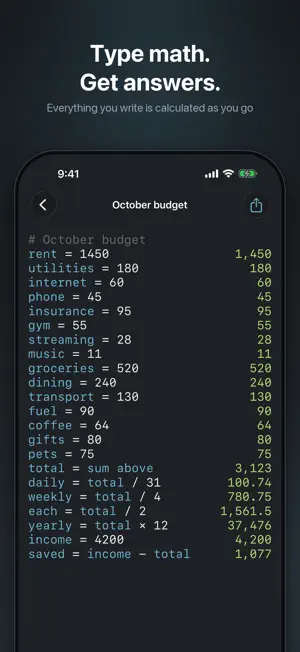
Write "29 dollars an hour, 22 hours a week, for 4 weeks." Tap AI. Get 2,552. InkCalc is a calculator you write in sentences. No re-punching numbers into a keypad, no wondering what that figure was for. Units, live currency, dates and percentages all work inline, right in your notes. Write expressions line by line and results appear on the right, accumulating over time alongside written notes — a calculator built to be kept open as a long-running notebook, not a scratchpad. For iPhone, iPad and Mac. Universal Purchase means one subscription covers all three. Starts with a 1-month free trial (auto-renews after that — see SUBSCRIPTION below for details). — AI-NATIVE ACTIONS (subscription required) — AI — Natural language to expression Write "29 dollars an hour, 22 hours a week, for 4 weeks", tap the AI button in the toolbar, and AI converts it to `29 * 22 * 4`. Fix — AI fixes errors With one tap, AI replaces a parser-failed line with a corrected expression. Summary — One-to-three-line note summary AI reads your whole note and summarizes the intent and conclusion in plain natural language. Intent — Intent inference from comments Write a question comment like `# Monthly communications total?`, and AI analyzes the relevant lines and inserts a summing formula directly below the question. Backends: Apple Intelligence (default, on-device or via Apple Private Cloud Compute with end-to-end encryption — neither the developer nor any third party can read the data), or bring-your-own-key options. With a bring-your-own-key backend, the user supplies their own credentials and prompts are sent to the chosen provider. — CALCULATOR FEATURES — • Unit math: `5 km in miles`, `1 kg as lb`, `100 USD in JPY` • Real-time currency conversion (USD, EUR, JPY, GBP, and more) — subscription required • Percent: `20% of 100`, `1000 + 10%` • Hex / binary / octal literals + bitwise ops: `0xff & 0x0f`, `255 in hex` • Line references: `ans`, `line2`, `sum above`, `avg above`, `total` • Dates: `2025-04-25 + 7 days`, `today + 30 days`, date diff in days • Functions: sqrt, sin/cos/tan, ln/log, round/floor/ceil, sum/min/max/avg, and more • Constants: pi, e, tau • Variables: assign with `x = 5` and reuse on later lines — AS A CALCULATION NOTE — • Multiple notes + folder selection. Each note is a local `.inkcalc` file. • iCloud Drive sync keeps your notes up to date across iPhone, iPad, and Mac. • Open `.inkcalc` files directly from the Files app. • Export to Markdown / CSV. — UI — • Designed for iPhone and iPad (two-pane list + editor layout on iPad) • Quick bar above the keyboard: comment toggle and one-tap calculator symbols • Dark, minimal UI with a light/dark appearance setting • Adjustable font size and decimal precision — PRIVACY — The developer collects nothing — no server, no telemetry, no analytics. With Apple Intelligence as the backend, requests stay on-device or are processed through Apple Private Cloud Compute with end-to-end encryption — neither the developer nor any third party can read the data. See the in-app privacy policy for details. — SUBSCRIPTION — • Title: InkCalc Monthly (auto-renewable subscription) • Length: 1 month, auto-renewing • Price: $1.99 / month (Apple displays your local price in-app) • Free trial: 1 month for new subscribers • Payment is charged to your Apple ID after the trial. The subscription auto-renews unless canceled at least 24 hours before the end of the current period. • Manage or cancel in Settings → [your name] → Subscriptions, or right from the app's own settings screen. • Privacy Policy: https://inkcalc.app/privacy • Terms of Use (Apple Standard EULA): https://www.apple.com/legal/internet-services/itunes/dev/stdeula/ — REQUIREMENTS — iPhone and iPad: iOS 17.0 or later Mac: macOS 13.0 or later (Apple Silicon and Intel) Universal Purchase — one subscription covers all three devices.
What’s new
Version 1.2.3 · Updated October 7, 2026
Improvements and bug fixes.
App privacy
The developer, KENTARO SOGA, reported these privacy practices to Apple.
Data Not Linked to You
The following data, which may be collected but is not linked to your identity, may be used for the following purposes:
- User Content: Other User Content
Used for: App Functionality
Alternatives to InkCalc: Notepad Calculator
Looking for apps like InkCalc: Notepad Calculator? Here are 6 similar apps on the App Store.
-
 Mathpad: Calculator Notebook
-
 Promptan
-
 DeepDo
-
 Calto: Note Calculator
-
 Score Calendar - Track Scores
-
 with notes_view notes wherever
| App | Rating | Price | Last updated | Compare |
|---|---|---|---|---|
| InkCalc: Notepad Calculator | – | Free | October 7, 2026 | |
| Mathpad: Calculator Notebook | – | Free | Aug 15, 2026 | Compare |
| Promptan | – | Free | Jul 1, 2026 | Compare |
| DeepDo | – | Free | Oct 8, 2026 | Compare |
| Calto: Note Calculator | – | Free | Sep 15, 2026 | Compare |
| Score Calendar - Track Scores | – | Free | Oct 15, 2026 | Compare |
| with notes_view notes wherever | – | Free | Jul 4, 2025 | Compare |