

Skyby
StoryForward Travel iPhoneiPadiPod touch
Skyby is a free Travel app for iPhone and iPad by StoryForward. Rated 4.4/5 from 9 ratings. Requires iOS 15.0. Updated October 19, 2026.
- Rating
- 4.4
- 9 ratings
- Price
- Free
- on the App Store
- Size
- 11 MB
- Age 4+
- Updated
- Oct 19
- 2026 · v1.28
Screenshots


About Skyby
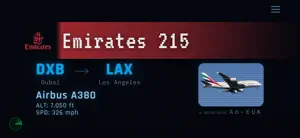
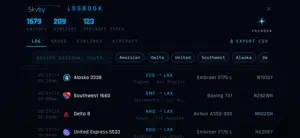
Know exactly what's flying over you. Look up, and whatever is overhead appears on screen. Airliners, private jets, helicopters, and more, identified instantly. No searching, no typing, no menus. NOTE: Some features shown in the screenshots require Skyby Pro. Whether you're a planespotter camped at the end of a runway or a casual fan glancing up from home, Skyby reads the sky in real time and shows the aircraft directly above: the airline or operator, the aircraft type, the altitude, and, for scheduled flights, where it came from and where it's headed. An inbound indicator shows when a flight is coming into range. Two ways to use it: Set it and forget it. Prop Skyby on a desk, shelf, or windowsill and leave it running: a quiet radar for your patch of sky. Set an alert for the aircraft you care about, and Skyby chimes the moment one flies over. Pull it out and look up. On a walk or in the backyard, open Skyby and see what's flying over right now. From airliners to helicopters: Skyby identifies it all. The passenger and cargo jets, the private planes and business jets, the helicopters overhead. And yes, if a blimp drifts over, Skyby catches that too. Prefer to keep it to the airlines? Flip on Commercial Only in settings. Set your spot, or take it with you: Use your current location Drop a pin anywhere in the coverage area to watch the planes over home while you're away Or set the pin to live, and Skyby follows you as you move WHAT YOU GET Instant overhead ID for the aircraft above you Adjustable search area, up to 3 nm free (wider with Pro) Alerts that chime when a plane you care about flies over (A380 and 747 built in, free) An inbound indicator when a flight is coming into range Real routes and aircraft types for scheduled flights A logbook that saves your catches automatically Available across the US, Canada, UK, Europe, Australia/New Zealand, Japan, Korea, Mexico, Philippines and Singapore today, with more on the way Skyby Pro adds aircraft photos matched to the tail number (when available), custom alerts (any airline, aircraft type, flight number, or tail), your full logbook with search and bookmarks, detailed stats, and an even wider search radius. Skyby runs on iPhone and iPad, and it shines on iPad propped up on a desk or shelf. Terms of Use (EULA): https://www.apple.com/legal/internet-services/itunes/dev/stdeula/
Ratings & reviews
4.4
9 ratings
What’s new
Version 1.28 · Updated October 19, 2026
Skyby 1.28 is a big one! Hello, Caribbean and Central America! Skyby now works in Jamaica, the Bahamas, the Dominican Republic, the Caymans, Trinidad and Tobago, Barbados and the rest of the Caribbean, plus Bermuda, Guatemala, Belize, El Salvador, Honduras, Nicaragua, Costa Rica and Panama. The flight data comes from a community network of receivers. Some spots are still filling in, and the map will tell you when that's the case. Make your videos/photos look pro Tap any catch in your logbook and Skyby builds a custom chyron for that exact flight: airline, route, aircraft and tail number. Save it straight to Photos and drop it over your own shots and videos. Instant broadcast look, no editing skills required. Wait, that plane turned around? If a flight circles back to where it took off, or aborts a landing and goes around, Skyby now tags it RETURNED or GO-AROUND. Those catches are rare, so now you'll know when you got one. Taking off or landing? The catch card now shows whether a plane is departing or landing. Don't care? Turn it off in Settings. A logbook you can actually read I made the small text bigger. Tap your top airlines or aircraft to filter instantly, and search finally fits above the keyboard in landscape. Pro users can now export their whole logbook as a spreadsheet. Custom Alerts, rebuilt Your most-caught airlines, aircraft and repeat tail numbers are now one tap away. No more typing on a tiny landscape keyboard. Cleaner Settings Everything is easier to find, and there's a new Account section. Fixes - Speeds were sometimes showing about 15% high. Fixed! - The location map now recovers on its own if it gets stuck. - Catches made right after you open the app always save now. - Skyby goes easier on your connection when the network gets flaky.
App privacy
The developer, StoryForward, reported these privacy practices to Apple.
Data Linked to You
The following data, which may be collected and linked to your identity, may be used for the following purposes:
- Usage Data: Product Interaction
- Purchases: Purchase History
- Location: Precise Location
- Identifiers: Device ID
Used for: Analytics, App Functionality
Data Not Linked to You
The following data, which may be collected but is not linked to your identity, may be used for the following purposes:
- Diagnostics: Other Diagnostic Data
Used for: Analytics
Alternatives to Skyby
Looking for apps like Skyby? Here are 6 similar apps on the App Store. The highest rated is Waypoint — Live Flight Map (5.0/5), and all 6 are free to download.
-
 Waypoint — Live Flight Map
5.0
Waypoint — Live Flight Map
5.0
-
 Loxim: Sim Tracker & Flights
3.9
Loxim: Sim Tracker & Flights
3.9
-
 Fleet: Planes You’ve Flown
4.9
Fleet: Planes You’ve Flown
4.9
-
 Overflight: Sky Radar
4.7
Overflight: Sky Radar
4.7
-
 FlightDeck - Flight Tracker
4.5
FlightDeck - Flight Tracker
4.5
-
 Tailvision by ADS-B Exchange
3.1
Tailvision by ADS-B Exchange
3.1
| App | Rating | Price | Last updated | Compare |
|---|---|---|---|---|
| Skyby | 4.4 / 5 (9 ratings) | Free | October 19, 2026 | |
| Waypoint — Live Flight Map | 5.0 / 5 (10) | Free | Oct 15, 2026 | Compare |
| Loxim: Sim Tracker & Flights | 3.9 / 5 (35) | Free | Sep 23, 2026 | Compare |
| Fleet: Planes You’ve Flown | 4.9 / 5 (552) | Free | Oct 19, 2026 | Compare |
| Overflight: Sky Radar | 4.7 / 5 (23) | Free | Oct 13, 2026 | Compare |
| FlightDeck - Flight Tracker | 4.5 / 5 (1,459) | Free | Aug 3, 2026 | Compare |
| Tailvision by ADS-B Exchange | 3.1 / 5 (24) | Free | Oct 13, 2026 | Compare |
Compare Skyby with the top alternatives: ratings, updates, ASO score and keyword gaps →