

FaceSculpt AI
FaceSculpt AI LLC Lifestyle iPhoneiPadiPod touch
FaceSculpt AI is a free Lifestyle app for iPhone and iPad by FaceSculpt AI LLC. Rated 5.0/5 from 4 ratings. Requires iOS 26.0. Updated September 12, 2026.
- Rating
- 5.0
- 4 ratings
- Price
- Free
- on the App Store
- Size
- 19 MB
- Age 4+
- Updated
- Sep 12
- 2026 · v1.4
Screenshots


About FaceSculpt AI
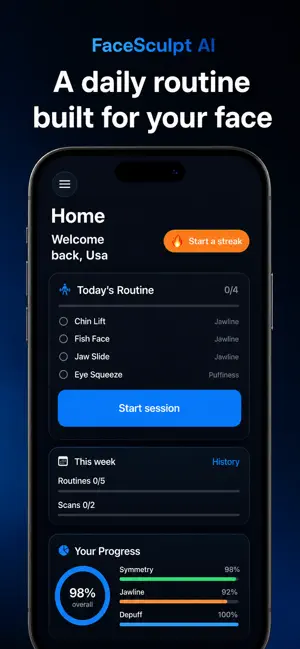
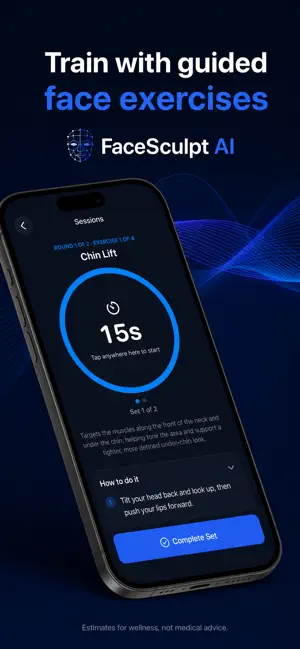
FaceSculpt AI uses your iPhone’s TrueDepth camera to build a 3D model of your face and track how it changes over time. Your first scan sets the baseline. Every scan after compares against that saved 3D model, so scores stay steadier from day to day when nothing has really changed. WHAT YOU CAN DO • Scan your face in 3D with ARKit and TrueDepth • See scores for symmetry, jawline, side profile, puffiness, and more • Follow a daily routine of guided face exercises • Track trends and scan history over days and weeks • Match scans with Face ID so progress stays tied to you • Compete on leaderboards when you opt in HOW IT WORKS 1. Complete your first face scan with guided poses. 2. Review your scores and see what to focus on. 3. Do today’s routine—short sessions with clear instructions. 4. Scan again to track real change over time. BUILT FOR TRUEDEPTH IPHONES FaceSculpt AI requires an iPhone with Face ID (TrueDepth). Scanning and scoring run on your device for a fast, private experience. CONSISTENT 3D TRACKING Your first good scan becomes your baseline. Later scans are compared to that same 3D model—not a new measurement from scratch every time—so day-to-day numbers reflect your face, not random angle or lighting swings. DAILY ROUTINE Get a focused set of face exercises each day—jaw, chin, symmetry, and more—with timers and step-by-step guidance. Build a streak and stay consistent. TRACK PROGRESS View trends for jawline, symmetry, depuffing, and other metrics. See how your scores move over time and where you rank when you join the leaderboard. IMPORTANT FaceSculpt AI is for wellness and self-tracking only. It does not provide medical advice and does not diagnose or treat any condition. Results vary. Scores are estimates from your scan, not guarantees of appearance or health outcomes. SUBSCRIPTION FaceSculpt Pro unlocks full routines, progress features, and more. Payment is charged to your Apple ID at confirmation of purchase. Subscriptions renew automatically unless canceled at least 24 hours before the end of the current period. Manage or cancel in Apple ID Account Settings. Privacy Policy: https://complex-pint-907.notion.site/FaceSculpt-AI-Privacy-Policy-Support-356ce751fdbd80b18cf5d679e41a08ce Terms of Use: Apple’s Standard EULA
What’s new
Version 1.4 · Updated September 12, 2026
Minor bug fixes and performance improvements.
App privacy
The developer, FaceSculpt AI LLC, reported these privacy practices to Apple.
Data Linked to You
The following data, which may be collected and linked to your identity, may be used for the following purposes:
- Purchases: Purchase History
- Contact Info: Email Address
- Identifiers: User ID, Device ID
Used for: App Functionality
Alternatives to FaceSculpt AI
Looking for apps like FaceSculpt AI? Here are 6 similar apps on the App Store.
-
 SafeRise – Safety Alerts
-
 Get Stoic
-
 Lumira Meditation Breathe Calm
-
 Petsalonapp
-
 Quotely - Get Inspired
-
 Beljwar
| App | Rating | Price | Last updated | Compare |
|---|---|---|---|---|
| FaceSculpt AI | 5.0 / 5 (4 ratings) | Free | September 12, 2026 | |
| SafeRise – Safety Alerts | – | Free | Sep 3, 2026 | Compare |
| Get Stoic | – | Free | Aug 17, 2026 | Compare |
| Lumira Meditation Breathe Calm | – | Free | Mar 30, 2026 | Compare |
| Petsalonapp | – | Free | Jun 8, 2026 | Compare |
| Quotely - Get Inspired | – | Free | Jan 30, 2025 | Compare |
| Beljwar | – | Free | Jan 22, 2026 | Compare |
Compare FaceSculpt AI with the top alternatives: ratings, updates, ASO score and keyword gaps →