

Orua - Wealth & expenses
HSIANGCHIH HSU Finance iPhoneiPadiPod touch
Orua - Wealth & expenses is a free Finance app for iPhone and iPad by HSIANGCHIH HSU. Rated 5.0/5 from 1 ratings. Requires iOS 18.0.
- Rating
- 5.0
- 1 ratings
- Price
- Free
- on the App Store
- Size
- 18 MB
- Age 4+
- Updated
- Oct 15
- 2026 · v6.0
Screenshots



About Orua - Wealth & expenses
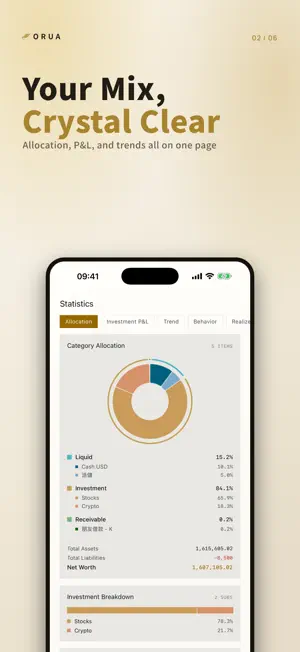
Orua is your private net-worth ledger. We believe your financial data should never become ad-targeting material. Orua keeps everything on your phone — no account sign-up, no third-party tracking; cloud backup goes through your own iCloud. Only you can see how your assets are distributed. [Absolute Privacy] Positions, purchase history and tags are all stored locally on your device. The app only goes online to fetch quotes, and the backend keeps no personal data. iCloud sync across iPhone and iPad (CloudKit): your data lives only in your own iCloud and merges automatically between devices, with JSON or CSV export anytime. [Multi-Market Support] Taiwan, US, Japan, Hong Kong and Vietnam stocks, crypto, forex, precious metals, plus onshore & offshore funds with daily NAV — all in one app. Lot-based positions track the cost and timing of every buy-in; selling automatically records realized P&L. [Statistics & Analysis] Allocation donut, balance sheet, investment P&L (today vs. total, expandable per market down to each holding), annualized return (XIRR), and realized P&L. Export the full net-worth report as a PDF for reconciliation or record-keeping. [Growth Visualization] Switch between 1D / 30D / 6M / 1Y / YTD / custom ranges on the home screen, with per-category change rates. The asset range chart marks every purchase point. [Handy Tools] - Memos: jot down investment notes and to-dos - Recurring plans: installment payments and scheduled deposits with reminders - Receivables & liabilities: principal, repayment progress and adjustment history at a glance - Asset groups: drag to combine holdings into custom subtotals [Tags & Lock] Two-level tagging — tag a whole position or a single lot. "Lock" positions you don't want counted: off the books, but never deleted. [Privacy Mode] Don't want amounts glanced at in public? One tap masks totals and subtotals while individual items stay browsable. [Friendly Interface] - Two UI modes: Minimal / Classic (bottom tab bar) - Dual-currency display, 4-step font scaling, automatic light/dark mode - 7 languages: Traditional & Simplified Chinese, English, Japanese, French, Vietnamese, Cantonese — Why "Orua" — Orua comes from the root of "Aurora". The reason I built it is simple: to save up for a trip to take my girlfriend to see the northern lights. May it help you save toward your own faraway place, too. — Our Promise — No ads, no third-party tracking, no data monetization. Your data belongs to you alone. Questions or suggestions: [email protected] — — — Orua Premium (auto-renewable subscription) - Monthly/yearly plans auto-renew and are charged within 24 hours before the period ends; cancel anytime in your App Store account settings. Lifetime is a one-time purchase. - Terms of Use (EULA): https://www.apple.com/legal/internet-services/itunes/dev/stdeula/ - Privacy Policy: https://orua.app/privacy
What’s new
Version 6.0 · Updated October 15, 2026
Ask Orua: your ledger, in plain words Apple Intelligence is here. Tap the star button and ask. ■ Ask Orua - There’s a new star button. Tap it and ask: “How much did my net worth change this month?” “What’s due next week?” Orua does the math, and every answer comes with a source card you can check. - Needs iOS 27 and an iPhone that supports Apple Intelligence (15 Pro or later). Don’t want it? Turn it off under Settings › Quick toggles. To put it in the tab bar, enable it under Settings › UI mode. ■ Ask by voice - There’s a microphone next to the input: tap it and speak, the words land in the box, check them and send. - Recognition happens on your iPhone; your voice never leaves the device. ■ Bank logos for your accounts - The icon picker for cash accounts has a new “Banks” page: 83 single-colour logos from Taiwan, the US, Japan, Hong Kong, China and international banks, so you spot an account at a glance. ■ Smoother detail pages - Detail and inner pages now open full screen: close with ‹, a pull-down from the top, or a swipe from the left edge; no more closing at the slightest touch. - Tap “Edit” on a detail page and the form stacks on top; you land back on the detail when you’re done. Ask Orua runs on Apple’s Private Cloud Compute: a summary of your ledger is sent only at the moment you ask, never passes through Orua’s servers, and Apple doesn’t keep it. I can’t see it either. Be specific — “How did my net worth change last month?” gets a much better answer. Ask too quickly and you may be asked to wait a moment; that’s Apple’s quota. Wrong answer, or something feels off? Write to me from Settings › About — I read every email. More apps SubLife — subscription manager: subscriptions, one-time purchases and per-use passes in one place. 咚咚節拍器 — metronome: the iPhone clicks, the Apple Watch taps your wrist, so you keep time even in a loud room.
App privacy
The developer, HSIANGCHIH HSU, reported these privacy practices to Apple.
Data Not Collected
The developer does not collect any data from this app.
Alternatives to Orua - Wealth & expenses
Looking for apps like Orua - Wealth & expenses? Here are 6 similar apps on the App Store. The highest rated is Moniit - AI Asset Management (5.0/5), and all 6 are free to download.
-
 Workfree: Portfolio & FIRE
-
 FINXI|記帳・投資・日記・共同帳本
-
 Walleaf - 投資與資產整合記帳
-
 V-Track: Asset & Stock Tracker
-
 Moniit - AI Asset Management
5.0
Moniit - AI Asset Management
5.0
-
 Investing and Rebalancing
| App | Rating | Price | Last updated | Compare |
|---|---|---|---|---|
| Orua - Wealth & expenses | 5.0 / 5 (1 rating) | Free | October 15, 2026 | |
| Workfree: Portfolio & FIRE | – | Free | Apr 8, 2026 | Compare |
| FINXI|記帳・投資・日記・共同帳本 | – | Free | Oct 15, 2026 | Compare |
| Walleaf - 投資與資產整合記帳 | – | Free | Jun 20, 2026 | Compare |
| V-Track: Asset & Stock Tracker | – | Free | Jul 14, 2026 | Compare |
| Moniit - AI Asset Management | 5.0 / 5 (3) | Free | Oct 9, 2026 | Compare |
| Investing and Rebalancing | – | Free | Jun 8, 2026 | Compare |