

InkStamp: Photo Watermark
嘉乐 陈 Productivity iPhoneiPadiPod touch
InkStamp: Photo Watermark is a free Productivity app for iPhone and iPad by 嘉乐 陈. Requires iOS 17.0. Updated April 29, 2026.
- Price
- Free
- on the App Store
- Size
- 6 MB
- Age 9+
- Updated
- Apr 29
- 2026 · v1.0.1
Screenshots


About InkStamp: Photo Watermark
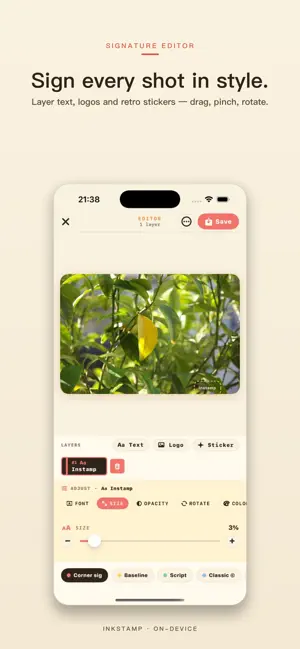
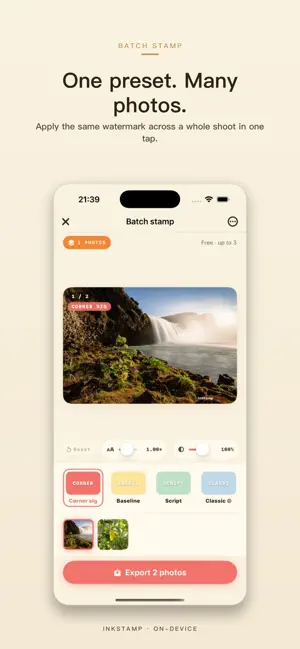
InkStamp is a private photo watermarking app for creators, online sellers, photographers, students, and anyone who wants their photos to travel with a signature — not with tracking. Add text, signatures, logos, copyright notes, retro stamp effects, or invisible watermarks without sending your images to a server. Every edit is processed on your iPhone or iPad. KEY FEATURES • Photo watermark editor Layer text, signatures, logos, dates, copyright labels, and retro stamp effects on a single photo. Drag to position, rotate up to 360°, tune opacity, and preview in real time. • Batch watermark export Import a full shoot, pick one watermark style, preview every image, then export the whole batch in one flow. Perfect for shops, portfolios, class photos, and client previews. • Invisible watermark Embed a mark that is imperceptible in normal viewing but can be verified later with the in-app detector. Useful for proving ownership of a leaked shot. • Templates for repeat use Save your go-to stamp as a template so every export stays on-brand without re-adjusting rotation, opacity, or position. • Private by design No account. No ads. No analytics. Photos are processed on-device and are not uploaded by InkStamp. • Retro look that sets your photos apart Cream paper, coral ink, mint accents, classic stamp motifs. Your watermark signals craftsmanship, not stock filters. WHY INKSTAMP IS DIFFERENT 1. The invisible-watermark detector is built in, not sold as a separate app. You can verify your mark later, even on a screenshot a friend took. 2. Batch mode treats every batch as one trip: you preview, adjust, and export all images together, so every photo carries the same signature. 3. Everything happens on-device. InkStamp never uploads the photos you stamp. WHO IT IS FOR InkStamp is useful for: - Photographers watermarking client previews before delivery - Online sellers protecting product photos on marketplaces - Designers and illustrators adding signatures to portfolio work - Students and teachers marking submitted assignments - Creators stamping the shots they share on social platforms FREE AND PRO You can watermark a limited number of images for free. InkStamp Pro unlocks unlimited batch exports, the invisible watermark editor and detector, saved templates, and the full watermark style library. Pro is available as a monthly subscription, a yearly subscription, or a one-time Lifetime purchase. All purchases are handled by Apple. Subscriptions can be managed or canceled at any time from iOS Settings > Apple ID > Subscriptions. Terms of Use: https://www.apple.com/legal/internet-services/itunes/dev/stdeula/ Privacy Policy: https://watermark.j-chan.com/privacy.html
What’s new
Version 1.0.1 · Updated April 29, 2026
What's New 1.Fix the bug that transparency dose not take effect 2.Fix the multi-picture bug
App privacy
The developer, 嘉乐 陈, reported these privacy practices to Apple.
Data Not Collected
The developer does not collect any data from this app.
Alternatives to InkStamp: Photo Watermark
Looking for apps like InkStamp: Photo Watermark? Here are 6 similar apps on the App Store. The highest rated is Treasure Life Countdown Widget (5.0/5), and all 6 are free to download.
-
 副業収支
副業収支
-
 Treasure Life Countdown Widget
5.0
Treasure Life Countdown Widget
5.0
-
 Copia: Clipboard Manager
5.0
Copia: Clipboard Manager
5.0
-
 Storage Widget - DiskState
5.0
Storage Widget - DiskState
5.0
-
 Italfile Easy Check
-
 Logit AI - Meeting Note Taker
5.0
Logit AI - Meeting Note Taker
5.0
| App | Rating | Price | Last updated | Compare |
|---|---|---|---|---|
| InkStamp: Photo Watermark | – | Free | April 29, 2026 | |
| 副業収支 | – | Free | Nov 9, 2025 | Compare |
| Treasure Life Countdown Widget | 5.0 / 5 (1) | Free | Jul 31, 2026 | Compare |
| Copia: Clipboard Manager | 5.0 / 5 (2) | Free | Sep 24, 2026 | Compare |
| Storage Widget - DiskState | 5.0 / 5 (1) | Free | Oct 15, 2026 | Compare |
| Italfile Easy Check | – | Free | Aug 4, 2026 | Compare |
| Logit AI - Meeting Note Taker | 5.0 / 5 (7) | Free | Aug 8, 2025 | Compare |