

Glora AI: Photo & Video Editor
Glora Labs Photo & Video iPhoneiPadiPod touch
Glora AI: Photo & Video Editor is a free Photo & Video app for iPhone and iPad by Glora Labs. Rated 4.6/5 from 23 ratings. Requires iOS 15.0.
- Rating
- 4.6
- 23 ratings
- Price
- Free
- on the App Store
- Size
- 147 MB
- Age 12+
- Updated
- Oct 8
- 2026 · v0.9.0
Screenshots


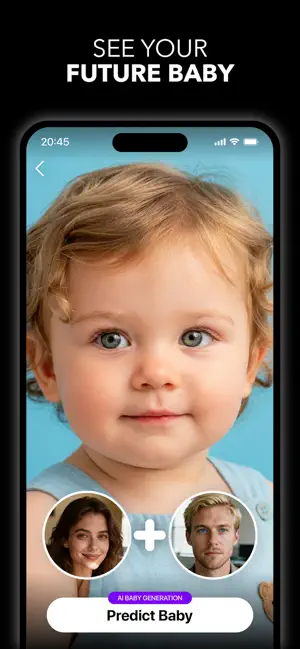
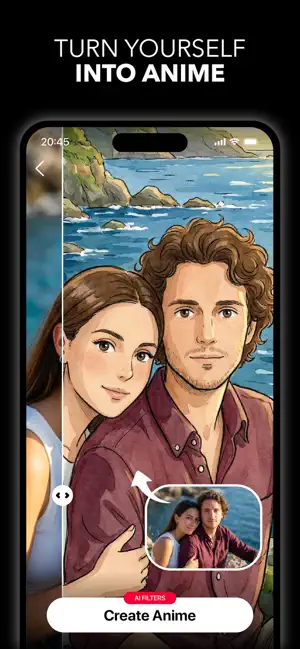
About Glora AI: Photo & Video Editor
>> Turn your photos into something unforgettable. Glora AI is your personal creative studio — generate viral dance videos, step into anime worlds, preview a new hairstyle, see your future baby, and create studio-quality photoshoots from a single selfie. Whatever you can imagine, Glora can create. Upload your photo and explore hundreds of AI-powered presets across photoshoots, transformations, and video — all designed to make you look incredible and make your content stand out. What you can create with Glora: • AI dance videos and viral motion clips from a single photo • Studio-quality photoshoots in dozens of curated styles • Anime, cartoon, and stylized portrait transformations • Realistic future baby and future family previews • Hairstyle and hair color try-on before you commit • Pet videos, caricatures, and playful creative edits • Beauty retouching, background swaps, and AI retakes AI Photoshoots, Done for You Skip the studio. Choose from premium presets — birthday glamour, monochrome editorial, sakura dreams, and more — and get magazine-quality portraits in seconds. Photo to Video, Made Viral Bring still images to life with AI dance moves, animated effects, and shareable clips built for social. Turn one photo into content people actually stop scrolling for. See Your Future Baby Curious what your future kids might look like? Upload a couple photo and let Glora's AI create realistic baby and family previews in moments. Try Any Hairstyle, Risk-Free Preview a new cut, color, or style on your own face before stepping into the salon. Find your look before you commit. Anime, Cartoons, and Beyond Transform yourself into anime characters, illustrated avatars, and stylized portraits with one tap. Download Glora AI and discover what your photos can become. Subscribe to have unlimited access to premium features as well. • Subscription length: weekly, monthly, yearly • Your payment will be charged to your iTunes Account as soon as you confirm your purchase. • You can manage your subscriptions and turn off auto-renewal from your Account Settings after the purchase. • Your subscription will renew automatically, unless you turn off auto-renew at least 24 hours before the end of the current period. • The cost of renewal will be charged to your account in the 24 hours prior to the end of the current period. • When canceling a subscription, your subscription will stay active until the end of the period. Auto-renewal will be disabled, but the current subscription will not be refunded. • Any unused portion of a free trial period, if offered, will be forfeited when purchasing a subscription. Have a feature request you would like to see in a future version of the app? Do not hesitate to contact us at [email protected] Terms of Service: https://getglora.app/terms Privacy Policy: https://getglora.app/privacy
Ratings & reviews
4.6
23 ratings
What’s new
Version 0.9.0 · Updated October 8, 2026
Bug fixes and improvements
App privacy
The developer, Glora Labs, reported these privacy practices to Apple.
Data Used to Track You
The following data may be used to track you across apps and websites owned by other companies:
- Identifiers: User ID, Device ID
- Usage Data: Advertising Data
Data Not Linked to You
The following data, which may be collected but is not linked to your identity, may be used for the following purposes:
- Usage Data: Advertising Data, Product Interaction
- Identifiers: User ID, Device ID
- Diagnostics: Crash Data, Performance Data, Other Diagnostic Data
- User Content: Photos or Videos
Used for: Third-Party Advertising, Analytics, App Functionality
Alternatives to Glora AI: Photo & Video Editor
Looking for apps like Glora AI: Photo & Video Editor? Here are 6 similar apps on the App Store. The highest rated is AI Photo Generator - acha AI (5.0/5), and all 6 are free to download.
-
 Fluxfield - AI Photo Editor
-
 Latted AI Videos & Images
4.6
-
 Vixio AI: Video Generator
4.9
-
 AI Photo Generator - acha AI
5.0
-
 LuminoVid: AI Video Generator
4.4
-
 AI Image Generator - LooksArt
4.9
| App | Rating | Price | Last updated | Compare |
|---|---|---|---|---|
| Glora AI: Photo & Video Editor | 4.6 / 5 (23 ratings) | Free | October 8, 2026 | |
| Fluxfield - AI Photo Editor | – | Free | Jul 22, 2026 | Compare |
| Latted AI Videos & Images | 4.6 / 5 (41) | Free | Jul 4, 2026 | Compare |
| Vixio AI: Video Generator | 4.9 / 5 (42) | Free | Aug 6, 2026 | Compare |
| AI Photo Generator - acha AI | 5.0 / 5 (2) | Free | Oct 2, 2026 | Compare |
| LuminoVid: AI Video Generator | 4.4 / 5 (23) | Free | Oct 10, 2026 | Compare |
| AI Image Generator - LooksArt | 4.9 / 5 (21) | Free | Jun 29, 2026 | Compare |