

FRAQ CALC Lite
TAKAO OGASAWARA Utilities iPhoneiPadiPod touch
FRAQ CALC Lite is a free Utilities app for iPhone and iPad by TAKAO OGASAWARA. Requires iOS 16.4. Updated May 7, 2026.
- Price
- Free
- on the App Store
- Size
- 7 MB
- Age 4+
- Updated
- May 7
- 2026 · v1.1
Screenshots


About FRAQ CALC Lite
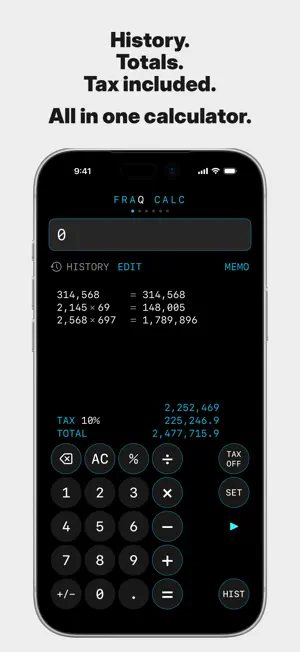
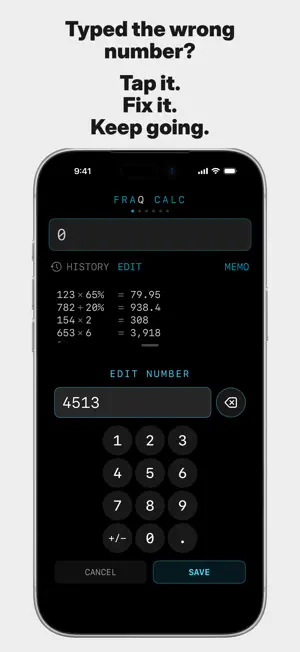
Stop typing the same calculations over and over again! FRAQ CALC Lite is the free (ad-supported) version of "FRAQ CALC", the next-generation calculator designed for professionals who work with numbers every day. Use all the core features with zero restrictions: History Edit, HISTORY TOTAL, MEMORY Save, SPLIT, MULTI, PERCENT, MARKUP, RE:MARKUP, and TAX IN/OFF. Tired of standard calculator problems? - Make a typo, and you have to start all over. - You have to add multiple results together manually. - You can’t find your past calculations. FRAQ changes all of that. Tap any number in the history to edit it, and the result is instantly recalculated. HISTORY TOTAL automatically adds up all your results. Save your calculation sets to MEMORY to reuse them later. - SPLIT: View division results from /2 to /99 in a handy list. - MULTI: Instantly see multiplications from 2x to 99x. - PERCENT: Check percentages from 1% to 100% at a glance. - MARKUP/RE:MARKUP: Easily calculate selling price or target cost. - TAX IN/OFF: Check the total with or without tax using a custom tax rate. ■ About the Lite Version It is free to use with ads (a banner at the bottom, and after about 5 minutes of use, full-screen ads may appear during calculations). No features are locked. If you love it, you can upgrade to the ad-free version via the "AD OFF" button to work with 100% focus. ■ How to Use 1. Calculate and press "=" to save it to your history. 2. Tap the result to copy it (clean numbers only, no commas). 3. Tap numbers in the history to correct mistakes and auto-recalculate. 4. HISTORY TOTAL: Auto-sum for quotes, estimates, and materials. 5. MEMO: Save and reopen your calculation sets. 6. Swipe to switch modes: CALC/SPLIT/MULTI/PERCENT/MARKUP... 7. TAX IN/OFF: Set your local sales tax rate easily. ■ Key Features - Edit numbers in history for automatic recalculation - Automatic display of the history's grand total - Save formulas into MEMORY - SPLIT/MULTI/PERCENT/MARKUP/RE:MARKUP modes - Custom tax settings (explanations available in 50 languages) - One-tap copy for results - Right/Left-handed layout options - iPhone / iPad support - No login required, data is saved locally - Easy ad-free upgrade (AD OFF) ■ How is it different from a normal calculator? Standard calculators just give you an answer. In business, you need to track, correct, summarize, and reuse data. FRAQ saves you time and minimizes human error. It’s not just a calculator; it’s your calculation workspace. Try the Lite version today! Calculate faster. Make fewer mistakes.
What’s new
Version 1.1 · Updated May 7, 2026
Improved multilingual display support. Fixed an issue where the tax rate settings screen and calculation mode descriptions might not appear correctly in some language environments. Improved the App Tracking Transparency permission flow. Also improved display stability and minor app behavior.
App privacy
The developer, TAKAO OGASAWARA, reported these privacy practices to Apple.
Data Used to Track You
The following data may be used to track you across apps and websites owned by other companies:
- Identifiers: Device ID
- Usage Data: Advertising Data
Data Linked to You
The following data, which may be collected and linked to your identity, may be used for the following purposes:
- Identifiers: Device ID
- Usage Data: Advertising Data
Used for: Third-Party Advertising
Alternatives to FRAQ CALC Lite
Looking for apps like FRAQ CALC Lite? Here are 6 similar apps on the App Store.
-
 Calculators Plus
-
 Super Calc Pro+
-
 月光小算琴
月光小算琴
-
 全新计算器-简洁高效日常计算助手
-
 ITQ SimpleCalc
-
 Calculator with reverse screen
| App | Rating | Price | Last updated | Compare |
|---|---|---|---|---|
| FRAQ CALC Lite | – | Free | May 7, 2026 | |
| Calculators Plus | – | Free | Jul 24, 2026 | Compare |
| Super Calc Pro+ | – | Free | Sep 12, 2026 | Compare |
| 月光小算琴 | – | Free | Jul 8, 2026 | Compare |
| 全新计算器-简洁高效日常计算助手 | – | Free | Mar 11, 2026 | Compare |
| ITQ SimpleCalc | – | Free | Jun 16, 2025 | Compare |
| Calculator with reverse screen | – | Free | Jul 28, 2026 | Compare |
Compare FRAQ CALC Lite with the top alternatives: ratings, updates, ASO score and keyword gaps →