

AR Drawing Projector: Trace
omur olgunay Graphics & Design iPhoneiPadiPod touch
AR Drawing Projector: Trace is a free Graphics & Design app for iPhone and iPad by omur olgunay. Requires iOS 17.0. Updated October 26, 2026.
- Price
- Free
- on the App Store
- Size
- 46 MB
- Age 4+
- Updated
- Oct 26
- 2026 · v1.4
Screenshots

About AR Drawing Projector: Trace
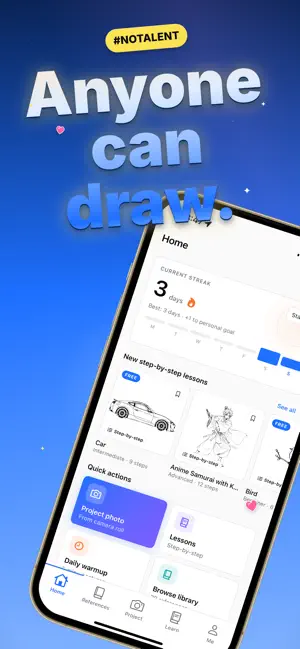
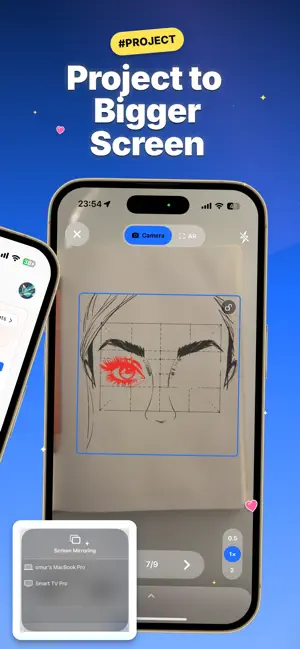
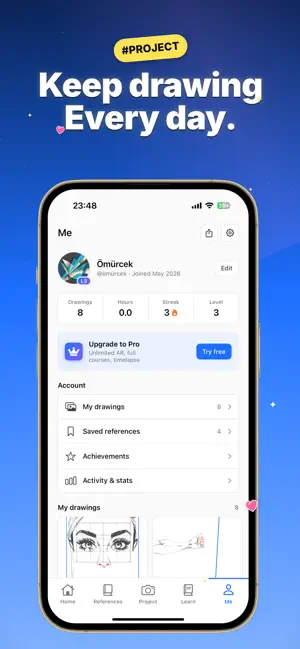
Trace a projected picture onto paper and color it, or cast your reference to a bigger external screen and draw at any size. AR Drawing Projector turns your phone into an AR drawing projector, a tracing app, a step-by-step art teacher, and a library of thousands of images to trace, all in one drawing app. No drawing skills? No problem. Point your camera, line up the picture, and trace what you see on your paper. Then keep going with guided lessons that take you from "I can't draw" to finished art. Whether you want to learn how to draw, trace a photo, or sketch your favorite characters, this AR drawing projector meets you at your level. WHY AR DRAWING PROJECTOR • PROJECT ONTO PAPER OR A BIGGER SCREEN Most AR drawing apps only project through your phone. AR Drawing Projector also casts your reference to an external screen, so you can trace murals, posters, canvases,ze. Draw big or small, on paper, wood, walls, or any surface. • LEARN TO DRAW, STEP BY STEP — Follow guided, beginner-fried real skills instead of just tracing once. Learn how to drawpeople, animals, cartoons, and more with easy step-by-step tutorials. Perfect for kids, students, and adults returning to art. • THOUSANDS OF IMAGES TO TRACE — A huge built-in drawing library: animals, anime, cartoons, characters, flowers, cars, dinosaurs, and more. New images are added regularly, so you never run out of things to draw, • TRACE ANY PHOTO — Import your own photo, convert it to a c, and trace it on paper. Great for portraits, pets, logos,tattoos, and custom art. Turn any picture into a drawing you can trace by hand. • SKETCH AND OUTLINE MODES — Switch between outline and sketch styles to match your skill level. Adjust opacity, zoom, and lock the image so your reference stays perfectly in place while you draw. • DAILY STREAKS & ACHIEVEMENTS — Turn drawing into a daily h unlock achievements, and watch your art skills grow a littleevery day. • EASY, KID-FRIENDLY CONTROLS — A clean, simple interface that anyone can use. No sign-up needed to start, no complicated tools, just pick an image and draw. • AVAILABLE IN 12 LANGUAGES — Learn to draw and create in yo HOW IT WORKS 1. Pick an image from the library, import your own photo, or choose a drawing lesson. 2. Project it onto your paper through the camera, or cast it 3. Keep your phone steady, trace the lines, then color and finish your drawing. 4. Keep your daily streak going and level up your art skills PERFECT FOR • Total beginners who think they "can't draw" • Kids and students learning to sketch and trace • Parents looking for a creative, screen-smart activity • Artists tracing references, murals, and large-format work • Anyone who wants a simple daily creative habit • Hobbyists, doodlers, and anyone who loves to draw and colo TRACE, SKETCH, AND LEARN ON ANY SURFACE AR Drawing Projector is more than a tracing app. It is a complete drawing companion that helps you trace images, learn how to draw step by step, and build lasting art skills. Use it to trace on paper through yll for a mural, or cast to a big screen for large artwork.From quick doodles to detailed portraits, from cartoon characters to realistic sketches, you decide what to draw and how big to draw it. Download AR Drawing Projector and start drawing today. Trace, sketch, learn, and create on any surface, at any size. Questions or feedback? We read every message, so reach out anytime and we will help. Terms of Use (EULA): https://www.apple.com/legal/internet-services/itunes/dev/stdeula/ Privacy Policy: https://omurolgunay.com/ar-projector-pp.html
What’s new
Version 1.4 · Updated October 26, 2026
New in-app live support, chat with us directly Performance improvements and bug fixes
App privacy
The developer, omur olgunay, reported these privacy practices to Apple.
Data Not Linked to You
The following data, which may be collected but is not linked to your identity, may be used for the following purposes:
- Usage Data: Other Usage Data
- Diagnostics: Crash Data, Other Diagnostic Data
Used for: Analytics
Alternatives to AR Drawing Projector: Trace
Looking for apps like AR Drawing Projector: Trace? Here are 6 similar apps on the App Store. The highest rated is Drawing Projector Lite (5.0/5), and all 6 are free to download.
-
 Drawing Projector Lite
5.0
Drawing Projector Lite
5.0
-
 Drawing Projector: AR Trace
-
 Trace Drawing & Projector - AR
1.0
Trace Drawing & Projector - AR
1.0
-
 Trace Drawing - DrawLens
3.9
Trace Drawing - DrawLens
3.9
-
 AR Drawing: Easy Sketch & Draw
4.6
AR Drawing: Easy Sketch & Draw
4.6
-
 Sketchar: AR Drawing App
4.2
Sketchar: AR Drawing App
4.2
| App | Rating | Price | Last updated | Compare |
|---|---|---|---|---|
| AR Drawing Projector: Trace | – | Free | October 26, 2026 | |
| Drawing Projector Lite | 5.0 / 5 (1) | Free | Oct 29, 2026 | Compare |
| Drawing Projector: AR Trace | – | Free | Oct 29, 2026 | Compare |
| Trace Drawing & Projector - AR | 1.0 / 5 (1) | Free | Aug 28, 2026 | Compare |
| Trace Drawing - DrawLens | 3.9 / 5 (37) | Free | Sep 24, 2026 | Compare |
| AR Drawing: Easy Sketch & Draw | 4.6 / 5 (1,366) | Free | Oct 29, 2026 | Compare |
| Sketchar: AR Drawing App | 4.2 / 5 (9,856) | Free | Oct 18, 2026 | Compare |