

SportsDraw: Video Analysis
David Balderston Sports iPhoneiPadiPod touch
SportsDraw: Video Analysis is a paid Sports app for iPhone and iPad by David Balderston. Requires iOS 18.0. Updated November 9, 2026.
- Price
- 9.99 USD
- on the App Store
- Size
- 79 MB
- Age 4+
- Updated
- Nov 9
- 2026 · v1.1.0
Screenshots
Save to Pinterest


About SportsDraw: Video Analysis
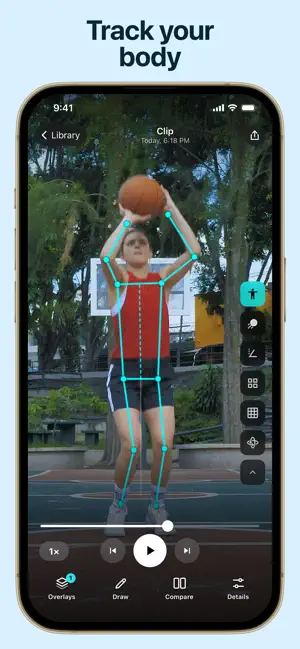
Track the ball automatically, review every rep in slow motion and compare clips. Pay once. All tools included. No subscription. Dial in your form, one frame at a time. SportsDraw is a video player for reviewing practice clips from any sport you can film: baseball, softball, tennis, pickleball, basketball, disc golf and more. It's made for players, parents and coaches on iPhone and iPad. ONE PLAYER FOR EVERY SPORT There are no modes to pick. Open a swing, a pitch, a serve, a dink, a jump shot or a throw, and the same tools sit right beside the video. AUTOMATIC BALL TRACKING SportsDraw finds the ball for you and draws its path as a trail you can adjust, so you can see the flight of a pitch, a serve or a shot. BODY TRACKING AND ANGLES Turn on AI body tracking to see a skeleton over the player, frame by frame. Draw lines and show the angles where they meet to check posture, balance and timing. SLOW IT DOWN AND MARK IT UP Step through frame by frame or play at half or quarter speed. Draw lines and circles to mark stride, contact point, arm position or release. COMPARE TWO CLIPS Put two videos side by side or stacked to see what changed between reps. RECORD HANDS-FREE Set a 3, 5 or 10 second start delay, then start and stop recording with the volume buttons, Camera Control or a Bluetooth remote. You can also import clips from Photos. SAVE, ORGANIZE AND SHARE Add voice notes, tags and favorites. Share a photo or video right after you save it, or share the original clip from your Library. PRIVATE BY DESIGN Everything runs on your device. There's no account and no ads. Every tool is included with the app, with no subscriptions or in-app purchases. Privacy Policy: https://sportsdraw.app/privacy/ Terms of Use: https://sportsdraw.app/terms/
What’s new
Version 1.1.0 · Updated November 9, 2026
BaseballDraw is now SportsDraw! I've rebuilt the app for any sport you can film, and your clips, notes and drawings are all still here. • One player for every clip, with your tools beside the video instead of separate Pitch and Hit modes. Prefer the old controls? Turn on the classic layout in Help & Settings. • Automatic ball tracking, with a trail length you can adjust. • Compare two clips side by side or stacked. • A 3, 5 or 10 second start-delay countdown, and start or stop recording with your volume buttons, Camera Control or a Bluetooth remote. • Share right after you save a photo or video, or share originals from your Library. • More reliable saving, even with a big library. • SportsDraw is now available in 50 languages. Body tracking, angles, drawing, frame-by-frame and slow motion are all still here, and everything still runs privately on your device. I'd love to hear what you think: [email protected] Thanks, David
App privacy
The developer, David Balderston, reported these privacy practices to Apple.
Data Not Collected
The developer does not collect any data from this app.
Alternatives to SportsDraw: Video Analysis
Looking for apps like SportsDraw: Video Analysis? Here are 6 similar apps on the App Store.
-
 Motionline
-
 野球の物理 打球と投球のシミュレーター
-
 Batto: Baseball Scorebook
-
 MotionTagger: Video Form Coach
-
 Baseball Stats Calculator
-
 Baseball Inning Scoreboard
| App | Rating | Price | Last updated | Compare |
|---|---|---|---|---|
| SportsDraw: Video Analysis | – | 9.99 USD | November 9, 2026 | |
| Motionline | – | Free | Aug 9, 2026 | Compare |
| 野球の物理 打球と投球のシミュレーター | – | Free | Sep 1, 2026 | Compare |
| Batto: Baseball Scorebook | – | Free | Nov 4, 2026 | Compare |
| MotionTagger: Video Form Coach | – | Free | Nov 9, 2026 | Compare |
| Baseball Stats Calculator | – | Free | Aug 24, 2026 | Compare |
| Baseball Inning Scoreboard | – | Free | Aug 21, 2026 | Compare |