

DigiBound: Screen Time Blocker
Yixin Yiyi Information Technology Co., Ltd. Productivity iPhoneiPadiPod touch
DigiBound: Screen Time Blocker is a free Productivity app for iPhone and iPad by Yixin Yiyi Information Technology Co., Ltd. Requires iOS 17.0.
- Price
- Free
- on the App Store
- Size
- 24 MB
- Age 4+
- Updated
- Oct 29
- 2026 · v1.0.5
Screenshots
Save to Pinterest


About DigiBound: Screen Time Blocker
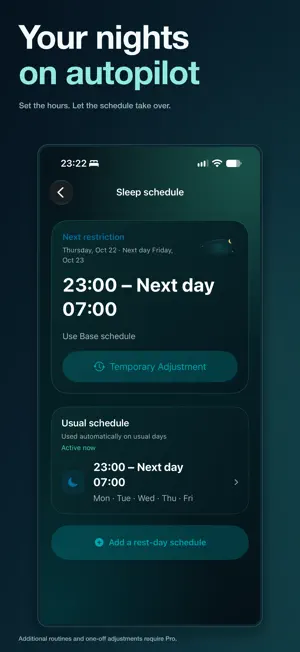
One more video can turn into another hour. DigiBound helps you put your phone down at bedtime, limit distracting apps on a schedule, and make room for sleep and the rest of life. 【MY RESULT WITH DIGIBOUND】 A note from the maker: I built DigiBound after struggling with my own late-night scrolling. Since using it, I spend about 2 hours and 30 minutes less each day on social media and short videos. I now put my phone down before 11 p.m. and sleep about an hour longer at night. 【MY IPHONE SCREEN TIME】 In the iPhone Screen Time records shown in the screenshots, my daily average fell from 18h 22m to around 9 hours. If late-night scrolling sounds familiar, give DigiBound a try and see if it helps you put your phone down sooner. 【BLOCK THE APPS YOU CHOOSE】 Select the apps, categories, or websites that keep pulling you back. DigiBound limits only what you choose—not your entire phone. 【PUT YOUR NIGHTS ON AUTOPILOT】 Set your bedtime, wake time, and days once. Sleep Lock applies your limits on schedule, even when DigiBound isn’t open, and removes them when the scheduled window ends. Overnight schedules are supported. If tonight is different, skip just this occurrence; your future schedule stays in place. 【PAUSE BEFORE ENDING A LOCK】 If you try to end Sleep Lock early, DigiBound offers a one-minute breathing pause—a chance to reconsider before a quick check turns into another late night. 【FOCUS ON WHAT MATTERS】 Start a saved Focus mode when it’s time to work, exercise, meditate, or study. Choose what to limit and how long to focus, then give that time to what you meant to do. 【SEE YOUR FOCUS ADD UP】 Set a daily goal and follow your completed sessions and focus time. Review your weekly progress inside DigiBound. The screen-time chart in the screenshots comes from my own iPhone Screen Time records, not DigiBound’s focus report. FREE AND PRO Free includes a repeating automatic Sleep Lock schedule and one Focus session every 24 hours. Pro adds three bedtime routines for different days of the week, unlimited Focus sessions, and Sleep Lock history for the past 7 or 30 days. PRIVATE BY DESIGN No account is required. DigiBound asks for Apple Screen Time permission when you enable restrictions. It uses privacy-protected selection tokens and does not upload the names of the apps or websites you select. Sleep Lock history does not measure how long you actually slept. Pro is optional. Prices, billing periods, and trial eligibility are shown on the App Store purchase screen. Subscriptions renew automatically and can be managed or canceled through the App Store. Terms of Use: https://digital-detox.indieer.top/legal/terms-of-use/en.html
What’s new
Version 1.0.5 · Updated October 29, 2026
Refined translations and wording for Focus modes, Pomodoro cycles, Sleep Lock, and breathing exercises, making guidance clearer and easier to follow.
App privacy
The developer, Yixin Yiyi Information Technology Co., Ltd., reported these privacy practices to Apple.
Data Not Linked to You
The following data, which may be collected but is not linked to your identity, may be used for the following purposes:
- Purchases: Purchase History
- Identifiers: Device ID
- Usage Data: Product Interaction
- Diagnostics: Other Diagnostic Data
Used for: Analytics, App Functionality
Alternatives to DigiBound: Screen Time Blocker
Looking for apps like DigiBound: Screen Time Blocker? Here are 6 similar apps on the App Store. The highest rated is Hold On: App Blocker & Focus (5.0/5), and all 6 are free to download.
-
 9to9: Night App Blocker
-
 AppBlocker: PEAK
-
 Hold On: App Blocker & Focus
5.0
-
 App Blocker: Lockscreen
-
 LimitSet: App Blocker & Focus
-
 Kappi: Screen Time Blocker
4.2
| App | Rating | Price | Last updated | Compare |
|---|---|---|---|---|
| DigiBound: Screen Time Blocker | – | Free | October 29, 2026 | |
| 9to9: Night App Blocker | – | Free | Sep 22, 2026 | Compare |
| AppBlocker: PEAK | – | Free | Sep 11, 2026 | Compare |
| Hold On: App Blocker & Focus | 5.0 / 5 (1) | Free | Sep 12, 2026 | Compare |
| App Blocker: Lockscreen | – | Free | Sep 30, 2026 | Compare |
| LimitSet: App Blocker & Focus | – | Free | Aug 30, 2026 | Compare |
| Kappi: Screen Time Blocker | 4.2 / 5 (5) | Free | Oct 15, 2026 | Compare |