

AuthenticCam: Real Photo Proof
Shenzhen Fu Kang Heng Development Co., Ltd. Photo & Video iPhoneiPadiPod touch
AuthenticCam: Real Photo Proof is a free Photo & Video app for iPhone and iPad by Shenzhen Fu Kang Heng Development Co., Ltd. Requires iOS 17.6.
- Price
- Free
- on the App Store
- Size
- 2 MB
- Age 4+
- Updated
- Apr 29
- 2026 · v1.0
Screenshots
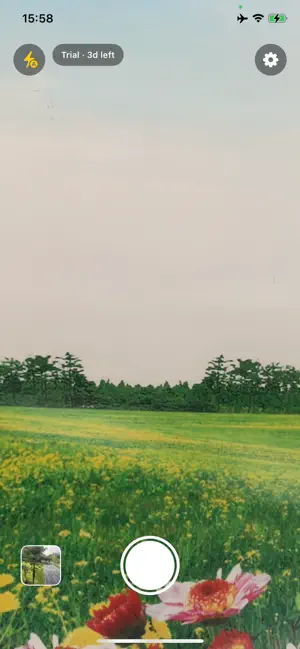


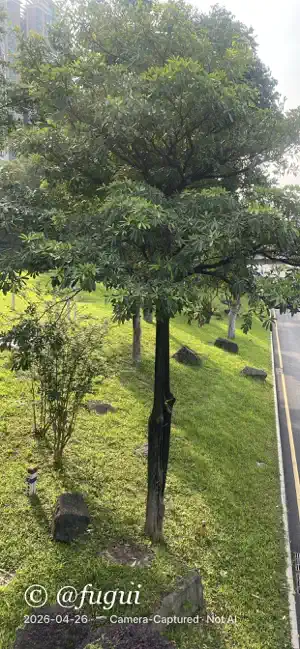
About AuthenticCam: Real Photo Proof
AI-generated images are everywhere. Real photos are getting harder to trust. AuthenticCam gives you proof. Every photo you take with AuthenticCam is: • Stamped with a visible watermark — choose from Classic, Minimal, Journalistic, Branded, or Scan-to-Verify styles • Locked with a SHA-256 hash embedded in EXIF metadata • Verifiable later — the app re-hashes the pixels and tells you instantly if the photo has been edited This matters for: — Journalists and citizen reporters submitting photos from the field — Real estate agents documenting property condition — Insurance adjusters and loss adjusters recording claims — eBay and marketplace sellers showing real product photos — Parents capturing irreplaceable moments they want to keep verifiable — Anyone posting online who is tired of being accused of using AI HOW IT WORKS 1. Open AuthenticCam instead of your regular camera 2. Take a photo — the watermark is burned in; the authenticity hash is written into the file 3. Share to Messages, Mail, AirDrop, Signal, or any app — the hash travels with the photo 4. Anyone can open the photo in AuthenticCam to re-verify it hasn't been tampered with FIVE WATERMARK STYLES • Classic — clean bottom bar with date, location, and device • Minimal — one-line date and "Not AI" mark in the corner • Journalistic — full field sheet, EXIF-style rows, perfect for submissions • Branded — bold corner stamp with your capture data • Scan to Verify — a QR-style visual marker linked to the hash Most styles are free forever. Upgrade to Pro to unlock all five styles and remove the daily photo limit. PRIVACY BY DESIGN AuthenticCam works entirely on your device. No photos ever leave your iPhone. No analytics, no ads, no trackers. Location is optional and only written to the photo's own EXIF GPS fields — never sent anywhere. The tamper-evident hash is computed on-device using Apple's CryptoKit. PRO SUBSCRIPTION AuthenticCam is free to use with a daily photo limit and the Classic watermark style. Upgrade to Pro for unlimited photos and every watermark style: • $2.99/month • $19.99/year (save 44%) • $39.99 one-time lifetime unlock Payment is charged to your Apple ID. Auto-renewable subscriptions can be managed and cancelled anytime in iOS Settings → Apple ID → Subscriptions. BUILT FOR THE AI ERA AuthenticCam doesn't try to detect AI — it does the reverse: it proves a photo came from a real camera at a real moment in time, and lets anyone check. When an accusation of "that's fake" lands on one of your photos, you'll have the receipts. — Support: [email protected] Privacy: https://www.fukangheng.com/iOS/authenticcam_privacy_policy.html
App privacy
The developer, Shenzhen Fu Kang Heng Development Co., Ltd., reported these privacy practices to Apple.
Data Not Collected
The developer does not collect any data from this app.
Alternatives to AuthenticCam: Real Photo Proof
Looking for apps like AuthenticCam: Real Photo Proof? Here are 6 similar apps on the App Store. The highest rated is ProveIT Camera (5.0/5), and all 6 are free to download.
-
 ProveIT Camera
5.0
ProveIT Camera
5.0
-
 ProofMark
5.0
ProofMark
5.0
-
 Camera Only Authentic-Capture
-
 TrueCapture: Verified Photos
5.0
TrueCapture: Verified Photos
5.0
-
 ProofSnap – Photo Proof Cam
-
 Real.Photos
5.0
Real.Photos
5.0
| App | Rating | Price | Last updated | Compare |
|---|---|---|---|---|
| AuthenticCam: Real Photo Proof | – | Free | April 29, 2026 | |
| ProveIT Camera | 5.0 / 5 (1) | Free | Jun 1, 2026 | Compare |
| ProofMark | 5.0 / 5 (2) | Free | Feb 16, 2026 | Compare |
| Camera Only Authentic-Capture | – | Free | Dec 17, 2025 | Compare |
| TrueCapture: Verified Photos | 5.0 / 5 (3) | Free | Sep 23, 2024 | Compare |
| ProofSnap – Photo Proof Cam | – | Free | Jun 3, 2026 | Compare |
| Real.Photos | 5.0 / 5 (4) | Free | Apr 10, 2026 | Compare |