

AVA 3D: AI Body Scanner App
Aesthetic Vision Inc. Medical iPhoneiPadiPod touch
AVA 3D: AI Body Scanner App is a free Medical app for iPhone and iPad by Aesthetic Vision Inc. Requires iOS 18.0. Updated October 7, 2026.
- Price
- Free
- on the App Store
- Size
- 87 MB
- Age 17+
- Updated
- Oct 7
- 2026 · v1.6.1
Screenshots

About AVA 3D: AI Body Scanner App
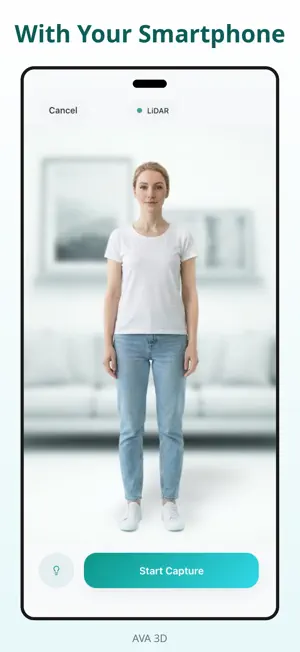
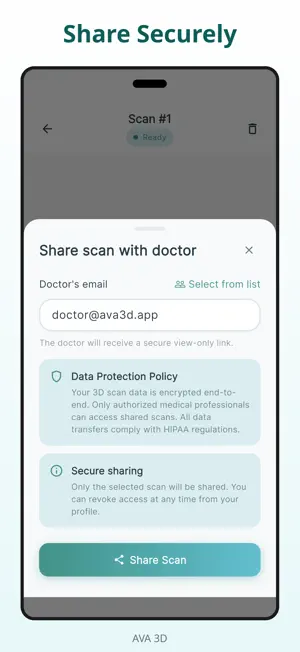
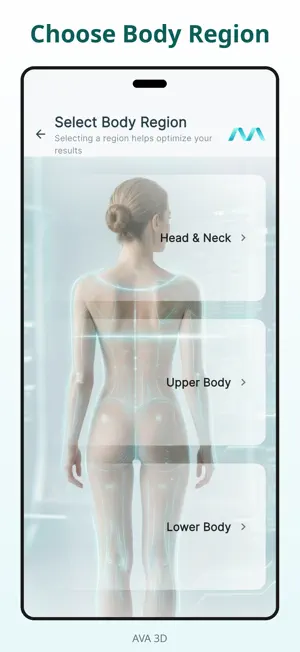
Create high-quality 3D models of selected body regions using just your smartphone - no special equipment required. AVA combines advanced 3D modeling, AI-powered enhancement, and guided capture to make detailed 3D scanning simple, accessible, and convenient - without special equipment. WHY AVA AVA makes it easy to create detailed 3D models of selected body regions wherever it suits you best. You can complete guided scans at home or in any comfortable setting, using only your mobile device. With intelligent processing and AR visualization, AVA helps turn smartphone scans into clear, high-quality 3D models that are easy to review, manage, and securely share with selected professionals. AVA is currently available free of charge for users. KEY FEATURES • High-quality 3D scanning using only a smartphone • No special equipment required • Guided multi-step scan process • AI-powered model enhancement • 3D models of selected body regions • AR visualization • Real-time scan and processing progress • Scan history and result management • Secure sharing with selected professionals • Personal, user-controlled data handling HOW IT WORKS 1. Select the body region you want to scan 2. Follow the in-app instructions 3. Complete the guided scan process using your device camera 4. Generate a clear 3D model in just a few steps 5. View, manage, or share your results YOUR DATA, YOUR CONTROL AVA is designed to give you a personal and convenient scanning experience. Your scans and results are available in the app, so you can access them whenever needed. You stay in control of your information, with secure handling and user-managed sharing. IMPORTANT NOTE For best results, follow the scanning instructions and tips provided in the app. Scan quality depends on proper lighting, positioning, and completing all required steps. SUPPORT Have questions or need assistance? [email protected] IMPORTANT DISCLAIMER This application is intended for informational and communication purposes only. It is not intended for clinical use and must not be used for diagnosis or treatment. LEGAL Terms of Use: https://ava3d.app/terms.html Privacy Policy: https://ava3d.app/privacy.html
What’s new
Version 1.6.1 · Updated October 7, 2026
Fixes and improvements.
App privacy
The developer, Aesthetic Vision Inc., reported these privacy practices to Apple.
Data Linked to You
The following data, which may be collected and linked to your identity, may be used for the following purposes:
- Contact Info: Email Address, Name
- User Content: Photos or Videos, Customer Support, Other User Content
- Identifiers: User ID
Used for: App Functionality
Data Not Linked to You
The following data, which may be collected but is not linked to your identity, may be used for the following purposes:
- Usage Data: Product Interaction
- Diagnostics: Crash Data, Other Diagnostic Data
Used for: Analytics, App Functionality
Alternatives to AVA 3D: AI Body Scanner App
Looking for apps like AVA 3D: AI Body Scanner App? Here are 6 similar apps on the App Store. The highest rated is VZN 3D Body Scanner (5.0/5), and all 6 are free to download.
-
 VZN 3D Body Scanner
5.0
VZN 3D Body Scanner
5.0
-
 Fitycal - 3D Body Scan Tracker
3.0
Fitycal - 3D Body Scan Tracker
3.0
-
 Quadrascan
4.9
Quadrascan
4.9
-
 3DsizeME
3.9
3DsizeME
3.9
-
 Comb 3D Scanner
3.5
Comb 3D Scanner
3.5
-
 SnugFit O&P 3D Scanner
5.0
SnugFit O&P 3D Scanner
5.0
| App | Rating | Price | Last updated | Compare |
|---|---|---|---|---|
| AVA 3D: AI Body Scanner App | – | Free | October 7, 2026 | |
| VZN 3D Body Scanner | 5.0 / 5 (2) | Free | Oct 15, 2026 | Compare |
| Fitycal - 3D Body Scan Tracker | 3.0 / 5 (2) | Free | Oct 18, 2026 | Compare |
| Quadrascan | 4.9 / 5 (20) | Free | Oct 14, 2026 | Compare |
| 3DsizeME | 3.9 / 5 (22) | Free | Feb 4, 2026 | Compare |
| Comb 3D Scanner | 3.5 / 5 (19) | Free | Jul 2, 2026 | Compare |
| SnugFit O&P 3D Scanner | 5.0 / 5 (27) | Free | Oct 15, 2026 | Compare |